Chapter 1 — Core Foundation
1.1 Objective
The first version of ACAI should begin with a small, working core rather than attempting to implement the entire architecture at once.
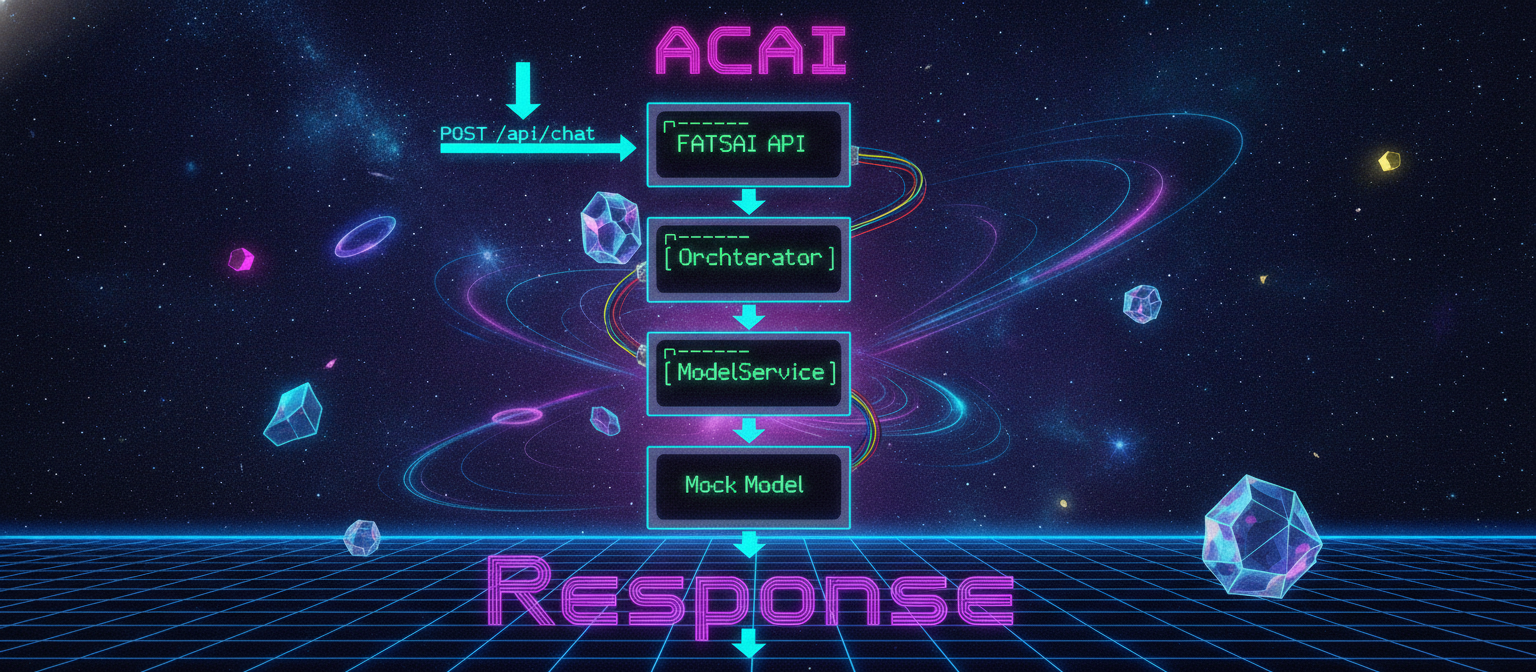
The Chapter 1 pipeline is:
User
  ↓
FastAPI
  ↓
ACAI Orchestrator
  ↓
Model Service
  ↓
AI Model
  ↓
Response
The first implementation uses a Mock Model so the system can be tested without requiring an external API key.
1.2 Project Structure
ACAI/
└── backend/
    ├── app/
    │   ├── __init__.py
    │   ├── main.py
    │   ├── config.py
    │   ├── schemas.py
    │   ├── orchestrator.py
    │   └── services/
    │       ├── __init__.py
    │       └── model_service.py
    │
    ├── tests/
    │   └── test_api.py
    │
    ├── .env.example
    ├── requirements.txt
    └── README.md
1.3 Environment Setup
mkdir ACAI
cd ACAI

mkdir backend
cd backend

python -m venv .venv
Activate the virtual environment:
.\.venv\Scripts\Activate.ps1
If PowerShell blocks the activation script:
Set-ExecutionPolicy -Scope CurrentUser RemoteSigned
Then activate again:
.\.venv\Scripts\Activate.ps1
1.4 Dependencies
Create requirements.txt:
fastapi
uvicorn[standard]
pydantic
pydantic-settings
python-dotenv
httpx
pytest
Install:
pip install -r requirements.txt
1.5 Configuration
Create app/config.py:
from pydantic_settings import BaseSettings, SettingsConfigDict


class Settings(BaseSettings):
    app_name: str = "ACAI"
    app_version: str = "0.1.0"
    environment: str = "development"

    model_provider: str = "mock"
    model_name: str = "acai-demo-model"

    api_key: str | None = None

    model_config = SettingsConfigDict(
        env_file=".env",
        env_file_encoding="utf-8",
        extra="ignore",
    )


settings = Settings()
1.6 Environment Variables
Create .env.example:
APP_NAME=ACAI
APP_VERSION=0.1.0
ENVIRONMENT=development

MODEL_PROVIDER=mock
MODEL_NAME=acai-demo-model

API_KEY=
Create the local environment file:
copy .env.example .env
1.7 API Schemas
Create app/schemas.py:
from pydantic import BaseModel, Field


class ChatRequest(BaseModel):
    message: str = Field(
        ...,
        min_length=1,
        max_length=10000,
        description="User message",
    )


class ChatResponse(BaseModel):
    success: bool
    response: str
    model: str
    mode: str
1.8 Model Service
Create app/services/model_service.py:
from app.config import settings


class ModelService:
    def __init__(self) -> None:
        self.provider = settings.model_provider
        self.model_name = settings.model_name

    async def generate(self, prompt: str) -> str:
        """
        Generate a response using the configured model provider.

        Chapter 1 uses a mock model.
        Later chapters can replace this with a real model provider.
        """

        if self.provider == "mock":
            return self._mock_generate(prompt)

        raise RuntimeError(
            f"Unsupported model provider: {self.provider}"
        )

    def _mock_generate(self, prompt: str) -> str:
        return (
            "ACAI Demo Model Response\n\n"
            f"Received request:\n{prompt}\n\n"
            "The ACAI core is working successfully."
        )


model_service = ModelService()
1.9 ACAI Orchestrator
Create app/orchestrator.py:
from app.services.model_service import model_service


class ACAIOrchestrator:

    async def process(self, message: str) -> str:
        """
        Main ACAI request pipeline.

        Chapter 1:

        User
          ↓
        Orchestrator
          ↓
        Model
          ↓
        Response
        """

        cleaned_message = message.strip()

        if not cleaned_message:
            raise ValueError("Message cannot be empty.")

        response = await model_service.generate(
            cleaned_message
        )

        return response


orchestrator = ACAIOrchestrator()
1.10 FastAPI Application
Create app/main.py:
from fastapi import FastAPI, HTTPException

from app.config import settings
from app.orchestrator import orchestrator
from app.schemas import ChatRequest, ChatResponse


app = FastAPI(
    title=settings.app_name,
    version=settings.app_version,
    description="Adaptive Cognitive AI Architecture",
)


@app.get("/")
async def root():
    return {
        "name": settings.app_name,
        "version": settings.app_version,
        "status": "online",
    }


@app.get("/health")
async def health():
    return {
        "status": "healthy",
        "environment": settings.environment,
    }


@app.post("/api/chat", response_model=ChatResponse)
async def chat(request: ChatRequest):

    try:
        response = await orchestrator.process(
            request.message
        )

        return ChatResponse(
            success=True,
            response=response,
            model=settings.model_name,
            mode=settings.model_provider,
        )

    except ValueError as exc:
        raise HTTPException(
            status_code=400,
            detail=str(exc),
        )

    except Exception as exc:
        raise HTTPException(
            status_code=500,
            detail=f"ACAI processing error: {exc}",
        )
1.11 Package Initialization
Create app/__init__.py:
__version__ = "0.1.0"
Create:
app/services/__init__.py
It can remain empty.
1.12 Run the Application
From the backend directory:
uvicorn app.main:app --reload
The server should become available at:
http://127.0.0.1:8000
1.13 Test the Root Endpoint
Open:
http://127.0.0.1:8000
Expected response:
{
  "name": "ACAI",
  "version": "0.1.0",
  "status": "online"
}
1.14 Health Check
Open:
http://127.0.0.1:8000/health
Expected response:
{
  "status": "healthy",
  "environment": "development"
}
1.15 Swagger API
Open:
http://127.0.0.1:8000/docs
Select:
POST /api/chat
Click Try it out.
Use:
{
  "message": "Hello ACAI"
}
Then click Execute.
Expected response:
{
  "success": true,
  "response": "ACAI Demo Model Response\n\nReceived request:\nHello ACAI\n\nThe ACAI core is working successfully.",
  "model": "acai-demo-model",
  "mode": "mock"
}
1.16 Automated Tests
Create tests/test_api.py:
from fastapi.testclient import TestClient

from app.main import app


client = TestClient(app)


def test_root():
    response = client.get("/")

    assert response.status_code == 200

    data = response.json()

    assert data["name"] == "ACAI"
    assert data["status"] == "online"


def test_health():
    response = client.get("/health")

    assert response.status_code == 200
    assert response.json()["status"] == "healthy"


def test_chat():
    response = client.post(
        "/api/chat",
        json={
            "message": "Hello ACAI"
        },
    )

    assert response.status_code == 200

    data = response.json()

    assert data["success"] is True
    assert "ACAI Demo Model Response" in data["response"]


def test_empty_message():
    response = client.post(
        "/api/chat",
        json={
            "message": ""
        },
    )

    assert response.status_code == 422
Run:
pytest
Expected result:
4 passed
1.17 Chapter 1 Architecture
                    USER
                      │
                      ▼
              POST /api/chat
                      │
                      ▼
              ┌──────────────┐
              │ FastAPI API  │
              └──────┬───────┘
                     │
                     ▼
              ┌──────────────┐
              │ Orchestrator │
              └──────┬───────┘
                     │
                     ▼
              ┌──────────────┐
              │ ModelService │
              └──────┬───────┘
                     │
                     ▼
                 Mock Model
                     │
                     ▼
                  Response
1.18 Chapter 1 Success Criteria
Chapter 1 is complete when:
[✓] Python environment created
[✓] Dependencies installed
[✓] FastAPI starts successfully
[✓] Root endpoint works
[✓] Health endpoint works
[✓] Chat endpoint works
[✓] Mock model responds
[✓] Automated tests pass
1.19 What Comes Next
The following components are intentionally not included in Chapter 1:
Planner
Retrieval / RAG
Vector Database
Long-Term Memory
Model Router
Multiple Models
Tool System
Verification Layer
Authentication
Production Database
Frontend
Evaluation Platform
They will be added incrementally.
The development sequence is:
Chapter 1
Core Foundation
      ↓
Chapter 2
Planner
      ↓
Chapter 3
Retrieval / RAG
      ↓
Chapter 4
Memory
      ↓
Chapter 5
Model Router
      ↓
Chapter 6
Verification
      ↓
Chapter 7+
Tools, Evaluation, Security,
Frontend, Deployment and Production
The guiding development loop remains:
IMPLEMENT
    ↓
TEST
    ↓
MEASURE
    ↓
DOCUMENT
    ↓
IMPROVE
End of Chapter 1


Comments
Post a Comment