11.1 Objective
Until Chapter 10, ACAI could:
Understand
 ↓
Plan
 ↓
Retrieve
 ↓
Remember
 ↓
Select a model
 ↓
Generate
 ↓
Verify
 ↓
Evaluate
But an intelligent system often needs to do something outside the model.
For example:
Read a file
Search a database
Call an API
Calculate something
Create a document
Process an image
Run an approved computation
This chapter introduces controlled tool execution.
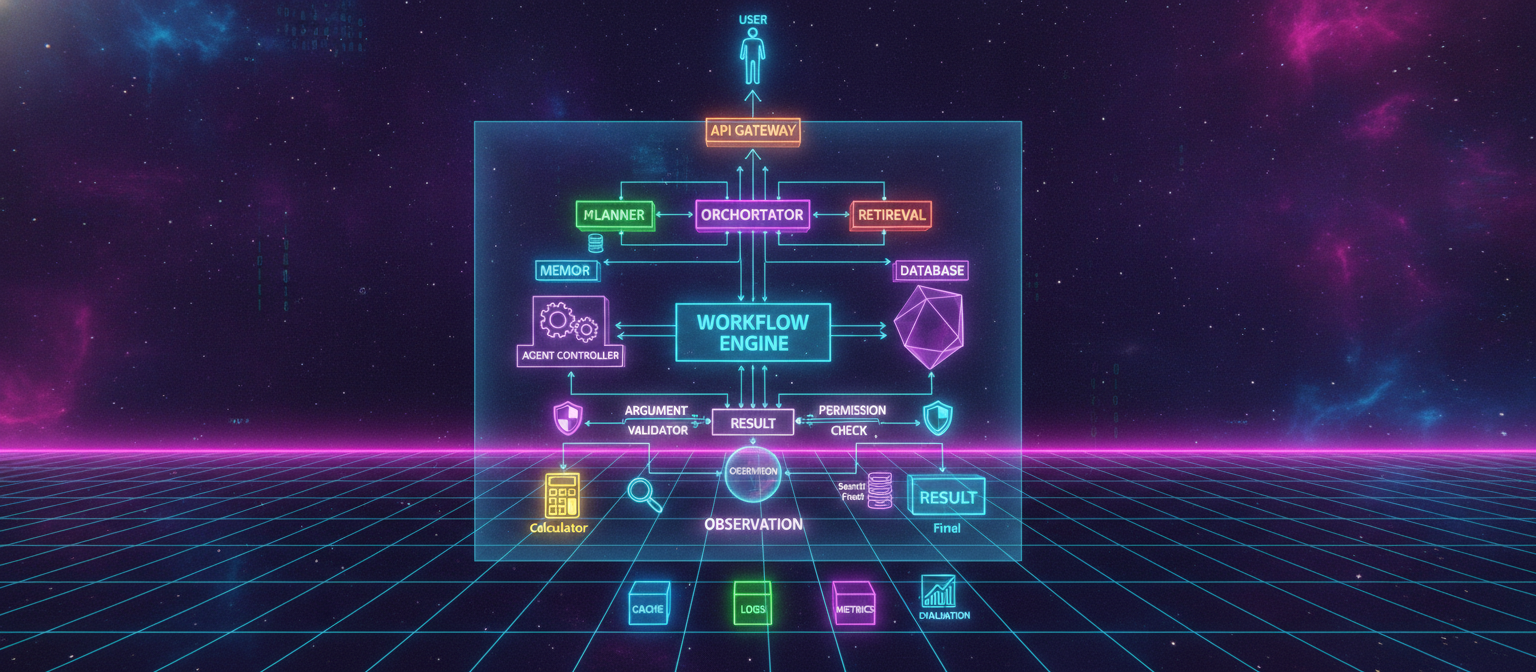
The core architecture becomes:
USER
 ↓
PLANNER
 ↓
TOOL SELECTION
 ↓
ARGUMENT VALIDATION
 ↓
PERMISSION CHECK
 ↓
TOOL EXECUTION
 ↓
OBSERVATION
 ↓
REASONING
 ↓
NEXT ACTION / FINAL ANSWER
11.2 What Is a Tool?
A tool is a controlled function that ACAI can invoke.
Conceptually:
def calculator(
    expression: str
):
    ...
The model does not directly execute arbitrary code.
Instead:
Model
 ↓
Request:
calculator("25 * 4")
 ↓
Tool Registry
 ↓
Calculator
 ↓
40?
 ↓
Observation
The tool produces the result.
11.3 Why Tools Matter
A language model is primarily a reasoning/generation component.
External tools can provide:
Current information
Precise calculations
Structured data
File access
Database access
Specialized processing
External services
Therefore:
Model + Tools
can support a wider range of tasks than:
Model alone
But tool access introduces additional security and reliability concerns.
11.4 Tool Interface
Create:
app/tools/base.py
from abc import ABC, abstractmethod


class Tool(ABC):

    name: str
    description: str

    @abstractmethod
    async def execute(
        self,
        arguments: dict,
    ):
        raise NotImplementedError
Every tool follows the same basic interface.
11.5 Tool Metadata
A tool should describe itself.
Example:
class CalculatorTool(Tool):

    name = "calculator"

    description = (
        "Performs approved "
        "mathematical calculations."
    )
The description helps the planner understand when the tool is appropriate.
11.6 Tool Registry
Create:
app/tools/registry.py
class ToolRegistry:

    def __init__(self):

        self.tools = {}

    def register(
        self,
        tool,
    ):

        self.tools[
            tool.name
        ] = tool

    def get(
        self,
        name: str,
    ):

        return self.tools.get(name)

    def list_tools(self):

        return list(
            self.tools.values()
        )
The registry becomes the controlled entry point for available tools.
11.7 Calculator Tool
A calculator is a good first tool because its behavior can be tightly constrained.
Example:
class CalculatorTool(Tool):

    name = "calculator"

    description = (
        "Performs approved calculations."
    )

    async def execute(
        self,
        arguments: dict,
    ):

        expression = arguments.get(
            "expression"
        )

        if not expression:

            raise ValueError(
                "Expression is required."
            )

        # Use a dedicated safe
        # expression parser here.
        # Do not evaluate arbitrary
        # Python code supplied by users.

        return {
            "expression": expression,
            "status": "accepted",
        }
The important security rule is:
Never use unrestricted eval() on untrusted model output.
A real calculator should use a restricted parser or a dedicated mathematical library.
11.8 Tool Arguments
A tool request can look like:
{
  "tool": "calculator",
  "arguments": {
    "expression": "25 * 4"
  }
}
The tool system should validate this before execution.
11.9 Pydantic Validation
Example:
from pydantic import BaseModel, Field


class CalculatorArguments(BaseModel):

    expression: str = Field(
        min_length=1,
        max_length=1000,
    )
Then:
validated = (
    CalculatorArguments.model_validate(
        arguments
    )
)
Only validated data should reach the execution layer.
11.10 Tool Execution Pipeline
The complete flow becomes:
                    MODEL
                      │
                      ▼
                Tool Request
                      │
                      ▼
               Tool Registry
                      │
                      ▼
              Tool Exists?
                ┌─────┴─────┐
                ▼           ▼
               YES          NO
                │           │
                ▼           ▼
          Validate Args   Reject
                │
                ▼
          Permission Check
                │
                ▼
            Execute Tool
                │
                ▼
             Result
                │
                ▼
            Observation
                │
                ▼
              Model
11.11 Permission System
Not every tool should be available to every user or workflow.
Define permissions:
tool.read
tool.calculate
tool.search
tool.write
tool.external_api
Then:
User
 ↓
Permission Check
 ↓
Tool
11.12 Tool Risk Levels
Tools can also have risk classifications.
Example:
LOW
  calculator

MEDIUM
  read-only database query

HIGH
  external write operation

CRITICAL
  irreversible external action
The higher the risk, the stronger the approval and validation requirements should be.
11.13 Read vs Write Tools
This distinction is important.
Read
Search
Read file
Read database
Fetch public information
Write
Create record
Modify record
Send message
Delete resource
Publish content
Write operations should generally require stronger authorization than read operations.
11.14 Human Approval
For sensitive actions:
Model
 ↓
Tool Proposal
 ↓
Human Approval
 ↓
Execution
For example:
ACAI:
"I am ready to submit this action.
Approve?"
Only after approval:
Execute
This is preferable to giving an autonomous system unrestricted authority over consequential actions.
11.15 Tool Result
Tool results should be structured.
Example:
{
  "success": true,
  "tool": "calculator",
  "result": "100"
}
On failure:
{
  "success": false,
  "tool": "calculator",
  "error": {
    "code": "TOOL_EXECUTION_ERROR",
    "message": "Calculation failed."
  }
}
11.16 Tool Timeout
Every external tool should have a timeout.
Example:
import asyncio


result = await asyncio.wait_for(
    tool.execute(arguments),
    timeout=30,
)
A tool that hangs indefinitely should not block the entire agent.
11.17 Tool Retry
Retries should be selective.
Potentially retryable:
Temporary network failure
Temporary provider error
Timeout
Usually not automatically retryable:
Invalid arguments
Permission denied
Invalid resource
Permanent validation failure
A retry policy should therefore depend on error type.
11.18 Tool Audit Log
Every tool invocation should be logged.
Record:
request_id
user/workflow identifier
tool
arguments
timestamp
result status
latency
error
approval status
Sensitive arguments should be redacted where necessary.
11.19 Tool Audit Example
TOOL_EXECUTION

Request:
abc123

Tool:
calculator

Status:
success

Latency:
measured

Arguments:
redacted/validated

Timestamp:
recorded
This makes the system auditable.
11.20 Agent Loop
An agent is essentially a controlled loop around:
Reason
 ↓
Act
 ↓
Observe
 ↓
Reason again
Architecture:
             ┌───────────────┐
             │     MODEL     │
             └───────┬───────┘
                     │
                     ▼
                  DECISION
                     │
              ┌──────┴──────┐
              ▼             ▼
             TOOL          FINAL
              │             │
              ▼             ▼
          EXECUTION        ANSWER
              │
              ▼
          OBSERVATION
              │
              └───────────────► MODEL
11.21 Agent State
The agent needs state.
Example:
class AgentState:

    def __init__(self):

        self.messages = []

        self.tool_results = []

        self.steps = 0

        self.finished = False

        self.final_answer = None
11.22 Maximum Steps
An agent loop must have a hard limit.
MAX_AGENT_STEPS = 10
Otherwise a bug could cause:
Tool
 ↓
Model
 ↓
Tool
 ↓
Model
 ↓
Tool
 ↓
...
forever.
11.23 Agent Execution
A simplified controller:
class Agent:

    def __init__(
        self,
        model,
        tool_registry,
        max_steps=10,
    ):

        self.model = model

        self.tools = tool_registry

        self.max_steps = max_steps

    async def run(
        self,
        request,
    ):

        state = AgentState()

        while (
            state.steps
            < self.max_steps
        ):

            state.steps += 1

            decision = (
                await self.model.decide(
                    request,
                    state,
                )
            )

            if decision["type"] == "final":

                state.final_answer = (
                    decision["answer"]
                )

                state.finished = True

                break

            if decision["type"] == "tool":

                result = await self.execute_tool(
                    decision,
                    state,
                )

                state.tool_results.append(
                    result
                )

        return state
This is an architectural skeleton, not a complete production agent.
11.24 Controlled Tool Execution
The most important part is:
Model
 ↓
Proposal
 ↓
Validator
 ↓
Permission
 ↓
Executor
not:
Model
 ↓
Arbitrary system access
11.25 Tool Sandboxing
Some tools may need stronger isolation.
For example, if ACAI eventually supports user-supplied code execution, the code should not run directly inside the main application process.
Instead:
ACAI
 ↓
Sandbox
 ↓
Restricted Environment
 ↓
Execution
 ↓
Result
Possible controls include:
CPU limit
Memory limit
Time limit
Network restrictions
Filesystem restrictions
Process restrictions
11.26 Why Sandboxing Matters
Without isolation:
AI
 ↓
Code Execution
 ↓
Application Server
 ↓
Potentially sensitive resources
A safer design is:
AI
 ↓
Validated Request
 ↓
Sandbox
 ↓
Limited Resources
This is particularly important for any tool capable of executing code or interacting with system resources.
11.27 External APIs
An API tool can use the same architecture:
Tool Interface
 ↓
Argument Validation
 ↓
Permission Check
 ↓
API Request
 ↓
Timeout
 ↓
Response Validation
 ↓
Observation
The model should not directly control arbitrary URLs, headers, or credentials.
11.28 URL Allowlisting
For tools that access external services, consider:
Allowed domains
Allowed HTTP methods
Allowed endpoints
Allowed parameters
For example:
api.example.com
may be allowed while arbitrary domains are rejected.
This reduces the risk of unintended network access.
11.29 Tool Discovery
The model does not necessarily need every tool definition at all times.
A large system can use:
Tool Catalog
    ↓
Relevant Tool Search
    ↓
Small Tool Set
    ↓
Model
This reduces context size and makes tool selection easier.
11.30 Tool Categories
A registry can categorize tools:
math
search
files
database
media
communication
productivity
developer
Example:
TOOLS_BY_CATEGORY = {

    "math": [
        "calculator",
    ],

    "search": [
        "search_tool",
    ],

    "files": [
        "read_file",
    ],
}
11.31 Tool Selection
The planner can output:
{
  "action": "use_tool",
  "tool": "calculator",
  "reason": "Precise arithmetic is required."
}
The execution system then validates the requested tool.
The reason field should be treated as explanatory metadata, not as a permission mechanism.
11.32 Agent + Planner
ACAI now separates:
Planner
 ↓
What should happen?

Agent Controller
 ↓
What action should happen next?

Tool Executor
 ↓
How is that action executed?
Architecture:
USER
 ↓
PLANNER
 ↓
PLAN
 ↓
AGENT CONTROLLER
 ↓
TOOL SELECTION
 ↓
VALIDATION
 ↓
EXECUTION
 ↓
OBSERVATION
 ↓
AGENT CONTROLLER
 ↓
FINAL ANSWER
11.33 Agent Failure Handling
Suppose:
Tool A
 ↓
Timeout
The agent should not necessarily terminate.
It may:
Retry
 ↓
Try fallback tool
 ↓
Modify request
 ↓
Ask user
 ↓
Return controlled failure
The correct response depends on the task and error.
11.34 Agent Recovery
Example:
Search Tool
     ↓
Timeout
     ↓
Retry once
     ↓
Still fails
     ↓
Alternative provider/tool
     ↓
Success
Maximum retries must remain bounded.
11.35 Asking the User
Some decisions cannot safely be inferred.
Example:
User:
"Send this to my team."
If multiple teams or recipients are possible:
ACAI:
"Which team should receive it?"
The agent should not invent a recipient.
11.36 Ambiguous Tool Requests
When tool arguments are ambiguous:
Tool:
send_message

Required:
recipient
message
User:
"Send it."
The system should not guess the recipient.
Instead:
Missing required information
        ↓
Ask user
        ↓
Receive clarification
        ↓
Validate
        ↓
Execute
11.37 Agent Safety Boundary
The architecture should enforce:
Model proposes
Tool system validates
Permission system authorizes
Executor performs
Audit system records
This separation is one of the most important design principles in agentic systems.
11.38 Testing Tools
Each tool needs unit tests.
Example:
@pytest.mark.asyncio
async def test_calculator_validation():

    tool = CalculatorTool()

    result = await tool.execute(
        {
            "expression": "25 * 4"
        }
    )

    assert result is not None
Additional tests:
Valid arguments
Missing arguments
Invalid arguments
Oversized arguments
Permission denied
Timeout
External failure
Malformed response
11.39 Testing the Agent Loop
Test:
Model chooses final answer
Model chooses tool
Tool succeeds
Tool fails
Tool times out
Maximum steps reached
Invalid tool selected
Permission denied
The agent should never be allowed to exceed the configured step limit.
11.40 End-to-End Example
Suppose the user asks:
"What is 25 × 48?"
The flow:
User
 ↓
Planner
 ↓
Recognizes arithmetic
 ↓
Calculator Tool
 ↓
Argument validation
 ↓
Permission check
 ↓
Calculator
 ↓
Observation: 1200
 ↓
Verification
 ↓
Final Answer
The model does not need to invent a calculation when a deterministic calculator tool is available.
11.41 More Complex Example
Suppose:
"Find information from an approved source and summarize it."
Potential flow:
User
 ↓
Planner
 ↓
Search Tool
 ↓
Search Result
 ↓
Observation
 ↓
Relevant Content
 ↓
Summarization
 ↓
Verification
 ↓
Final Answer
The exact search and source rules should be explicitly configured.
11.42 Multi-Step Agent
For a more complex task:
User
 ↓
Planner
 ↓
Step 1: retrieve data
 ↓
Step 2: analyze data
 ↓
Step 3: calculate result
 ↓
Step 4: verify
 ↓
Final answer
The workflow engine from earlier chapters can persist these steps.
Therefore:
Workflow Engine
+
Agent Controller
+
Tool Registry
becomes a powerful combination.
11.43 Combined Architecture
                             USER
                               │
                               ▼
                            PLANNER
                               │
                               ▼
                            WORKFLOW
                               │
                               ▼
                         AGENT CONTROLLER
                               │
                               ▼
                         TOOL SELECTION
                               │
                               ▼
                        ARGUMENT VALIDATOR
                               │
                               ▼
                         PERMISSION CHECK
                               │
                  ┌────────────┼────────────┐
                  ▼            ▼            ▼
              Calculator    Search       Database
                  │            │            │
                  └────────────┼────────────┘
                               ▼
                            RESULT
                               │
                               ▼
                          OBSERVATION
                               │
                               ▼
                            AGENT
                               │
                     ┌─────────┴─────────┐
                     ▼                   ▼
                 Next Tool            Final
                     │                   │
                     └───────►           ▼
                                      VERIFY
                                        │
                                        ▼
                                      RESULT
11.44 Audit Architecture
Every action should be observable:
Request
 ↓
Plan
 ↓
Tool Proposal
 ↓
Permission
 ↓
Execution
 ↓
Result
 ↓
Verification
These events can be connected using the same:
request_id
workflow_id
introduced in earlier chapters.
11.45 Tool Registry Growth
As ACAI grows:
10 tools
 ↓
50 tools
 ↓
100 tools
 ↓
500 tools
the registry needs stronger organization.
Eventually:
Tool Catalog
 ↓
Semantic Tool Search
 ↓
Permission Filtering
 ↓
Capability Matching
 ↓
Final Tool Set
This prevents the model from receiving unnecessary tool definitions.
11.46 Capability-Based Tool Selection
Instead of asking:
"Which exact tool name should I use?"
the planner can identify:
Capability:
calculate
Then the registry finds:
calculator_v1
or:
calculator_v2
This creates another layer of abstraction:
Task
 ↓
Capability
 ↓
Tool
11.47 Tool Versioning
Tools can evolve.
Example:
calculator:v1
calculator:v2
A workflow can record the exact version used.
This helps reproducibility.
11.48 Tool Security Checklist
Before allowing a tool into production:
[ ] Input validation
[ ] Output validation
[ ] Permission policy
[ ] Timeout
[ ] Retry policy
[ ] Resource limits
[ ] Audit logging
[ ] Error handling
[ ] Sensitive-data handling
[ ] Tests
[ ] Documentation
11.49 Chapter 11 Success Criteria
Chapter 11 is complete when:
[✓] Tool interface exists
[✓] Tool registry exists
[✓] Tool metadata exists
[✓] Argument validation exists
[✓] Permission system is defined
[✓] Risk classification exists
[✓] Tool timeout exists
[✓] Retry policy exists
[✓] Tool audit logging exists
[✓] Agent loop exists
[✓] Maximum agent steps exist
[✓] Failure recovery exists
[✓] Human approval path exists
[✓] Sandboxing architecture is defined
[✓] Tool tests are defined
[✓] Agent tests are defined
11.50 Current ACAI Architecture
                                      USER
                                        │
                                        ▼
                                  API GATEWAY
                                        │
                                        ▼
                                   ORCHESTRATOR
                                        │
               ┌────────────────────────┼────────────────────────┐
               ▼                        ▼                        ▼
            PLANNER                   MEMORY                 RETRIEVAL
               │                        │                        │
               │                        ▼                        │
               │                    DATABASE                     │
               └────────────────────────┬────────────────────────┘
                                        ▼
                                  WORKFLOW ENGINE
                                        │
                                        ▼
                                  AGENT CONTROLLER
                                        │
                                        ▼
                                  MODEL ROUTER
                                        │
                          ┌─────────────┼─────────────┐
                          ▼             ▼             ▼
                       Provider A    Provider B      Local
                          │             │             │
                          └─────────────┼─────────────┘
                                        ▼
                                  TOOL DECISION
                                        │
                                        ▼
                                 TOOL REGISTRY
                                        │
                               ┌────────┼────────┐
                               ▼        ▼        ▼
                           Calculator Search  Database
                               │        │        │
                               └────────┼────────┘
                                        ▼
                                  TOOL RESULT
                                        │
                                        ▼
                                   OBSERVATION
                                        │
                                        ▼
                                    VERIFIER
                                        │
                              ┌─────────┴─────────┐
                              ▼                   ▼
                            PASS                REVISE
                              │                   │
                              ▼                   ▼
                           RESULT              RETRY
                              │
                    ┌─────────┼─────────┐
                    ▼         ▼         ▼
                  CACHE      LOGS     METRICS
                                      │
                                      ▼
                                  EVALUATION
11.51 Important Engineering Principle
ACAI should not be designed as:
AI
 ↓
Unlimited system access
It should be:
AI
 ↓
Proposal
 ↓
Validation
 ↓
Authorization
 ↓
Controlled Execution
 ↓
Observation
 ↓
Verification
This architecture allows the system to become more capable while preserving explicit control boundaries.
11.52 Next Chapter
The system now has:
Core API
Planning
Memory
Retrieval
Workflow
Verification
Persistence
Multi-provider routing
Fallback
Evaluation
Tool calling
Agent loops
Controlled external actions
The next major layer is to make the system capable of handling large amounts of information and long-running context without simply placing everything into one model prompt.
Therefore:
Chapter 12 — Advanced Memory, Long-Context Processing, Knowledge Systems, and Retrieval Architecture
The next chapter will cover:
Short-term memory
Long-term memory
Episodic memory
Semantic memory
Working memory
Memory consolidation
Embeddings
Vector search
Hybrid retrieval
Knowledge graphs
Document chunking
Context compression
Long-context strategies
Memory relevance
Memory decay
Conflict resolution
Knowledge updates
The target architecture will become:
Experience
 ↓
Memory Extraction
 ↓
Memory Storage
 ↓
Retrieval
 ↓
Relevance Ranking
 ↓
Context Compression
 ↓
Model
 ↓
New Experience
End of Chapter 11


Comments
Post a Comment