13.1 Objective
ACAI is now conceptually capable of:
Planning
Memory
Retrieval
Workflow execution
Model routing
Tool calling
Verification
Evaluation
The next challenge is making it reliable in the real world.
A prototype may work on one computer:
User
 ↓
Application
 ↓
Model
 ↓
Database
A production system needs to handle:
Many users
Many requests
Long-running jobs
Provider failures
Database failures
Traffic spikes
Security threats
Monitoring
Backups
Deployments
The architecture therefore evolves into:
USER
 ↓
LOAD BALANCER
 ↓
API SERVERS
 ↓
QUEUE
 ↓
WORKERS
 ↓
AI / TOOLS / DATABASES
 ↓
OBSERVABILITY
13.2 Production Architecture
A practical high-level architecture:
                         INTERNET
                            │
                            ▼
                    ┌───────────────┐
                    │ LOAD BALANCER │
                    └───────┬───────┘
                            │
                ┌───────────┼───────────┐
                ▼           ▼           ▼
             API-1       API-2       API-3
                │           │           │
                └───────────┼───────────┘
                            ▼
                       ORCHESTRATOR
                            │
             ┌──────────────┼──────────────┐
             ▼              ▼              ▼
          DATABASE        CACHE          QUEUE
                                           │
                                  ┌────────┼────────┐
                                  ▼        ▼        ▼
                               Worker-1 Worker-2 Worker-3
                                  │        │        │
                                  └────────┼────────┘
                                           ▼
                                   MODEL / TOOLS
                                           │
                                           ▼
                                      VERIFIER
                                           │
                                           ▼
                                     OBSERVABILITY
13.3 Why Separate Services?
One giant application can become difficult to maintain.
Instead, ACAI can separate major responsibilities:
API Service
Auth Service
Orchestration Service
Memory Service
Retrieval Service
Model Service
Tool Service
Worker Service
Evaluation Service
The boundaries should be introduced when they provide operational value; unnecessary microservices can increase complexity.
13.4 API Service
The API service handles:
Authentication
Request validation
Rate limiting
Request creation
Response delivery
It should not perform every heavy operation synchronously.
For expensive work:
API
 ↓
Create Job
 ↓
Queue
 ↓
Worker
13.5 Synchronous vs Asynchronous Tasks
Some operations are fast:
Simple chat
Small calculation
Configuration lookup
These may be synchronous.
Other operations may be expensive:
Large document processing
Video processing
Long AI workflows
Batch evaluation
Large retrieval jobs
These should generally use asynchronous jobs.
13.6 Queue Architecture
Example:
USER
 ↓
API
 ↓
JOB CREATED
 ↓
QUEUE
 ↓
WORKER
 ↓
PROCESSING
 ↓
RESULT
 ↓
DATABASE
The user can then retrieve job status.
Example states:
queued
running
completed
failed
cancelled
13.7 Job Model
A basic job record:
class Job:

    id: str

    status: str

    task_type: str

    created_at: str

    started_at: str | None

    completed_at: str | None

    result: dict | None

    error: dict | None
Production implementations should persist this information rather than keeping it only in process memory.
13.8 Worker
A worker receives jobs:
Queue
 ↓
Worker
 ↓
Load job
 ↓
Execute
 ↓
Save result
 ↓
Acknowledge
If a worker crashes, the queue should be capable of making the job available again according to the configured delivery semantics.
13.9 Idempotency
A critical production concept is idempotency.
Suppose:
Request
 ↓
Worker
 ↓
External action
 ↓
Worker crashes
The system may retry the job.
Without protection:
Action executed twice
An idempotency key can help:
request_id = abc123
The system records whether that operation has already been completed.
13.10 Database
ACAI may require multiple storage technologies.
A common separation is:
Relational Database
 ↓
Users
Jobs
Configurations
Transactions
Metadata
Vector storage:
Embeddings
Semantic retrieval
Object storage:
Images
Videos
Documents
Large artifacts
Cache:
Temporary frequently accessed data
13.11 Database Connection Pooling
A production API should not create a completely new database connection for every request.
Instead:
API Servers
      │
      ▼
Connection Pool
      │
      ▼
Database
The pool controls the number of active connections.
13.12 Transactions
For related database changes:
Begin Transaction
 ↓
Update A
 ↓
Update B
 ↓
Commit
If a critical operation fails:
Rollback
This protects consistency.
13.13 Cache
Caching can reduce latency and cost.
Possible cache targets:
Model configuration
Tool metadata
Frequently requested retrieval results
Session data
Computed results
Public documents
But cache invalidation must be designed carefully.
13.14 Cache Flow
Request
 ↓
Cache?
 ├── HIT → Return
 │
 └── MISS
       ↓
    Database / Model
       ↓
    Store Cache
       ↓
    Return
13.15 Cache Safety
Never blindly cache data that should be isolated per user.
For example:
User A private result
must never become the cached response for:
User B
Cache keys should include appropriate authorization and scope information.
13.16 Rate Limiting
Public APIs need rate limiting.
Example:
User
 ↓
100 requests/minute
 ↓
Allowed
After the configured limit:
429 Too Many Requests
Different endpoints may have different limits.
13.17 Token / Cost Limits
AI requests can also be limited by:
Input tokens
Output tokens
Requests/day
Model usage
Tool calls
Workflow duration
This protects both infrastructure and budget.
13.18 Authentication
Authentication answers:
"Who are you?"
Possible methods:
Email/password
OAuth
Passkeys
Enterprise identity provider
API keys
Passwords should never be stored in plaintext.
13.19 Authorization
Authorization answers:
"What are you allowed to do?"
Example:
User
 ↓
Can use chat

Admin
 ↓
Can manage users

Operator
 ↓
Can inspect production jobs
Authentication and authorization are separate concepts.
13.20 Role-Based Access Control
A simple RBAC model:
ROLE_USER
ROLE_ADMIN
ROLE_OPERATOR
ROLE_DEVELOPER
Permissions can be:
read
write
execute
manage
For example:
ADMIN
 ├── users.read
 ├── users.write
 ├── jobs.read
 └── jobs.cancel
13.21 Secrets Management
API keys should not be placed directly inside source code.
Bad:
API_KEY = "actual-secret"
Better:
import os

API_KEY = os.environ["API_KEY"]
For production, use a dedicated secrets-management system where appropriate.
13.22 Configuration
Separate configuration from application logic.
Example:
APP_ENV
DATABASE_URL
CACHE_URL
MODEL_PROVIDER
REQUEST_TIMEOUT
MAX_AGENT_STEPS
Use different configurations for:
development
testing
staging
production
13.23 Environment Separation
Architecture:
Development
 ↓
Testing
 ↓
Staging
 ↓
Production
Never assume code that works in development is automatically production-ready.
13.24 Health Checks
The application should expose health information.
For example:
GET /health
A simple response:
{
  "status": "ok"
}
A deeper readiness check can verify required dependencies.
13.25 Liveness vs Readiness
These are different.
Liveness
"Is the process alive?"
Readiness
"Can this instance currently receive traffic?"
For example:
Process alive
+
Database unavailable
could mean:
Liveness = healthy
Readiness = unhealthy
13.26 Observability
Production systems need three major observability signals:
Logs
Metrics
Traces
Together:
             OBSERVABILITY
                  │
        ┌─────────┼─────────┐
        ▼         ▼         ▼
      Logs      Metrics    Traces
13.27 Structured Logging
Instead of:
Something failed
use structured records:
{
  "level": "error",
  "request_id": "abc123",
  "service": "agent",
  "event": "tool_failure",
  "tool": "calculator"
}
This makes searching and aggregation easier.
13.28 Request IDs
Every request should receive a unique identifier.
USER
 ↓
request_id
 ↓
API
 ↓
Planner
 ↓
Model
 ↓
Tool
 ↓
Verifier
All logs can then be connected using the same request ID.
13.29 Distributed Tracing
A request may cross many services:
API
 ↓
Planner
 ↓
Memory
 ↓
Model
 ↓
Tool
 ↓
Verifier
Tracing can show:
API: 50ms
Memory: 80ms
Model: 1200ms
Tool: 200ms
Verifier: 150ms
This identifies bottlenecks.
13.30 Metrics
Useful metrics include:
Requests/sec
Error rate
Latency
Queue depth
Worker utilization
Model latency
Token usage
Tool failure rate
Retrieval quality
Verification failure rate
13.31 AI-Specific Metrics
ACAI should track:
Model selection
Provider success rate
Fallback frequency
Average generation latency
Input/output token usage
Tool-call frequency
Agent step count
Verification pass rate
These help determine whether the architecture is actually improving.
13.32 Provider Failure
Suppose:
Provider A
 ↓
Timeout
The model router can execute:
Provider A
 ↓ failure
Provider B
 ↓
Provider C
 ↓
Local Model
The fallback system should preserve:
request ID
task state
context
budget
timeout
13.33 Circuit Breaker
If a provider repeatedly fails:
Provider A
 ↓
Failure
 ↓
Failure
 ↓
Failure
the router can temporarily stop sending requests there.
Conceptually:
CLOSED
 ↓ failures
OPEN
 ↓ recovery period
HALF-OPEN
 ↓ successful test
CLOSED
This prevents repeated calls to an unhealthy dependency.
13.34 Retry Backoff
Do not immediately retry thousands of failed requests.
Instead:
Attempt 1
 ↓
short delay
 ↓
Attempt 2
 ↓
longer delay
 ↓
Attempt 3
This reduces pressure on a failing service.
13.35 Deployment
A production deployment pipeline can be:
Developer
 ↓
Git
 ↓
CI
 ↓
Tests
 ↓
Build
 ↓
Security Checks
 ↓
Staging
 ↓
Verification
 ↓
Production
13.36 Continuous Integration
Every code change should ideally trigger:
Lint
 ↓
Unit Tests
 ↓
Integration Tests
 ↓
Build
If a required test fails:
Deployment blocked
13.37 Continuous Deployment
A mature pipeline may automatically deploy validated changes.
Example:
git push
 ↓
CI
 ↓
Tests
 ↓
Build
 ↓
Deploy staging
 ↓
Smoke tests
 ↓
Production deployment
Production deployment should still have rollback capability.
13.38 Blue-Green Deployment
Two environments:
BLUE = current
GREEN = new
Traffic initially goes to:
BLUE
After verification:
GREEN
receives traffic.
If something goes wrong:
GREEN
 ↓
rollback
 ↓
BLUE
13.39 Canary Deployment
Instead of switching everyone at once:
Production
 ↓
1% traffic
 ↓
5%
 ↓
25%
 ↓
50%
 ↓
100%
At every stage, monitor:
Errors
Latency
Quality
Cost
If the new version fails:
Stop rollout
13.40 Database Migration
Database schema changes should be version-controlled.
Example:
Migration 001
 ↓
Migration 002
 ↓
Migration 003
Deploy migrations carefully.
For large production systems, avoid changes that require long blocking operations during peak traffic.
13.41 Backup Strategy
Important data should be backed up.
Potentially:
Database backup
Object storage backup
Configuration backup
Critical metadata backup
Backups are useful only if restoration is tested.
13.42 Disaster Recovery
Define:
RPO
Recovery Point Objective

RTO
Recovery Time Objective
RPO asks:
"How much data can we afford to lose?"
RTO asks:
"How quickly must service recover?"
13.43 Failure Simulation
A production architecture should be tested against failures.
Examples:
Database unavailable
Cache unavailable
Model provider unavailable
Queue unavailable
Worker crashes
Network timeout
Malformed model output
Tool failure
The goal is to determine:
Does ACAI fail safely?
13.44 Graceful Degradation
If one feature fails, the entire system should not necessarily fail.
Example:
Advanced Retrieval
 ↓
Unavailable
ACAI might still provide:
Basic response
or:
Clear temporary failure
rather than pretending retrieval succeeded.
13.45 Security Architecture
Production security should exist at multiple layers:
Network
 ↓
API
 ↓
Authentication
 ↓
Authorization
 ↓
Application
 ↓
Database
 ↓
Tools
 ↓
Logs
Security is not a single feature.
13.46 Input Validation
Validate:
Request size
Text length
File type
File size
JSON structure
Tool arguments
Identifiers
Pagination
Never assume model-generated input is safe simply because it came from an AI component.
13.47 Output Validation
Model output should also be validated.
For structured output:
class ModelResult(BaseModel):

    answer: str
    confidence: float
Then:
result = ModelResult.model_validate(
    model_output
)
Invalid output can trigger:
Retry
Repair
Fallback
Failure
13.48 File Security
If ACAI accepts uploads:
Upload
 ↓
Size validation
 ↓
Type validation
 ↓
Malware/security scanning where appropriate
 ↓
Storage
 ↓
Processing
Never assume a filename extension guarantees the actual file type.
13.49 Tenant Isolation
If ACAI becomes a multi-user or multi-organization platform:
Tenant A
 ├── Users
 ├── Memories
 ├── Documents
 └── Jobs

Tenant B
 ├── Users
 ├── Memories
 ├── Documents
 └── Jobs
Authorization must prevent cross-tenant access.
13.50 Cost Control
AI infrastructure can become expensive.
Track:
Model calls
Tokens
Tool executions
Storage
Bandwidth
Worker runtime
Vector database usage
Then calculate:
Cost per request
Cost per workflow
Cost per user
Cost per feature
13.51 Budget Guard
A workflow can have a budget:
{
  "max_steps": 10,
  "max_tokens": 50000,
  "max_duration_seconds": 300,
  "max_tool_calls": 20
}
If the budget is exhausted:
Stop
 ↓
Return controlled result
13.52 Production Agent Boundary
The agent should never be allowed unlimited execution.
Use:
Maximum steps
Maximum duration
Maximum tool calls
Maximum token budget
Permission limits
Tool-specific resource limits
This turns:
Autonomous loop
into:
Bounded autonomous workflow
13.53 Production ACAI Flow
USER
 ↓
AUTHENTICATION
 ↓
AUTHORIZATION
 ↓
RATE LIMIT
 ↓
API
 ↓
REQUEST VALIDATION
 ↓
ORCHESTRATOR
 ↓
PLANNER
 ↓
MEMORY / RETRIEVAL
 ↓
WORKFLOW
 ↓
AGENT
 ↓
MODEL ROUTER
 ↓
TOOLS
 ↓
VERIFIER
 ↓
RESULT
 ↓
CACHE / DATABASE
 ↓
LOGS / METRICS / TRACES
 ↓
USER
13.54 Production Testing Matrix
ACAI should be tested at several levels.
Unit
Individual function
Integration
Service + database
Service + model
Service + queue
End-to-End
User → final result
Load
Many concurrent users
Failure
Dependencies unavailable
Security
Unauthorized access
Malformed input
Privilege escalation
Data isolation
13.55 Load Testing
Example test:
100 concurrent requests
 ↓
Measure
 ├── latency
 ├── errors
 ├── CPU
 ├── memory
 ├── queue depth
 └── model usage
Then increase:
100
 ↓
500
 ↓
1,000
 ↓
5,000
until the system reaches its tested capacity.
Do not assume a particular scale without benchmarking the actual infrastructure.
13.56 Performance Optimization
Optimization should follow measurement.
Pipeline:
Measure
 ↓
Find bottleneck
 ↓
Optimize
 ↓
Measure again
Possible bottlenecks:
Model latency
Database queries
Vector retrieval
Network
Queue
Serialization
File processing
13.57 Scaling API Servers
If API servers are stateless:
          LOAD BALANCER
          /     |     \
        API    API    API
new instances can be added when traffic increases.
This is easier than keeping user state inside individual server processes.
13.58 Scaling Workers
If the queue grows:
Queue
 ↓↓↓↓↓↓↓↓↓
Worker 1
Worker 2
Worker 3
Worker 4
Add more workers.
The queue becomes the buffer between incoming demand and processing capacity.
13.59 Backpressure
If workers cannot keep up:
Requests
 ↓↓↓↓↓↓↓↓↓↓↓
QUEUE
 ↑ growing
The system needs backpressure.
Possible actions:
Rate limit
Reject low-priority work
Delay jobs
Scale workers
Reduce expensive operations
13.60 Priority Queues
Jobs can have priority:
CRITICAL
HIGH
NORMAL
LOW
Example:
Production incident
 ↓
HIGH priority
while:
Batch evaluation
 ↓
LOW priority
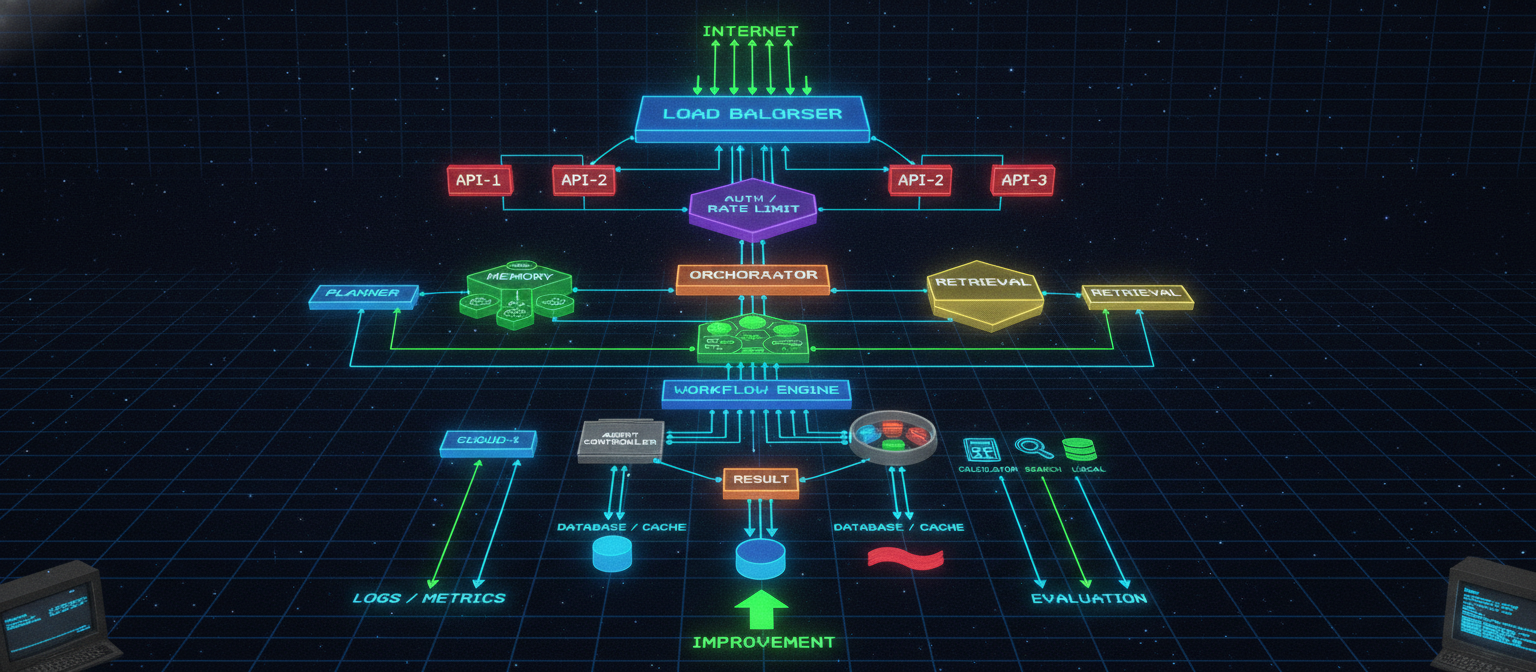
13.61 Final Production Architecture
                                      INTERNET
                                          │
                                          ▼
                                   LOAD BALANCER
                                          │
                         ┌────────────────┼────────────────┐
                         ▼                ▼                ▼
                       API-1            API-2            API-3
                         └────────────────┼────────────────┘
                                          ▼
                                  AUTH / RATE LIMIT
                                          │
                                          ▼
                                    ORCHESTRATOR
                                          │
               ┌──────────────────────────┼──────────────────────────┐
               ▼                          ▼                          ▼
            PLANNER                    MEMORY                    RETRIEVAL
               │                          │                          │
               │                   ┌──────┼──────┐                   │
               │                   ▼      ▼      ▼                   │
               │                Vector   SQL    Graph                 │
               │                          │                          │
               └──────────────────────────┼──────────────────────────┘
                                          ▼
                                    WORKFLOW ENGINE
                                          │
                                          ▼
                                    AGENT CONTROLLER
                                          │
                                          ▼
                                     MODEL ROUTER
                                          │
                           ┌──────────────┼──────────────┐
                           ▼              ▼              ▼
                        CLOUD-A        CLOUD-B          LOCAL
                           │              │              │
                           └──────────────┼──────────────┘
                                          ▼
                                     TOOL REGISTRY
                                          │
                           ┌──────────────┼──────────────┐
                           ▼              ▼              ▼
                       CALCULATOR       SEARCH        DATABASE
                           │              │              │
                           └──────────────┼──────────────┘
                                          ▼
                                       RESULT
                                          │
                                          ▼
                                      VERIFIER
                                          │
                                          ▼
                                  DATABASE / CACHE
                                          │
                                          ▼
                                  LOGS / METRICS
                                          │
                                          ▼
                                       TRACING
                                          │
                                          ▼
                                     EVALUATION
                                          │
                                          ▼
                                    IMPROVEMENT
13.62 Chapter 13 Success Criteria
[✓] Production architecture defined
[✓] API layer defined
[✓] Queue architecture defined
[✓] Worker architecture defined
[✓] Job lifecycle defined
[✓] Idempotency defined
[✓] Database architecture defined
[✓] Cache architecture defined
[✓] Rate limiting defined
[✓] Authentication defined
[✓] Authorization defined
[✓] RBAC defined
[✓] Secrets management defined
[✓] Health checks defined
[✓] Logging defined
[✓] Metrics defined
[✓] Distributed tracing defined
[✓] Provider fallback defined
[✓] Circuit breaker defined
[✓] Retry strategy defined
[✓] Deployment pipeline defined
[✓] Backup strategy defined
[✓] Disaster recovery defined
[✓] Security layers defined
[✓] Cost controls defined
[✓] Load testing defined
[✓] Scaling architecture defined
13.63 What ACAI Has Become
At this point, ACAI is no longer simply:
"An AI chatbot."
The architecture is closer to:
AI APPLICATION PLATFORM
with:
Models
+
Planning
+
Memory
+
Retrieval
+
Tools
+
Agents
+
Verification
+
Evaluation
+
Queues
+
Workers
+
Databases
+
Security
+
Observability
+
Scaling
13.64 The Critical Reality Check
This architecture can be built in reality, but the architecture document itself does not mean the system already exists.
The real implementation still requires:
Source code
Infrastructure
Model/API access
Database
Storage
Authentication
Testing
Deployment
Monitoring
Security review
The correct engineering process is:
DESIGN
 ↓
IMPLEMENT
 ↓
TEST
 ↓
MEASURE
 ↓
FIX
 ↓
DEPLOY
 ↓
MONITOR
 ↓
IMPROVE
A large architecture should therefore be implemented incrementally rather than attempting to build every component simultaneously.
13.65 Next Chapter
The next chapter moves into one of the most important parts of ACAI:
Chapter 14 — Training, Fine-Tuning, Synthetic Data, Evaluation, and Model Improvement
It will cover:
Base models
Dataset design
Instruction datasets
Input/output pairs
Data cleaning
Synthetic data
Fine-tuning
LoRA
QLoRA
Evaluation datasets
Benchmarks
Regression testing
Human evaluation
Reward signals
Model routing
Distillation
Continuous improvement
The objective will be to establish:
DATA
 ↓
TRAINING
 ↓
EVALUATION
 ↓
DEPLOYMENT
 ↓
REAL-WORLD FEEDBACK
 ↓
DATA
 ↓
IMPROVEMENT
End of Chapter 13


Comments
Post a Comment