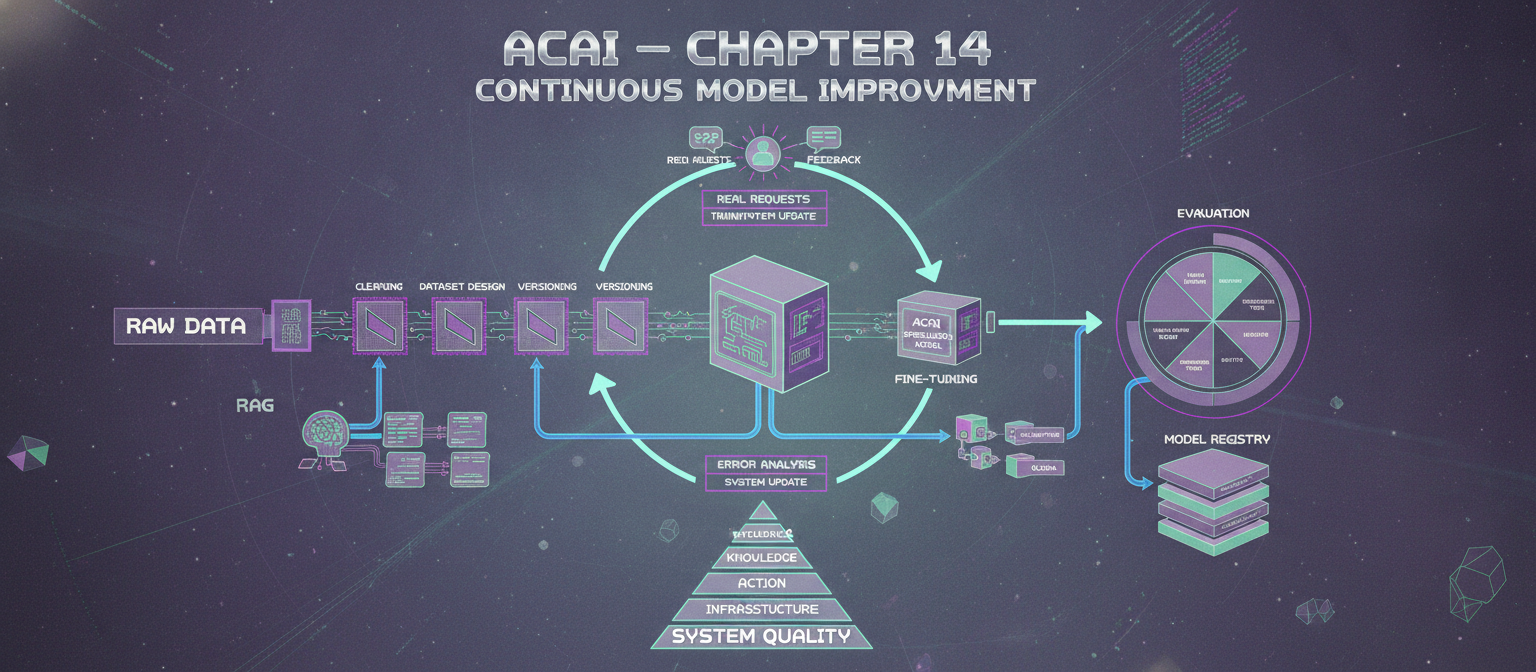
14.1 Objective
ACAI now has the infrastructure to use models, memory, retrieval, tools, agents, verification, and production services.
The next question is:
How does ACAI improve the quality of its models over time?
The answer is not simply:
More data
↓
Train model
↓
Better AI
A reliable improvement pipeline is closer to:
DATA
 ↓
CLEANING
 ↓
DATASET DESIGN
 ↓
TRAINING / FINE-TUNING
 ↓
EVALUATION
 ↓
ERROR ANALYSIS
 ↓
DEPLOYMENT
 ↓
REAL-WORLD FEEDBACK
 ↓
NEW DATA
 ↓
ITERATION
14.2 Base Model
ACAI should generally begin with a capable pretrained model rather than attempting to train a large language model completely from zero.
Conceptually:
Pretrained Model
       ↓
Domain Data
       ↓
Fine-Tuning
       ↓
ACAI Specialized Model
Training from scratch requires enormous datasets, compute, engineering, and evaluation infrastructure.
For most practical projects, adaptation of an existing model is considerably more realistic.
14.3 What Fine-Tuning Does
Fine-tuning changes model parameters using a task-specific dataset.
For example:
Input:
Explain this technical problem.

Output:
A clear structured explanation.
Thousands of high-quality examples can teach the model a desired behavior.
Fine-tuning is especially useful for:
Style
Formatting
Task behavior
Domain terminology
Structured outputs
Classification
Specialized workflows
It should not be treated as a replacement for retrieval when the information changes frequently.
14.4 Knowledge vs Behavior
This distinction is critical.
If you want the model to know a frequently changing document:
Use:
Retrieval / Knowledge System
If you want the model to consistently behave in a certain way:
Use:
Instruction design / Fine-tuning
Therefore:
Changing knowledge
        ↓
       RAG

Stable behavior
        ↓
   Fine-tuning
14.5 Dataset Design
The dataset is one of the most important parts of training.
A simple instruction dataset can contain:
{
  "instruction": "Explain recursion.",
  "input": "",
  "output": "Recursion is..."
}
For conversational training:
{
  "messages": [
    {
      "role": "user",
      "content": "Explain recursion."
    },
    {
      "role": "assistant",
      "content": "Recursion is..."
    }
  ]
}
The exact format depends on the selected training framework and model.
14.6 Dataset Quality
Large amounts of poor-quality data can be worse than a smaller, carefully curated dataset.
Potential problems:
Duplicate examples
Incorrect answers
Contradictory answers
Malformed records
Low-quality text
Unclear instructions
Unsafe or unauthorized data
Therefore:
Quality
>
Raw quantity
14.7 Data Cleaning Pipeline
RAW DATA
   ↓
FORMAT VALIDATION
   ↓
DUPLICATE REMOVAL
   ↓
QUALITY FILTER
   ↓
CONSISTENCY CHECK
   ↓
POLICY / PRIVACY REVIEW
   ↓
NORMALIZATION
   ↓
TRAINING DATASET
Every transformation should ideally be reproducible.
14.8 Dataset Versioning
Do not overwrite datasets without tracking versions.
Example:
dataset_v1
dataset_v2
dataset_v3
A training run can record:
Model:
acai-model-v3

Dataset:
dataset_v12

Training configuration:
config_07
This makes experiments reproducible.
14.9 Train / Validation / Test Split
A dataset should normally be divided into:
Training
Validation
Test
Conceptually:
100%
 ├── Training
 ├── Validation
 └── Test
The test set should remain protected from repeated tuning as much as practical.
14.10 Why the Test Set Matters
Suppose ACAI repeatedly optimizes against the same evaluation examples.
Eventually:
Model
 ↓
Learns evaluation patterns
This can make the measured score look better without providing equivalent real-world improvement.
Therefore, keep a held-out evaluation set.
14.11 Instruction Dataset
For a general assistant:
Instruction
→ High-quality response
Examples should cover:
Explanation
Summarization
Reasoning
Coding
Formatting
Question answering
Error correction
Planning
Tool selection
The dataset should match the behaviors ACAI actually needs.
14.12 Structured Output Dataset
If ACAI needs JSON output, examples can teach the expected structure.
Example:
{
  "task": "summarize",
  "result": "..."
}
Training examples should consistently use valid structures.
But production systems should still validate model output.
Fine-tuning does not eliminate the need for validation.
14.13 Tool-Calling Dataset
ACAI can also create examples of:
User request
 ↓
Tool selection
 ↓
Tool arguments
 ↓
Tool result
 ↓
Final response
Example:
{
  "request": "Calculate 25 times 48.",
  "tool": "calculator",
  "arguments": {
    "expression": "25 * 48"
  }
}
The training data should reflect the actual tool schema.
14.14 Synthetic Data
Synthetic data is model-generated training data.
Pipeline:
Seed Examples
 ↓
Generator Model
 ↓
Synthetic Examples
 ↓
Validation
 ↓
Filtering
 ↓
Human Review
 ↓
Training Dataset
Synthetic data can expand coverage, but generated examples should not automatically be assumed correct.
14.15 Synthetic Data Risks
Potential problems include:
Repeated mistakes
Artificial language patterns
Bias amplification
Incorrect reasoning
Low diversity
Model-generated misinformation
Therefore:
Synthetic Generation
+
Strong Filtering
+
Evaluation
is much safer than blindly training on generated outputs.
14.16 Teacher Model
A stronger model can sometimes generate candidate examples for a smaller model.
Architecture:
Teacher Model
      ↓
Generate Examples
      ↓
Filter
      ↓
Student Training
This can support knowledge or behavior transfer.
14.17 Knowledge Distillation
Distillation attempts to transfer useful behavior from a larger model to a smaller model.
Conceptually:
Large Teacher
      ↓
Outputs / Signals
      ↓
Training Dataset
      ↓
Smaller Student
Benefits can include:
Lower latency
Lower cost
Smaller deployment
Potentially easier local execution
The smaller model will not necessarily reproduce all capabilities of the teacher.
14.18 LoRA
LoRA is a parameter-efficient fine-tuning approach.
Instead of updating every parameter:
Full model
 ↓
Modify a smaller set of trainable parameters
Conceptually:
Base Model
    +
LoRA Adapter
    =
Specialized Behavior
This can significantly reduce fine-tuning resource requirements compared with full-parameter training.
14.19 QLoRA
QLoRA combines quantization with parameter-efficient fine-tuning.
Conceptually:
Quantized Base Model
        +
LoRA Adapters
        ↓
Efficient Fine-Tuning
This can make adaptation of larger models more accessible on constrained hardware, depending on the model and training setup.
14.20 Adapter Architecture
ACAI can maintain different adapters:
Base Model
   │
   ├── Coding Adapter
   ├── Research Adapter
   ├── Writing Adapter
   └── Domain Adapter
The router can select the appropriate configuration.
However, multiple adapters increase operational complexity and must be evaluated independently.
14.21 Training Configuration
A training run may specify:
model
dataset
learning rate
batch size
epochs
sequence length
optimizer
precision
adapter configuration
checkpoint strategy
Example conceptual configuration:
model: base-model
dataset: dataset_v12
epochs: 3
batch_size: 8
learning_rate: 0.0002
adapter: lora
Actual values should be determined experimentally.
14.22 Checkpoints
Training should periodically create checkpoints:
checkpoint_001
checkpoint_002
checkpoint_003
This allows comparison and recovery.
A checkpoint should be associated with:
Dataset version
Training configuration
Code version
Base model version
14.23 Training Run Registry
Create a record for each experiment:
{
  "run_id": "run_001",
  "model": "base-model",
  "dataset": "dataset_v12",
  "config": "config_07",
  "status": "completed"
}
Then record evaluation results:
{
  "run_id": "run_001",
  "accuracy": 0.91,
  "format_score": 0.97
}
The actual metrics will depend on the task.
14.24 Evaluation Before Deployment
Never deploy a newly trained model simply because training completed.
Pipeline:
Training
 ↓
Evaluation
 ↓
Regression Tests
 ↓
Safety Tests
 ↓
Human Review
 ↓
Staging
 ↓
Production
14.25 Evaluation Categories
ACAI can evaluate:
Correctness
Relevance
Instruction following
Reasoning quality
Format compliance
Tool selection
Groundedness
Safety
Latency
Cost
Different tasks require different metrics.
14.26 Exact-Match Evaluation
For deterministic tasks:
Expected:
1200

Model:
1200
Result:
PASS
This is useful for certain structured tasks.
14.27 Classification Evaluation
For classification:
Expected:
billing

Model:
billing
Aggregate results into:
Accuracy
Precision
Recall
F1
depending on the task.
14.28 Generation Evaluation
Open-ended generation is harder.
Possible evaluation:
Reference
+
Model Output
 ↓
Human evaluation
or:
Model output
 ↓
Automated evaluator
Automated evaluators are useful but should themselves be validated.
14.29 Human Evaluation
Human reviewers can score:
Correctness
Clarity
Completeness
Relevance
Helpfulness
Example:
1 = poor
2 = weak
3 = acceptable
4 = good
5 = excellent
The rubric should be clearly defined.
14.30 Pairwise Evaluation
Instead of asking:
"Is this answer good?"
compare:
Model A
vs
Model B
and ask which response is better according to a defined rubric.
This can be useful when evaluating model updates.
14.31 Regression Testing
A model update can improve one capability while damaging another.
Example:
Version 1
Coding: 90
Writing: 85

Version 2
Coding: 94
Writing: 72
Version 2 is not automatically better.
Therefore, maintain a regression suite.
14.32 Golden Dataset
Create a curated set of important tasks:
golden_001
golden_002
golden_003
...
Run every new model against it.
This becomes a stable quality gate.
14.33 Evaluation Pipeline
New Model
   ↓
Golden Dataset
   ↓
Automated Tests
   ↓
Task Metrics
   ↓
Safety Evaluation
   ↓
Human Review
   ↓
Regression Comparison
   ↓
Deployment Decision
14.34 Error Analysis
Scores alone are not enough.
Suppose:
Accuracy = 91%
We still need to know:
Why did the remaining 9% fail?
Group errors:
Retrieval failure
Reasoning failure
Formatting failure
Tool selection failure
Knowledge gap
Ambiguous request
14.35 Error Taxonomy
A useful taxonomy:
E1 — Understanding error
E2 — Retrieval error
E3 — Reasoning error
E4 — Tool error
E5 — Hallucination
E6 — Formatting error
E7 — Instruction-following error
E8 — Safety-policy error
This allows the engineering team to identify the right intervention.
14.36 Do Not Fine-Tune Every Error
Suppose the model gives a wrong answer because the document was never retrieved.
Fine-tuning may not solve the root cause.
Instead:
Retrieval failure
 ↓
Improve retrieval
Similarly:
Tool failure
 ↓
Improve tool interface
and:
Formatting failure
 ↓
Schema validation / prompting / fine-tuning
The goal is to fix the underlying subsystem.
14.37 Improvement Decision Tree
ERROR
 │
 ├── Missing current knowledge?
 │       ↓
 │      RAG
 │
 ├── Wrong behavior?
 │       ↓
 │   Prompt / Fine-tune
 │
 ├── Wrong tool?
 │       ↓
 │   Tool routing
 │
 ├── Bad source?
 │       ↓
 │   Retrieval ranking
 │
 ├── Invalid output?
 │       ↓
 │   Schema validation
 │
 └── Infrastructure failure?
         ↓
       Retry / Fallback
14.38 Continuous Improvement Loop
REAL REQUESTS
     ↓
OBSERVATION
     ↓
ERROR DETECTION
     ↓
ERROR CLASSIFICATION
     ↓
DATASET UPDATE
     ↓
TRAINING / SYSTEM UPDATE
     ↓
EVALUATION
     ↓
DEPLOYMENT
     ↓
REAL REQUESTS
This is the foundation of continuous model improvement.
14.39 Feedback Collection
Feedback can include:
Thumbs up
Thumbs down
Correction
Task completion
Retry behavior
Human review
Explicit evaluation
Feedback should be interpreted carefully.
A single negative rating does not necessarily identify the exact technical cause.
14.40 Feedback Dataset
A production feedback record might contain:
{
  "request_id": "abc123",
  "model_version": "acai-v4",
  "rating": 1,
  "category": "incorrect",
  "comment": "The answer used outdated information."
}
This can later feed error analysis.
14.41 Privacy and Data Governance
Training data derived from user interactions requires careful governance.
The system should determine:
Can this data be stored?
Can it be used for improvement?
Does it contain sensitive information?
Does the user have appropriate control?
Do not automatically turn every user interaction into training data.
14.42 Data Lineage
For each training example, ACAI should ideally know:
Where did this example come from?
When was it created?
Who/what generated it?
Was it reviewed?
Which dataset contains it?
Which model used it?
Example:
Source
 ↓
Example
 ↓
Dataset v12
 ↓
Training Run 45
 ↓
Model v8
This is data lineage.
14.43 Model Registry
Create a model registry:
acai-model-v1
acai-model-v2
acai-model-v3
Each version records:
Base model
Training dataset
Training configuration
Evaluation metrics
Deployment status
Possible statuses:
development
staging
production
retired
14.44 Model Promotion
A model can move through:
Development
 ↓
Evaluation
 ↓
Staging
 ↓
Canary
 ↓
Production
If evaluation fails:
STOP
If production metrics degrade:
ROLLBACK
14.45 A/B Testing
Two model versions can be evaluated against real traffic:
Users
 ├── Model A
 └── Model B
Compare:
Quality
Latency
Cost
Task completion
Failure rate
Traffic assignment should be controlled and privacy-preserving.
14.46 Shadow Testing
A new model can sometimes process a copy of production requests without its output being shown to users.
User
 ↓
Production Model → User response

            \
             → Candidate Model
                  ↓
              Evaluation
This provides real-world evidence before exposing users to the candidate model.
14.47 Model Routing + Training
The router can select specialized models:
Coding
 ↓
Coding Model

Research
 ↓
Research Model

General
 ↓
General Model
Training can therefore happen at the capability level.
14.48 Small Model + Large Model
A practical architecture can use:
Simple task
 ↓
Small / efficient model
and:
Complex task
 ↓
Large / stronger model
The router can consider:
Task complexity
Latency requirement
Cost
Quality requirement
Available provider
14.49 Local Model Training
If ACAI uses local models, fine-tuning can produce:
Base Local Model
       +
ACAI Adapter
       ↓
Local Specialized Model
The application can then run the model locally where hardware permits.
14.50 Model Evaluation Matrix
A useful model comparison:
| Capability | Model A | Model B | Model C |
|---|
| General QA | Measure | Measure | Measure |
| Coding | Measure | Measure | Measure |
| Tool calling | Measure | Measure | Measure |
| Retrieval | Measure | Measure | Measure |
| Structured output | Measure | Measure | Measure |
| Latency | Measure | Measure | Measure |
| Cost | Measure | Measure | Measure |
The actual values should come from ACAI's evaluation runs.
14.51 Training Infrastructure
A training environment can contain:
Dataset Storage
      ↓
Training Scheduler
      ↓
GPU Workers
      ↓
Checkpoint Storage
      ↓
Evaluation Workers
      ↓
Model Registry
Training and production inference should generally be isolated so that training workloads do not unexpectedly disrupt user-facing services.
14.52 Experiment Tracking
Every experiment should record:
Experiment ID
Model
Dataset
Hyperparameters
Hardware
Duration
Training loss
Evaluation metrics
Final checkpoint
This prevents:
"Which configuration produced this model?"
from becoming an unanswered question.
14.53 Training Pipeline
DATA INGESTION
      ↓
CLEANING
      ↓
VALIDATION
      ↓
VERSIONING
      ↓
TRAINING
      ↓
CHECKPOINT
      ↓
EVALUATION
      ↓
ERROR ANALYSIS
      ↓
MODEL REGISTRY
      ↓
STAGING
      ↓
CANARY
      ↓
PRODUCTION
14.54 Complete ACAI Improvement Architecture
                         REAL USERS
                             │
                             ▼
                          REQUESTS
                             │
                             ▼
                         PRODUCTION
                             │
            ┌────────────────┼────────────────┐
            ▼                ▼                ▼
          LOGS            FEEDBACK         METRICS
            │                │                │
            └────────────────┼────────────────┘
                             ▼
                        ERROR ANALYSIS
                             │
                             ▼
                       DATASET BUILDER
                             │
                             ▼
                       DATA VALIDATION
                             │
                             ▼
                      DATASET VERSION
                             │
                             ▼
                         TRAINING
                             │
                    ┌────────┼────────┐
                    ▼        ▼        ▼
                   LoRA    QLoRA   Distillation
                    │        │        │
                    └────────┼────────┘
                             ▼
                       MODEL EVALUATION
                             │
                             ▼
                       REGRESSION TEST
                             │
                             ▼
                        MODEL REGISTRY
                             │
                             ▼
                           STAGING
                             │
                             ▼
                          CANARY
                             │
                             ▼
                        PRODUCTION
                             │
                             └───────────────► CONTINUOUS LOOP
14.55 What Training Does Not Solve
Training cannot automatically solve every AI problem.
For example:
Bad retrieval
may require:
Better retrieval
and:
Outdated information
may require:
Updated knowledge source
and:
Provider outage
requires:
Fallback infrastructure
Therefore ACAI should improve the whole system, not only the model.
14.56 The Complete Improvement Philosophy
The engineering principle is:
MODEL QUALITY
        +
DATA QUALITY
        +
RETRIEVAL QUALITY
        +
TOOL QUALITY
        +
VERIFICATION
        +
INFRASTRUCTURE
        +
EVALUATION
        =
SYSTEM QUALITY
A stronger model alone does not guarantee a stronger AI system.
14.57 Chapter 14 Success Criteria
[✓] Base model strategy defined
[✓] Fine-tuning defined
[✓] Dataset architecture defined
[✓] Data cleaning defined
[✓] Dataset versioning defined
[✓] Train/validation/test split defined
[✓] Synthetic data pipeline defined
[✓] Teacher/student architecture defined
[✓] Distillation defined
[✓] LoRA defined
[✓] QLoRA defined
[✓] Training configuration defined
[✓] Checkpoints defined
[✓] Experiment tracking defined
[✓] Model registry defined
[✓] Evaluation pipeline defined
[✓] Human evaluation defined
[✓] Regression testing defined
[✓] Error taxonomy defined
[✓] Feedback loop defined
[✓] Model promotion defined
[✓] A/B testing defined
[✓] Shadow testing defined
[✓] Continuous improvement defined
14.58 Current ACAI System
The architecture now contains five major layers:
LAYER 1 — INTELLIGENCE
Models
Planning
Reasoning
Routing

LAYER 2 — KNOWLEDGE
Memory
Retrieval
Vector Search
Knowledge Graph

LAYER 3 — ACTION
Tools
Agents
Workflows
Verification

LAYER 4 — INFRASTRUCTURE
API
Queues
Workers
Database
Cache
Security
Observability

LAYER 5 — IMPROVEMENT
Datasets
Training
Fine-tuning
Evaluation
Feedback
Model Registry
Together:
                         ACAI
                          │
       ┌──────────────────┼──────────────────┐
       ▼                  ▼                  ▼
 INTELLIGENCE          KNOWLEDGE           ACTION
       │                  │                  │
       └──────────────────┼──────────────────┘
                          ▼
                    INFRASTRUCTURE
                          │
                          ▼
                     IMPROVEMENT
                          │
                          └──────► ACAI
14.59 Next Chapter
The next stage is to bring the architecture toward a more complete multimodal and research-capable system.
Chapter 15 — Multimodal Intelligence: Vision, Audio, Video, Documents, and Cross-Modal Reasoning
It will cover:
Text
Images
Audio
Video
Documents
OCR
Speech recognition
Speech synthesis
Vision models
Image understanding
Video understanding
Multimodal embeddings
Cross-modal retrieval
Media pipelines
Document intelligence
Multimodal agents
The target architecture becomes:
TEXT ───────┐
IMAGE ──────┤
AUDIO ──────┼──► MULTIMODAL CORE ───► REASONING
VIDEO ──────┤
DOCUMENT ───┘
End of Chapter 14


Comments
Post a Comment