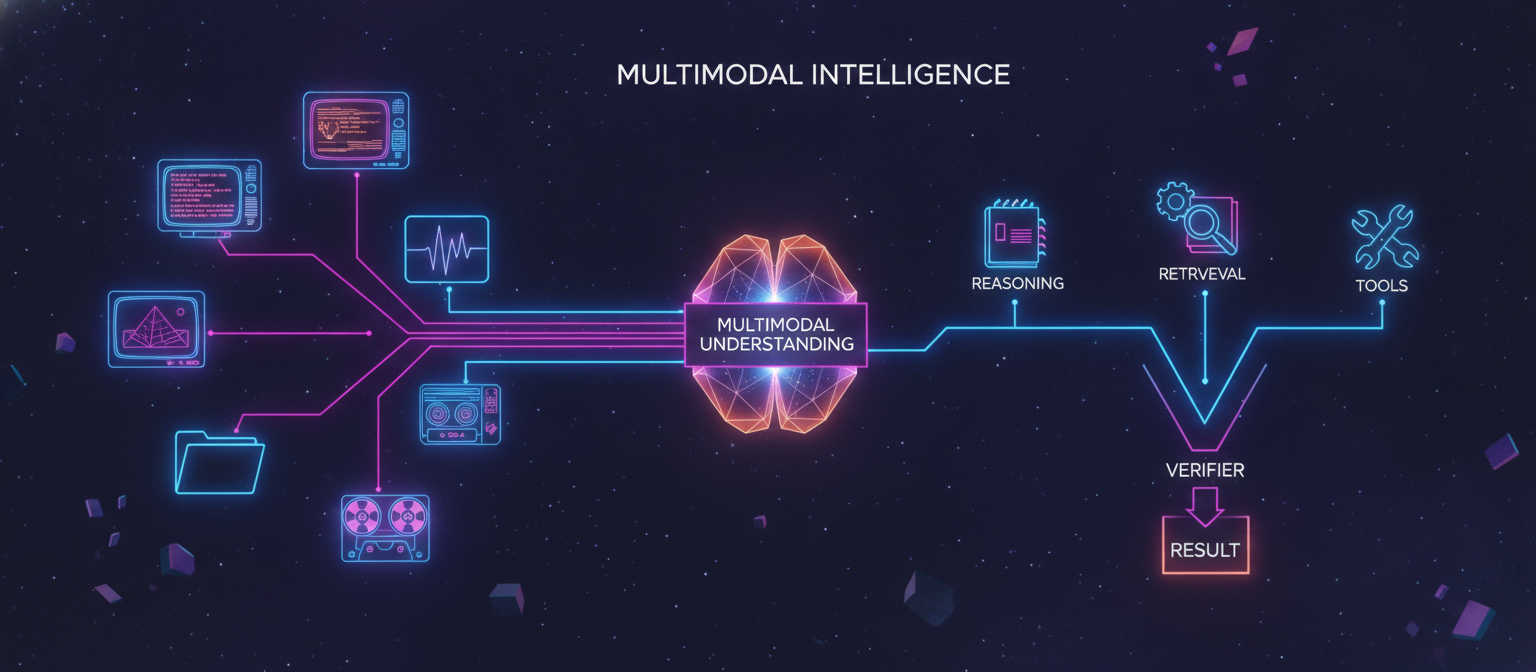
15.1 Objective
Until now, ACAI has primarily been described around text-based intelligence.
A real multimodal AI system must be able to work with:
Text
Images
Audio
Video
Documents
and combine information from multiple modalities.
The goal is:
TEXT
IMAGE
AUDIO
VIDEO
DOCUMENT
   │
   ▼
MULTIMODAL UNDERSTANDING
   │
   ▼
REASONING
   │
   ▼
ACTION
   │
   ▼
VERIFICATION
   │
   ▼
RESULT
This transforms ACAI from a primarily text-oriented architecture into a multimodal AI platform.
15.2 Multimodal Architecture
The high-level design becomes:
                         USER
                           │
          ┌────────────────┼────────────────┐
          ▼                ▼                ▼
        TEXT             IMAGE            AUDIO
          │                │                │
          └────────────────┼────────────────┘
                           │
                           ▼
                         VIDEO
                           │
                           ▼
                       DOCUMENTS
                           │
                           ▼
                  INPUT PROCESSING
                           │
                           ▼
                 MULTIMODAL ENCODING
                           │
                           ▼
                  MULTIMODAL MODEL
                           │
                 ┌─────────┼─────────┐
                 ▼         ▼         ▼
              REASONING  RETRIEVAL  TOOLS
                 │         │         │
                 └─────────┼─────────┘
                           ▼
                       VERIFIER
                           │
                           ▼
                         OUTPUT
15.3 Input Layer
Every modality should enter through a controlled input layer.
For example:
POST /input/text
POST /input/image
POST /input/audio
POST /input/video
POST /input/document
The system then normalizes these inputs into internal representations.
15.4 Input Normalization
Different media have different formats.
Examples:
Image:
PNG
JPEG
WEBP

Audio:
WAV
MP3
FLAC

Video:
MP4
MOV
WEBM

Documents:
PDF
DOCX
TXT
HTML
The input layer should validate and normalize supported formats before processing.
15.5 Image Understanding
A vision pipeline can look like:
IMAGE
 ↓
Validation
 ↓
Preprocessing
 ↓
Vision Encoder / Vision Model
 ↓
Visual Representation
 ↓
Reasoning
Possible tasks include:
Image description
Object understanding
Document image analysis
Visual question answering
Scene understanding
Image comparison
Chart interpretation
15.6 Image Preprocessing
Before sending an image to a model:
Upload
 ↓
Format validation
 ↓
Resolution check
 ↓
Resize if required
 ↓
Metadata handling
 ↓
Model input
The exact preprocessing depends on the selected model.
15.7 OCR
OCR means Optical Character Recognition.
A document-image workflow:
IMAGE
 ↓
OCR
 ↓
TEXT
 ↓
STRUCTURE
 ↓
RETRIEVAL
 ↓
REASONING
For example, a scanned document may contain text that is not directly machine-readable.
OCR converts visual characters into machine-readable text.
15.8 Document Intelligence
Documents should not always be treated as plain text.
A document may contain:
Title
Paragraphs
Tables
Images
Headers
Footnotes
Page numbers
Forms
Signatures
Charts
A document-processing pipeline can preserve these structures.
DOCUMENT
 ↓
PARSER
 ↓
LAYOUT ANALYSIS
 ↓
TEXT + TABLES + IMAGES
 ↓
CHUNKING
 ↓
EMBEDDING
 ↓
INDEX
15.9 PDF Processing
A PDF may contain either:
Machine-readable text
or:
Scanned images
Therefore:
PDF
 │
 ├── Text available
 │      ↓
 │    Extract
 │
 └── No text
        ↓
       OCR
The system should choose the appropriate path.
15.10 Document Chunking
Large documents should generally be divided into manageable retrieval units.
Example:
Document
 ↓
Chapter
 ↓
Section
 ↓
Paragraph
 ↓
Chunk
Each chunk can store metadata:
{
  "document_id": "doc_001",
  "page": 42,
  "section": "Architecture",
  "text": "..."
}
This improves traceability.
15.11 Multimodal Embeddings
Traditional embeddings may represent text.
A multimodal system can represent:
Text
Image
Audio
Video
in compatible or related embedding spaces, depending on the model architecture.
Conceptually:
TEXT ───► EMBEDDING
IMAGE ──► EMBEDDING
AUDIO ──► EMBEDDING
VIDEO ──► EMBEDDING
This allows cross-modal retrieval in systems designed for it.
15.12 Cross-Modal Retrieval
Example:
User:
"Find the image that contains the same diagram discussed in this document."
Possible pipeline:
Text Query
 ↓
Text Embedding
 ↓
Multimodal Search
 ↓
Image Candidates
 ↓
Ranking
 ↓
Result
This is more powerful than text-only search.
15.13 Image-to-Text Retrieval
Example:
IMAGE
 ↓
Visual Representation
 ↓
Search
 ↓
Relevant Documents
A user could upload an image and ask:
"What documents are related to this image?"
The system can search indexed multimodal representations.
15.14 Text-to-Image Retrieval
Reverse direction:
TEXT
 ↓
Embedding
 ↓
Image Search
 ↓
Relevant Images
This can support:
Media libraries
Research archives
Design systems
Product catalogs
Document repositories
15.15 Audio Intelligence
Audio processing can contain several stages:
AUDIO
 ↓
Preprocessing
 ↓
Speech Detection
 ↓
Speech Recognition
 ↓
Text
 ↓
Reasoning
For speech:
Speech
 ↓
ASR
 ↓
Transcript
ASR means Automatic Speech Recognition.
15.16 Audio Beyond Speech
Audio can contain more than spoken language.
Potential analysis includes:
Speech
Music
Environmental sounds
Speaker characteristics
Silence
Audio events
The supported capabilities depend on the selected models.
15.17 Speech-to-Text
Example:
USER SPEAKS
     ↓
MICROPHONE
     ↓
AUDIO STREAM
     ↓
ASR
     ↓
TRANSCRIPT
     ↓
LLM
     ↓
ANSWER
This enables voice interaction with ACAI.
15.18 Text-to-Speech
The reverse pipeline:
USER
 ↓
TEXT
 ↓
LLM
 ↓
RESPONSE TEXT
 ↓
TTS
 ↓
AUDIO
 ↓
USER
TTS means Text-to-Speech.
15.19 Voice Assistant
A complete voice interaction can therefore be:
USER SPEECH
     ↓
ASR
     ↓
UNDERSTANDING
     ↓
MEMORY
     ↓
PLANNING
     ↓
TOOLS
     ↓
REASONING
     ↓
TEXT RESPONSE
     ↓
TTS
     ↓
VOICE
The same orchestration architecture can be reused.
15.20 Video Understanding
Video introduces a time dimension.
A simple pipeline:
VIDEO
 ↓
Metadata
 ↓
Frame Sampling
 ↓
Visual Analysis
 ↓
Audio Extraction
 ↓
Speech Recognition
 ↓
Temporal Reasoning
 ↓
Summary
15.21 Video Is Not Just Many Images
Suppose a video contains:
Frame 1:
Person enters.

Frame 2:
Person picks up object.

Frame 3:
Person leaves.
Understanding the sequence requires temporal context.
Therefore:
Frame understanding
+
Temporal reasoning
is necessary for many video tasks.
15.22 Video Sampling
Processing every frame may be expensive.
Instead:
VIDEO
 ↓
Sampling Strategy
 ↓
Selected Frames
 ↓
Vision Model
Sampling frequency depends on the task.
For example, a static presentation may require fewer frames than a fast-action video.
15.23 Keyframe Extraction
The system can identify important frames:
Video
 ↓
Scene changes
 ↓
Keyframes
 ↓
Analysis
Keyframes reduce redundant processing.
15.24 Video + Audio
A better video understanding pipeline combines both:
                 VIDEO
                   │
          ┌────────┴────────┐
          ▼                 ▼
       FRAMES             AUDIO
          │                 │
          ▼                 ▼
       VISION              ASR
          │                 │
          └────────┬────────┘
                   ▼
             MULTIMODAL
              REASONING
This allows ACAI to combine what was seen with what was said.
15.25 Example Multimodal Request
User:
"Summarize this lecture video and identify the three diagrams shown."
ACAI could execute:
Video
 ↓
Audio extraction
 ↓
Transcript
 ↓
Frame sampling
 ↓
Diagram detection
 ↓
Visual understanding
 ↓
Transcript + visuals
 ↓
Reasoning
 ↓
Final summary
15.26 Multimodal Memory
ACAI memory can store more than text.
Possible memory records:
Text memory
Image memory
Audio transcript
Video event
Document reference
For example:
{
  "memory_id": "mem_001",
  "type": "image",
  "description": "...",
  "embedding": "...",
  "source": "user_upload"
}
15.27 Media Metadata
Every media object should have metadata.
Example:
{
  "media_id": "img_001",
  "type": "image",
  "mime_type": "image/jpeg",
  "size": 2048000,
  "created_at": "...",
  "owner_id": "user_001"
}
For video:
{
  "media_id": "vid_001",
  "type": "video",
  "duration": 120,
  "width": 1920,
  "height": 1080
}
15.28 Object Storage
Large files should generally not be stored directly inside relational database rows.
Use:
Application
 ↓
Object Storage
 ↓
Media File
Database stores:
metadata
permissions
location/reference
processing status
15.29 Media Processing Queue
Media processing can be expensive.
Therefore:
UPLOAD
 ↓
JOB CREATED
 ↓
QUEUE
 ↓
MEDIA WORKER
 ↓
PROCESSING
 ↓
STORAGE
 ↓
INDEX
This matches the production architecture from Chapter 13.
15.30 Processing States
A media object can have:
uploaded
validating
processing
indexed
ready
failed
Example:
uploaded
   ↓
processing
   ↓
ready
If something fails:
processing
   ↓
failed
15.31 Multimodal Agent
The agent can now choose among:
Text tool
Vision tool
OCR tool
Audio tool
Video tool
Search
Database
Calculator
Example:
User
 ↓
"Look at this chart and calculate the percentage change."
 ↓
Vision
 ↓
Extract values
 ↓
Calculator
 ↓
Verifier
 ↓
Answer
This demonstrates why multimodal systems benefit from tool orchestration.
15.32 Vision + Tool Calling
A model should not necessarily perform exact arithmetic itself when a calculator is available.
Pipeline:
IMAGE
 ↓
VISION
 ↓
VALUES
 ↓
CALCULATOR
 ↓
RESULT
 ↓
VERIFIER
This reduces avoidable numerical errors.
15.33 Document + Retrieval + Reasoning
Example:
PDF
 ↓
Parser
 ↓
OCR if needed
 ↓
Chunks
 ↓
Embeddings
 ↓
Vector Index
 ↓
User Question
 ↓
Retrieval
 ↓
Relevant Sections
 ↓
Reasoning
 ↓
Citation / Source Reference
The final answer should distinguish between information found in the document and model-generated interpretation.
15.34 Multimodal Verification
Verification can happen at multiple stages.
Input verification
 ↓
Processing verification
 ↓
Model-output verification
 ↓
Tool verification
 ↓
Final verification
For example:
Image says:
$500

OCR says:
$800
The system should flag a possible extraction conflict instead of confidently returning an unverified value.
15.35 Confidence
Multimodal systems may produce confidence signals.
For example:
OCR confidence
Vision confidence
Speech recognition confidence
Retrieval score
These should be treated as signals, not universal guarantees of correctness.
15.36 Uncertainty Handling
If ACAI cannot reliably interpret an image:
Confidence low
 ↓
Do not pretend certainty
 ↓
Ask for clearer image
Similarly:
Audio unclear
 ↓
Request repetition
Good multimodal behavior includes knowing when the input is insufficient.
15.37 Privacy
Multimedia can contain highly sensitive information.
Examples:
Faces
Voices
Documents
Locations
Personal conversations
Private recordings
Therefore the system needs:
Access controls
Encryption
Retention policies
Deletion mechanisms
Audit logs
Data collection and model training should also follow applicable consent and privacy requirements.
15.38 Media Access Control
A media object should be associated with an owner or authorized scope.
User A
 ↓
Media A
must not automatically be accessible to:
User B
Authorization should be checked before:
Download
View
Process
Share
Delete
15.39 Multimodal API
A conceptual request:
{
  "input": [
    {
      "type": "text",
      "content": "Analyze this image."
    },
    {
      "type": "image",
      "media_id": "img_001"
    }
  ]
}
The orchestrator determines the appropriate processing path.
15.40 Unified Input Representation
Internally, ACAI can normalize different inputs into a common structure:
class MultimodalInput:

    type: str

    content: str | bytes | dict

    metadata: dict
Possible types:
text
image
audio
video
document
This allows the orchestration layer to operate consistently.
15.41 Multimodal Workflow Example
Request:
"Read this PDF, inspect the chart, and explain the trend."
Workflow:
USER
 ↓
PDF
 ↓
DOCUMENT PROCESSOR
 ↓
TEXT + IMAGE
 ↓
CHART DETECTION
 ↓
VISION
 ↓
RETRIEVAL
 ↓
REASONING
 ↓
VERIFIER
 ↓
ANSWER
15.42 Multimodal Search Architecture
                    SEARCH QUERY
                         │
              ┌──────────┼──────────┐
              ▼          ▼          ▼
            TEXT       IMAGE      AUDIO
              │          │          │
              └──────────┼──────────┘
                         ▼
                 MULTIMODAL INDEX
                         │
                         ▼
                     RANKING
                         │
                         ▼
                     RESULTS
15.43 Media Index
A media index might contain:
media_id
type
embedding
metadata
owner_id
document_id
timestamp
source
For video, additional information may include:
timestamp
scene
frame
transcript segment
15.44 Temporal Indexing
Video information can be indexed by time:
00:00–00:30
00:30–01:00
01:00–01:30
Then ACAI can answer:
"What happened around 02:15?"
by retrieving the relevant temporal segment.
15.45 Multimodal RAG
Traditional RAG:
Question
 ↓
Text Retrieval
 ↓
Context
 ↓
LLM
Multimodal RAG:
Question
 ↓
Text + Image + Audio + Video Retrieval
 ↓
Multimodal Context
 ↓
Multimodal Model
 ↓
Answer
This enables richer research and document analysis.
15.46 Multimodal Research Assistant
A research workflow could be:
Research Question
 ↓
Web / Document Retrieval
 ↓
PDFs
 ↓
Charts
 ↓
Images
 ↓
Tables
 ↓
Audio / Video if relevant
 ↓
Cross-modal Analysis
 ↓
Evidence Organization
 ↓
Reasoning
 ↓
Final Report
The system should preserve source provenance so that conclusions can be traced back to supporting material.
15.47 Multimodal Creative System
ACAI can also support creative workflows:
Text Prompt
 ↓
Planning
 ↓
Image Generation
 ↓
Image Analysis
 ↓
Video Generation
 ↓
Audio / Voice
 ↓
Editing
 ↓
Quality Check
This connects multimodal intelligence with the creative-media capabilities envisioned for the broader platform.
15.48 End-to-End Multimodal Architecture
                              USER
                                │
        ┌───────────────────────┼────────────────────────┐
        ▼                       ▼                        ▼
       TEXT                    IMAGE                    AUDIO
        │                       │                        │
        │                    OCR/VISION                 ASR
        │                       │                        │
        └───────────────────────┼────────────────────────┘
                                ▼
                              VIDEO
                                │
                         FRAME + AUDIO
                                │
                                ▼
                           DOCUMENTS
                                │
                         PARSER / OCR
                                │
                                ▼
                     MULTIMODAL PROCESSOR
                                │
                                ▼
                         MEMORY / INDEX
                                │
                                ▼
                         RETRIEVAL SYSTEM
                                │
                                ▼
                           ORCHESTRATOR
                                │
                ┌───────────────┼────────────────┐
                ▼               ▼                ▼
             PLANNER          MODEL             TOOLS
                │               │                │
                └───────────────┼────────────────┘
                                ▼
                             VERIFIER
                                │
                                ▼
                              OUTPUT
                                │
                    ┌───────────┼───────────┐
                    ▼           ▼           ▼
                   TEXT        IMAGE       AUDIO
                                │
                                ▼
                              VIDEO
15.49 Implementation Order
Do not attempt to implement every modality simultaneously.
A practical order is:
STEP 1
Text foundation

STEP 2
Document processing

STEP 3
OCR

STEP 4
Image understanding

STEP 5
Audio transcription

STEP 6
Voice output

STEP 7
Video processing

STEP 8
Multimodal retrieval

STEP 9
Cross-modal reasoning

STEP 10
Multimodal agents
This reduces implementation complexity.
15.50 Testing Strategy
Each modality requires its own tests.
Image
Clear image
Low-resolution image
Multiple objects
Charts
Documents
Audio
Clear speech
Noise
Multiple speakers
Different accents
Silence
Video
Static scene
Fast scene
Long video
Multiple speakers
Audio + visual conflict
Documents
Text PDF
Scanned PDF
Tables
Images
Large document
Malformed document
15.51 Multimodal Regression Tests
Maintain a benchmark:
image_test_001
image_test_002
audio_test_001
video_test_001
document_test_001
Every major model or pipeline update should run against these tests.
15.52 Performance Optimization
Multimodal processing can be expensive.
Optimization techniques include:
Caching
Frame sampling
Image resizing
Batch processing
Asynchronous workers
Model routing
Result reuse
Selective modality processing
The principle is:
Process only what is necessary.
15.53 Cost-Aware Multimodal Routing
For a simple image:
Small vision model
For a difficult research task:
More capable multimodal model
For speech transcription:
Speech model
For exact arithmetic:
Calculator
Therefore the router should select the cheapest sufficiently capable component.
15.54 Failure Handling
Example:
Video uploaded
 ↓
Audio extraction fails
The system can still attempt:
Video frames
 ↓
Visual analysis
and clearly report that audio could not be processed.
This is another example of graceful degradation.
15.55 Chapter 15 Success Criteria
[✓] Multimodal architecture defined
[✓] Image processing defined
[✓] OCR defined
[✓] Document intelligence defined
[✓] Audio processing defined
[✓] Speech-to-text defined
[✓] Text-to-speech defined
[✓] Video processing defined
[✓] Frame sampling defined
[✓] Keyframe extraction defined
[✓] Multimodal embeddings defined
[✓] Cross-modal retrieval defined
[✓] Multimodal memory defined
[✓] Media storage defined
[✓] Media queues defined
[✓] Multimodal agents defined
[✓] Multimodal verification defined
[✓] Privacy architecture defined
[✓] Multimodal testing defined
[✓] Multimodal RAG defined
[✓] Multimodal research workflow defined
[✓] Multimodal creative workflow defined
15.56 Final Multimodal Vision
The complete concept is now:
                         ACAI
                          │
       ┌──────────────────┼──────────────────┐
       ▼                  ▼                  ▼
      TEXT              IMAGE              AUDIO
       │                  │                  │
       └──────────────────┼──────────────────┘
                          ▼
                        VIDEO
                          │
                          ▼
                      DOCUMENTS
                          │
                          ▼
                MULTIMODAL UNDERSTANDING
                          │
                          ▼
                       MEMORY
                          │
                          ▼
                      RETRIEVAL
                          │
                          ▼
                      REASONING
                          │
                          ▼
                       ACTION
                          │
                          ▼
                     VERIFICATION
                          │
                          ▼
                        OUTPUT
ACAI is therefore no longer limited to understanding words. Its architecture can process different forms of information and connect them inside one reasoning workflow.
15.57 Next Chapter
Chapter 16 — Autonomous Agents, Long-Horizon Planning, Multi-Agent Systems, and Safe Execution
The next chapter will cover:
Agent architecture
Task decomposition
Long-horizon planning
Planning loops
Multi-agent systems
Specialized agents
Agent communication
Shared memory
Agent supervision
Human approval
Execution boundaries
Sandboxing
Tool permissions
Agent failure recovery
Goal verification
Long-running autonomous workflows
The target architecture becomes:
USER GOAL
    ↓
PLANNER
    ↓
TASK DECOMPOSITION
    ↓
┌───────────────┐
│ AGENT SYSTEM  │
├───────────────┤
│ Research Agent│
│ Coding Agent  │
│ Vision Agent  │
│ Data Agent    │
│ Review Agent  │
└───────────────┘
    ↓
EXECUTION
    ↓
VERIFICATION
    ↓
HUMAN / POLICY GATE
    ↓
FINAL RESULT
End of Chapter 15


Comments
Post a Comment