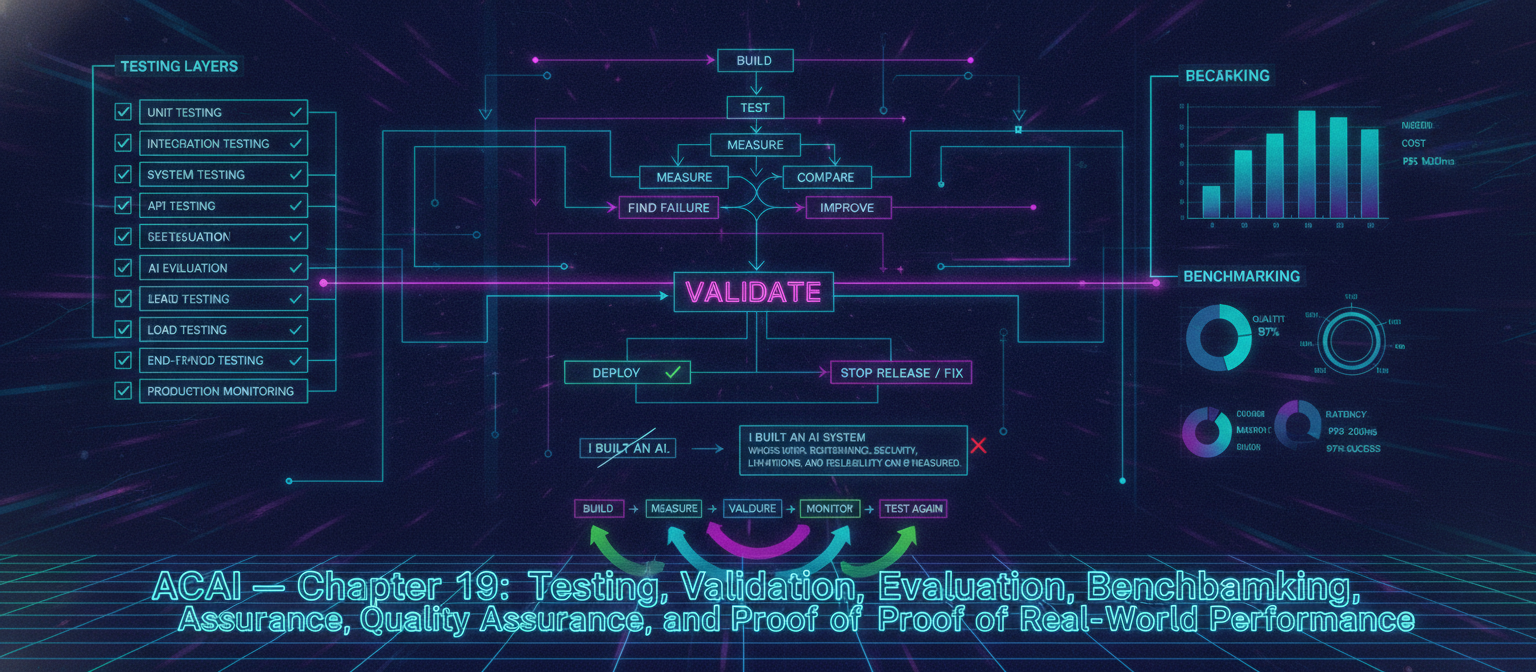
19.1 Objective
Building ACAI is only one part of the project.
The next question is:
How do we prove that ACAI actually works?
A serious AI platform needs measurable evidence.
The complete validation lifecycle is:
BUILD
 ↓
TEST
 ↓
MEASURE
 ↓
COMPARE
 ↓
FIND FAILURE
 ↓
IMPROVE
 ↓
RETEST
 ↓
VALIDATE
The goal is not to claim that the system is perfect.
The goal is to establish measurable performance, reliability, security, and limitations.
19.2 Testing Layers
ACAI should be tested at multiple levels:
Unit Testing
 ↓
Integration Testing
 ↓
API Testing
 ↓
System Testing
 ↓
AI Evaluation
 ↓
Security Testing
 ↓
Load Testing
 ↓
End-to-End Testing
 ↓
Production Monitoring
Each layer catches a different class of problems.
19.3 Unit Testing
Unit tests verify individual functions.
Example:
validateInput()
calculateCost()
parseModelResponse()
checkPermission()
formatResult()
Conceptually:
INPUT
 ↓
FUNCTION
 ↓
EXPECTED OUTPUT
If the output is incorrect, the test fails.
19.4 Example Unit Test
Suppose ACAI contains:
calculateTotal(a, b)
Test cases could include:
2 + 3 → 5
0 + 5 → 5
-2 + 2 → 0
The important point is that expected behavior is explicitly defined.
19.5 Edge Cases
Testing only normal input is insufficient.
Test:
Empty input
Very large input
Very small input
Invalid input
Unexpected characters
Missing fields
Duplicate requests
Timeouts
AI systems require especially strong edge-case testing because inputs can be unpredictable.
19.6 Integration Testing
Integration tests verify that multiple components work together.
Example:
API
 ↓
Agent
 ↓
Model
 ↓
Tool
 ↓
Database
The goal is to determine whether the entire interaction behaves correctly.
19.7 API Testing
Each API endpoint should have tests for:
Valid request
Invalid request
Missing authentication
Insufficient permissions
Rate limit
Malformed data
Timeout
Dependency failure
Example:
POST /api/agent/run
should be tested under both successful and unsuccessful conditions.
19.8 Authentication Testing
Test:
Correct credentials
Incorrect credentials
Expired session
Invalid token
Revoked session
Repeated failed login
The system should not accidentally grant access when authentication fails.
19.9 Authorization Testing
For every sensitive resource:
Owner → allowed
Authorized role → allowed
Unauthorized user → denied
Different tenant → denied
Anonymous user → denied
This is especially important for multi-user AI platforms.
19.10 Data Isolation Testing
Create:
Tenant A
Tenant B
Then verify:
Tenant A request
 ↓
Only Tenant A data
and:
Tenant B request
 ↓
Only Tenant B data
Cross-tenant access should fail.
19.11 Agent Testing
Agent systems require different testing because the exact internal path can vary.
Test:
Task understanding
Planning
Tool selection
Tool arguments
Memory usage
Policy compliance
Error recovery
Final answer
19.12 Agent Test Case
Example task:
"Find information from my uploaded document and summarize it."
Expected behavior:
1. Identify document
2. Retrieve permitted content
3. Process content
4. Generate summary
5. Return result
The agent should not access unrelated private resources.
19.13 Tool Selection Evaluation
Suppose three tools exist:
Search
Calculator
Document Reader
For a mathematical task:
User:
"Calculate 125 × 48."
The expected tool may be:
Calculator
The evaluation should check whether the agent selected an appropriate capability.
19.14 Tool Argument Testing
Even if the correct tool is selected, its arguments may be wrong.
Example:
{
  "query": "weather"
}
should not accidentally become:
{
  "query": null
}
Tool schemas should therefore be validated automatically.
19.15 Agent Loop Testing
If the agent uses iterative execution:
PLAN
 ↓
ACT
 ↓
OBSERVE
 ↓
REPLAN
test:
Normal completion
Tool failure
Repeated failure
Conflicting results
Missing information
Maximum-step limit
The agent must eventually stop.
19.16 Infinite Loop Protection
An agent should never run forever.
Set boundaries such as:
Maximum steps
Maximum runtime
Maximum tool calls
Maximum cost
Example:
Agent
 ↓
Step 1
 ↓
Step 2
 ↓
...
 ↓
Maximum limit
 ↓
STOP
19.17 AI Evaluation
Traditional software testing asks:
Did the function return the expected result?
AI evaluation additionally asks:
How good was the result?
Important dimensions include:
Correctness
Relevance
Completeness
Consistency
Safety
Instruction following
Factuality
Style
19.18 Evaluation Dataset
Create a fixed evaluation set:
Evaluation Dataset
 ├── Easy tasks
 ├── Medium tasks
 ├── Difficult tasks
 ├── Edge cases
 ├── Adversarial cases
 └── Safety cases
Run the same dataset across versions.
19.19 Golden Dataset
A carefully reviewed set of examples can become a benchmark.
Example:
{
  "input": "Explain photosynthesis simply.",
  "expected_properties": [
    "accurate",
    "clear",
    "age-appropriate"
  ]
}
The expected output does not always have to be a single exact sentence.
19.20 Human Evaluation
Some AI outputs cannot be reliably evaluated by exact string matching.
Human reviewers can score:
1–5 Correctness
1–5 Relevance
1–5 Clarity
1–5 Completeness
1–5 Safety
The scoring rubric should be defined before evaluation.
19.21 Automated Evaluation
Automated evaluators can check:
JSON validity
Required fields
Tool-call correctness
Citation presence
Forbidden output
Task completion
For subjective quality, automated model-based evaluation can be used cautiously and should ideally be calibrated against human judgments.
19.22 Model-Based Evaluation
A separate evaluator model can compare outputs against defined criteria.
Conceptually:
TASK
 ↓
ACAI OUTPUT
 ↓
EVALUATOR
 ↓
SCORE
The evaluator should not automatically be treated as ground truth.
19.23 Evaluation Bias
An evaluator can have weaknesses.
For example:
Evaluator prefers longer answers
Evaluator favors its own style
Evaluator misses subtle factual errors
Therefore important evaluations should combine automated and human review where appropriate.
19.24 Benchmarking
Benchmarking means comparing versions.
Example:
Model A → 78%
Model B → 84%
Model C → 87%
But a single score is insufficient.
Also measure:
Latency
Cost
Failure rate
Safety
Tool accuracy
19.25 Quality vs Cost
A stronger model may improve quality but increase cost.
Example:
Model A
Quality: 80
Cost: Low

Model B
Quality: 88
Cost: Medium

Model C
Quality: 91
Cost: High
The correct production choice depends on the application's requirements.
19.26 Latency Evaluation
Measure:
Request received
 ↓
Processing
 ↓
Model
 ↓
Tools
 ↓
Verification
 ↓
Response
Important measurements:
Average latency
Median latency
P95 latency
P99 latency
Tail latency matters because some users experience the slowest requests.
19.27 Throughput
Throughput measures how much work the system can handle.
Examples:
Requests / second
Jobs / minute
Documents / hour
Images / minute
Measure under realistic workloads.
19.28 Reliability
A useful metric is successful completion rate.
Conceptually:
Successful Tasks
──────────────────── × 100
Total Tasks
For example, if 970 out of 1,000 tasks complete successfully:
97%
This is only an example; real production results must come from actual measurements.
19.29 Error Classification
Do not treat every failure as identical.
Classify failures:
Authentication failure
Validation failure
Model failure
Tool failure
Database failure
Timeout
Rate limit
Policy denial
Infrastructure failure
This makes debugging much easier.
19.30 Failure Matrix
Create a matrix:
| Failure | Detection | Recovery | User Impact |
|---|
| Model timeout | Timeout monitor | Retry/fallback | Delayed |
| Worker crash | Health check | Replace worker | Delayed |
| Database failure | DB monitoring | Recovery/failover | Potential outage |
| Invalid input | Validation | Reject | Immediate |
| Policy denial | Policy engine | Block | Expected |
This becomes an operational reference.
19.31 Security Evaluation
Security testing should deliberately attempt to violate system boundaries.
Examples:
Unauthorized account access
Privilege escalation
Prompt injection
Tool abuse
Data extraction
Cross-tenant access
Credential leakage
Malicious file upload
The goal is to verify that security controls actually work.
19.32 Prompt Injection Benchmark
Build a dedicated dataset:
Normal prompts
+
Indirect injection
+
Direct injection
+
Malicious documents
+
Malicious tool results
Expected behavior:
Trusted policy remains authoritative.
19.33 Sensitive Data Leakage Test
Create synthetic secret values:
TEST_SECRET_123
Then place them in controlled test environments.
Test whether ACAI accidentally exposes them through:
Model output
Logs
Errors
Tool results
API responses
Use synthetic test secrets rather than real credentials.
19.34 Red-Team Testing
A red-team exercise attempts to break the system from an attacker's perspective.
Possible objectives:
Get unauthorized data
Trigger unauthorized tool execution
Escape sandbox
Bypass quotas
Access another tenant
Manipulate agent behavior
Every discovered vulnerability should be tracked to remediation.
19.35 Regression Testing
Whenever a bug is fixed:
BUG
 ↓
TEST CREATED
 ↓
FIX
 ↓
TEST PASSES
The test should remain permanently so the same bug does not silently return.
19.36 Regression Suite
Over time:
Test 001
Test 002
Test 003
...
Test 1000+
Every important release can run the suite automatically.
19.37 Continuous Evaluation
AI behavior can change when:
Model changes
Prompt changes
Retriever changes
Tool changes
Dataset changes
Policy changes
Therefore evaluation should run automatically after significant changes.
19.38 Evaluation Pipeline
CODE CHANGE
 ↓
BUILD
 ↓
UNIT TEST
 ↓
INTEGRATION TEST
 ↓
AI EVALUATION
 ↓
SECURITY TEST
 ↓
PERFORMANCE TEST
 ↓
STAGING
 ↓
PRODUCTION
19.39 Release Gate
A release should only proceed if required conditions pass.
Example:
Unit tests → PASS
Integration → PASS
Security → PASS
Evaluation → PASS
Build → PASS
Then:
DEPLOY
If a critical test fails:
STOP RELEASE
19.40 Model Versioning
Every model configuration should be identifiable.
Example:
model-version
prompt-version
tool-version
retriever-version
dataset-version
This allows an output to be traced back to the configuration that produced it.
19.41 Experiment Tracking
For each experiment record:
Experiment ID
Model
Prompt
Dataset
Parameters
Metrics
Date
Result
Example:
{
  "experiment_id": "exp_017",
  "model": "model-A",
  "dataset": "eval-v3",
  "accuracy": 0.87
}
19.42 A/B Testing
Two versions can be compared:
Users
 ├── Version A
 └── Version B
Measure:
Completion
Quality
Latency
Cost
User satisfaction
Failure rate
A/B testing should respect privacy, safety, and statistical validity requirements.
19.43 Canary Evaluation
Before a full release:
New Version
 ↓
Small Traffic
 ↓
Monitor
 ↓
Compare
 ↓
Expand or Roll Back
This combines deployment safety with real-world evaluation.
19.44 User Feedback
Users can provide:
👍 Good
👎 Bad
Report problem
Correct answer
Incorrect answer
Feedback can become evaluation data after appropriate review and privacy controls.
19.45 Human-in-the-Loop Review
For difficult cases:
AI
 ↓
Low Confidence / High Risk
 ↓
Human Reviewer
 ↓
Decision
 ↓
Final Result
This can be particularly valuable for high-impact or irreversible workflows.
19.46 Confidence
Confidence should not be represented as a magic number unless it has been properly calibrated.
Instead, ACAI can track signals such as:
Evidence quality
Tool success
Agreement between checks
Retrieval quality
Verification outcome
Then define operational thresholds based on evaluation data.
19.47 Verification
A powerful pattern is:
GENERATE
 ↓
VERIFY
 ↓
CORRECT
 ↓
FINAL
For example:
Agent creates result
 ↓
Reviewer checks constraints
 ↓
Errors detected?
 ├── YES → Repair
 └── NO → Accept
19.48 Multi-Stage Quality Control
For important tasks:
Planner
 ↓
Executor
 ↓
Reviewer
 ↓
Verifier
 ↓
Finalizer
This adds latency and cost, so it should be used where the additional reliability is valuable.
19.49 Evaluation Dashboard
A production dashboard can show:
Task Success Rate
Model Quality
Latency
Error Rate
Tool Accuracy
Security Events
Cost
Queue Depth
User Feedback
Example:
┌──────────────────────────────────┐
│ ACAI Evaluation Dashboard        │
├──────────────────────────────────┤
│ Success Rate        97%          │
│ Median Latency      ...          │
│ Error Rate          ...          │
│ Tool Accuracy       ...          │
│ Cost / Task         ...          │
│ Security Alerts     ...          │
└──────────────────────────────────┘
The displayed values must come from actual telemetry rather than invented numbers.
19.50 End-to-End Test
The most important test simulates a real user:
USER
 ↓
LOGIN
 ↓
CREATE PROJECT
 ↓
UPLOAD DATA
 ↓
SUBMIT TASK
 ↓
AGENT
 ↓
MODEL
 ↓
TOOLS
 ↓
VERIFICATION
 ↓
STORE RESULT
 ↓
DISPLAY RESULT
 ↓
LOG EVENT
If the complete flow works, the system has passed an end-to-end test.
19.51 Realistic Test Environment
Testing should approximate production:
Production-like API
Production-like database
Production-like queue
Production-like worker configuration
Representative model configuration
Representative datasets
Avoid relying exclusively on simplified local tests.
19.52 Test Data
Use controlled datasets.
Separate:
Development data
Test data
Staging data
Production data
Do not casually copy real private production data into development.
19.53 Synthetic Data
Synthetic data can be useful for testing:
Fake users
Fake documents
Fake transactions
Fake secrets
Fake workloads
This reduces unnecessary exposure of real user information.
19.54 Performance Test Architecture
LOAD GENERATOR
       │
       ▼
     API
       │
       ▼
   APPLICATION
       │
   ┌───┼────┐
   ▼   ▼    ▼
 QUEUE DB  CACHE
   │
   ▼
WORKERS
   │
   ▼
MODEL
Monitor the complete path.
19.55 Bottleneck Identification
Suppose:
API latency = 100 ms
Queue wait = 4 sec
Worker processing = 10 sec
Database = 200 ms
The major delay is worker processing and queueing rather than the API.
This tells the engineering team where optimization matters.
19.56 Cost Benchmark
For each workload measure:
Input size
Output size
Model calls
Tool calls
Compute time
Storage
Total cost
Then compare different implementations.
19.57 Quality Benchmark
For the same task set:
Version A → Quality Score
Version B → Quality Score
Version C → Quality Score
Do not compare versions using different datasets if the goal is a direct benchmark.
19.58 Reproducibility
A good experiment should be reproducible.
Record:
Code version
Model version
Prompt version
Dataset version
Configuration
Evaluation procedure
Then another engineer can reproduce the experiment.
19.59 Validation Report
Each major release can generate a report:
Release:
v1.x

Tests:
Unit ........ PASS
Integration . PASS
Security ..... PASS
AI Eval ...... PASS
Load ......... PASS

Known limitations:
...

Recommended:
DEPLOY
This creates an auditable engineering process.
19.60 What Counts as Proof?
A common mistake is saying:
"The AI works because I tested it once."
That is not strong evidence.
Stronger evidence is:
Defined test dataset
+
Repeated experiments
+
Quantitative metrics
+
Failure analysis
+
Regression testing
+
Security testing
+
Performance testing
+
Independent review where appropriate
This creates a much more credible validation process.
19.61 What Cannot Be Guaranteed
No realistic AI platform can honestly guarantee:
100% accuracy
100% security
Zero failures
Zero hallucinations
Perfect autonomy
Perfect reliability
Instead, the system should document:
Measured performance
Known limitations
Failure modes
Safety boundaries
Supported workloads
Unsupported workloads
19.62 Scientific Evaluation Principle
The correct approach is:
CLAIM
 ↓
HYPOTHESIS
 ↓
TEST
 ↓
DATA
 ↓
ANALYSIS
 ↓
RESULT
 ↓
LIMITATION
If the data does not support the claim, the claim should be reduced.
19.63 Example Research Claim
Weak claim:
"ACAI is the best AI system."
Better:
"On our defined evaluation dataset, ACAI achieved
X% task completion under the specified test conditions."
The second claim can be independently tested.
19.64 Benchmark Documentation
Every benchmark should document:
Hardware
Software
Model
Dataset
Number of tests
Evaluation method
Metrics
Failures
Date
Limitations
This prevents misleading comparisons.
19.65 Final Testing Architecture
                         ACAI
                          │
              ┌───────────┼───────────┐
              ▼           ▼           ▼
           SOFTWARE       AI        SECURITY
            TESTS       EVALS        TESTS
              │           │           │
              └───────────┼───────────┘
                          ▼
                     PERFORMANCE
                       TESTING
                          │
                          ▼
                     END-TO-END
                       TESTING
                          │
                          ▼
                     HUMAN REVIEW
                          │
                          ▼
                     RELEASE GATE
                          │
                    ┌─────┴─────┐
                    ▼           ▼
                  PASS         FAIL
                    │           │
                    ▼           ▼
                DEPLOY        FIX
                                │
                                └──► RETEST
19.66 Complete Validation Lifecycle
IDEA
 ↓
IMPLEMENT
 ↓
UNIT TEST
 ↓
INTEGRATION TEST
 ↓
SECURITY TEST
 ↓
AI EVALUATION
 ↓
PERFORMANCE TEST
 ↓
END-TO-END TEST
 ↓
HUMAN REVIEW
 ↓
STAGING
 ↓
CANARY
 ↓
MONITOR
 ↓
FULL RELEASE
 ↓
CONTINUOUS EVALUATION
19.67 Chapter 19 Success Criteria
[✓] Unit testing
[✓] Integration testing
[✓] API testing
[✓] Authentication testing
[✓] Authorization testing
[✓] Tenant isolation testing
[✓] Agent testing
[✓] Tool testing
[✓] Loop protection
[✓] AI evaluation
[✓] Human evaluation
[✓] Automated evaluation
[✓] Benchmarking
[✓] Latency measurement
[✓] Throughput measurement
[✓] Reliability measurement
[✓] Security evaluation
[✓] Prompt-injection testing
[✓] Data-leakage testing
[✓] Red-team testing
[✓] Regression testing
[✓] Continuous evaluation
[✓] Model versioning
[✓] Experiment tracking
[✓] A/B testing
[✓] Canary evaluation
[✓] Load testing
[✓] Cost benchmarking
[✓] Reproducibility
[✓] Validation reporting
19.68 Final Result
ACAI is now designed around a measurable engineering loop:
BUILD
  ↓
TEST
  ↓
MEASURE
  ↓
VALIDATE
  ↓
DEPLOY
  ↓
MONITOR
  ↓
LEARN
  ↓
IMPROVE
  ↓
TEST AGAIN
The important transition is from:
"I built an AI."
to:
"I built an AI system whose behavior,
performance, security, limitations,
and reliability can be measured."
That distinction is essential for turning a large AI architecture into a credible real-world system.
19.69 Next Chapter
Chapter 20 — Data Engineering, Knowledge Systems, RAG, Vector Search, Memory, Data Pipelines, and Knowledge Quality
The next chapter will cover:
Data architecture
Data ingestion
Document processing
Parsing
Chunking
Metadata
Embeddings
Vector databases
Hybrid search
Keyword search
Semantic search
Reranking
RAG
Knowledge graphs
Long-term memory
Short-term memory
Memory retrieval
Memory filtering
Data provenance
Knowledge freshness
Deduplication
Data quality
Indexing
Reindexing
Evaluation datasets
Knowledge security
Target flow:
DATA SOURCES
     ↓
INGESTION
     ↓
PARSING
     ↓
CLEANING
     ↓
CHUNKING
     ↓
METADATA
     ↓
EMBEDDINGS
     ↓
VECTOR / SEARCH INDEX
     ↓
RETRIEVAL
     ↓
RERANKING
     ↓
CONTEXT
     ↓
MODEL
     ↓
VERIFICATION
     ↓
ANSWER
End of Chapter 19


Comments
Post a Comment