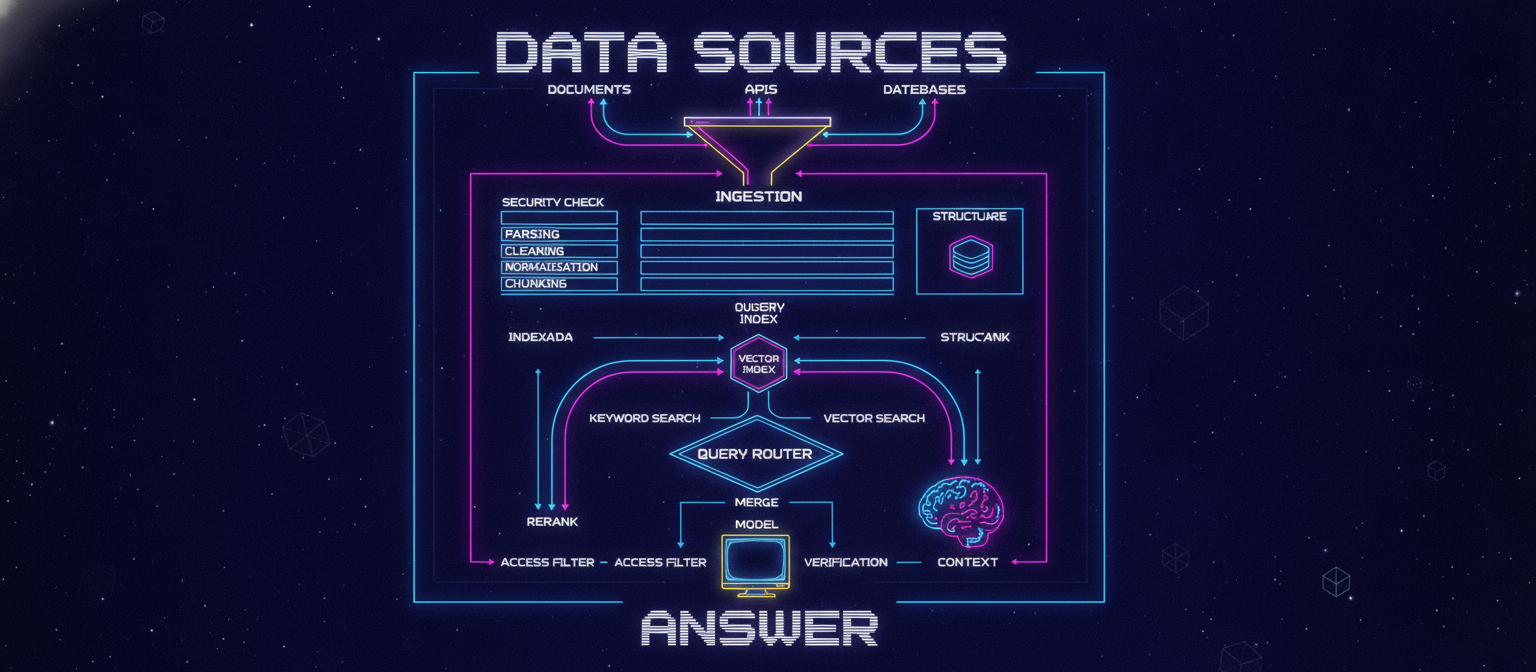
20.1 Objective
An advanced AI system is only as useful as the information it can reliably access.
ACAI therefore needs a complete knowledge architecture:
DATA
 ↓
INGESTION
 ↓
PROCESSING
 ↓
STORAGE
 ↓
INDEXING
 ↓
RETRIEVAL
 ↓
RERANKING
 ↓
CONTEXT
 ↓
MODEL
 ↓
VERIFICATION
 ↓
ANSWER
The purpose of this chapter is to explain how ACAI can turn raw information into searchable, trustworthy context.
20.2 Data Sources
ACAI may receive information from many sources:
Documents
Web pages
Databases
APIs
User uploads
Internal knowledge
Application records
Structured datasets
Images
Audio
Video
Different sources require different processing pipelines.
20.3 Data Ingestion
Ingestion means bringing information into the system.
SOURCE
 ↓
INGESTION SERVICE
 ↓
RAW DATA
 ↓
PROCESSING PIPELINE
The ingestion layer should record where the information came from.
Example metadata:
{
  "source_id": "source_001",
  "source_type": "document",
  "created_at": "...",
  "owner_id": "user_001"
}
20.4 Raw Data Layer
Keep the original source when appropriate.
RAW SOURCE
      ↓
OBJECT STORAGE
      ↓
PROCESSING
This can make reprocessing possible when parsing or indexing logic changes.
20.5 Data Processing
A document pipeline can look like:
UPLOAD
 ↓
FILE VALIDATION
 ↓
VIRUS / SECURITY CHECK
 ↓
PARSING
 ↓
TEXT EXTRACTION
 ↓
CLEANING
 ↓
STRUCTURING
 ↓
CHUNKING
 ↓
METADATA
 ↓
INDEXING
20.6 Document Parsing
Different file formats may require different parsers:
PDF
DOCX
TXT
HTML
CSV
JSON
XML
The output should ideally be normalized into a common internal representation.
20.7 Normalized Document Representation
Conceptually:
{
  "document_id": "doc_001",
  "title": "Example Document",
  "sections": [
    {
      "heading": "Introduction",
      "content": "..."
    }
  ],
  "metadata": {
    "language": "en"
  }
}
The exact schema depends on the implementation.
20.8 Cleaning
Raw text may contain:
Repeated whitespace
Broken formatting
Headers
Footers
Duplicate text
Navigation menus
HTML artifacts
Encoding problems
Cleaning attempts to remove noise while preserving meaning.
20.9 Chunking
Large documents should usually be divided into smaller retrieval units.
DOCUMENT
 ↓
CHUNK 1
CHUNK 2
CHUNK 3
CHUNK 4
A chunk should contain enough context to be useful while remaining small enough for efficient retrieval.
20.10 Naive Chunking
A simple strategy:
Every N characters
This is easy but can split concepts incorrectly.
Example:
Sentence A
Sentence B
------
CHUNK BREAK
------
Sentence C
Sentence D
The meaning of a paragraph may be divided unnecessarily.
20.11 Semantic Chunking
A more intelligent approach considers:
Paragraph boundaries
Headings
Sections
Topic changes
Sentences
Tables
Lists
Conceptually:
DOCUMENT
 ↓
SECTION
 ↓
PARAGRAPHS
 ↓
SEMANTIC UNITS
20.12 Chunk Metadata
Each chunk should preserve useful metadata.
Example:
{
  "chunk_id": "chunk_001",
  "document_id": "doc_001",
  "section": "Introduction",
  "page": 3,
  "text": "...",
  "source": "document_001"
}
This allows retrieval results to be traced back to the original source.
20.13 Embeddings
An embedding represents content as a numerical vector.
Conceptually:
TEXT
 ↓
EMBEDDING MODEL
 ↓
[0.12, -0.44, 0.81, ...]
Similar meanings tend to produce vectors that are closer according to the chosen similarity function.
20.14 Vector Search
Suppose the knowledge base contains:
Chunk A → information about cars
Chunk B → information about airplanes
Chunk C → information about bicycles
User asks:
"What is an electric vehicle?"
The query is embedded:
QUESTION
 ↓
QUERY VECTOR
The system searches for nearby vectors.
20.15 Semantic Retrieval
The basic flow:
USER QUESTION
 ↓
QUERY EMBEDDING
 ↓
VECTOR SEARCH
 ↓
TOP K CHUNKS
The retrieved chunks become candidates for the model's context.
20.16 Similarity
A vector database may use a similarity measure such as cosine similarity.
Conceptually:
Query Vector
      ↕
Document Vector
      ↓
Similarity Score
Higher similarity generally means stronger semantic proximity, although the meaning of scores depends on the embedding and index configuration.
20.17 Why Vector Search Alone Is Not Enough
Semantic search can miss:
Exact product IDs
Names
Numbers
Rare terms
Legal phrases
Technical identifiers
Therefore a strong retrieval system can combine semantic and lexical methods.
20.18 Keyword Search
Keyword search looks for exact or related terms.
USER QUERY
 ↓
KEYWORD INDEX
 ↓
MATCHES
This is useful for exact terminology.
20.19 Hybrid Search
Combine:
Keyword Search
+
Vector Search
Architecture:
                    QUERY
                      │
              ┌───────┴───────┐
              ▼               ▼
         KEYWORD SEARCH   VECTOR SEARCH
              │               │
              └───────┬───────┘
                      ▼
                 MERGE RESULTS
Hybrid retrieval can provide stronger coverage than relying on only one method.
20.20 Reranking
Initial retrieval may return many candidates.
Example:
100 candidates
 ↓
Reranker
 ↓
10 best candidates
The reranker evaluates the relationship between the query and each candidate more carefully.
20.21 Complete Retrieval Pipeline
QUESTION
 ↓
QUERY ANALYSIS
 ↓
KEYWORD SEARCH
 ↓
VECTOR SEARCH
 ↓
MERGE
 ↓
RERANK
 ↓
FILTER
 ↓
TOP CONTEXT
20.22 Context Construction
The model should not necessarily receive every retrieved result.
Instead:
RETRIEVED CHUNKS
 ↓
RELEVANCE FILTER
 ↓
DEDUPLICATION
 ↓
ORDERING
 ↓
CONTEXT WINDOW
This reduces irrelevant information.
20.23 Context Ordering
Useful ordering strategies may include:
Highest relevance first
Document structure order
Chronological order
Source priority
The best strategy should be validated experimentally.
20.24 Retrieval-Augmented Generation
RAG means the model generates an answer using retrieved external context.
USER
 ↓
RETRIEVAL
 ↓
RELEVANT KNOWLEDGE
 ↓
MODEL
 ↓
ANSWER
This can reduce dependence on information stored only inside model parameters.
20.25 RAG with Citations
For knowledge tasks, ACAI can preserve source references:
ANSWER
 ↓
SOURCE CHUNK
 ↓
DOCUMENT
 ↓
PAGE / SECTION
This enables the user to inspect the evidence.
20.26 Provenance
Every important knowledge item should ideally have provenance.
Example:
{
  "source": "document_001",
  "page": 12,
  "section": "Methods",
  "ingested_at": "...",
  "version": "3"
}
Provenance answers:
Where did this information come from?
20.27 Knowledge Freshness
Information changes.
Examples:
Product prices
Policies
Documentation
News
Software versions
Company information
A knowledge system needs a freshness strategy.
SOURCE
 ↓
UPDATED?
 ├── NO → Existing Index
 └── YES → Reprocess
20.28 Reindexing
When the embedding model changes:
OLD EMBEDDINGS
 ↓
NEW EMBEDDING MODEL
 ↓
RE-EMBED
 ↓
NEW INDEX
The original source should remain available so the index can be rebuilt.
20.29 Incremental Indexing
There is no need to reprocess everything when one document changes.
10,000 Documents
      ↓
Document 431 changed
      ↓
Process Document 431
      ↓
Update its chunks
This can greatly reduce processing cost.
20.30 Deduplication
Duplicate content can pollute retrieval.
Example:
Document A
Document B
Document C
All three may contain identical content.
A deduplication layer can identify duplicates using appropriate techniques.
20.31 Duplicate Detection
Conceptually:
DOCUMENT
 ↓
NORMALIZE
 ↓
HASH / SIMILARITY
 ↓
DUPLICATE?
 ├── YES → LINK / SKIP
 └── NO → INDEX
Exact hashing is useful for exact duplicates; semantic similarity can identify near-duplicates.
20.32 Access Control in Retrieval
This is critical.
Suppose:
User A owns Document A
User B owns Document B
A query from User A must not retrieve Document B merely because Document B is semantically similar.
Therefore:
QUERY
 ↓
IDENTITY
 ↓
ACCESS FILTER
 ↓
RETRIEVAL
Authorization should be enforced before private content reaches the model.
20.33 Tenant-Aware Retrieval
For multi-tenant systems:
Tenant A
 ├── Documents
 └── Memory

Tenant B
 ├── Documents
 └── Memory
Retrieval must preserve tenant boundaries.
20.34 Memory Architecture
ACAI can maintain different types of memory.
Short-Term Memory
Long-Term Memory
User Memory
Task Memory
Project Memory
System Knowledge
These should not all be treated identically.
20.35 Short-Term Memory
Short-term memory contains the current interaction.
Conversation
 ↓
Current Context
 ↓
Current Task
It is useful for maintaining immediate continuity.
20.36 Long-Term Memory
Long-term memory contains information that should persist beyond a single interaction.
Conceptually:
Important Information
 ↓
Memory Candidate
 ↓
Validation
 ↓
Storage
 ↓
Future Retrieval
Not every conversation message should automatically become permanent memory.
20.37 Memory Selection
A memory system can evaluate:
Importance
Durability
Usefulness
Confidence
Privacy
Scope
Then decide:
STORE
or
DO NOT STORE
20.38 Memory Scope
A memory item may belong to:
User
Project
Organization
Task
Conversation
System
The scope must be explicit.
20.39 Memory Retrieval
When a new request arrives:
NEW TASK
 ↓
MEMORY SEARCH
 ↓
RELEVANT MEMORIES
 ↓
ACCESS CHECK
 ↓
CONTEXT
Only relevant memory should be inserted into the prompt.
20.40 Memory Decay
Some information becomes obsolete.
Possible lifecycle:
NEW
 ↓
ACTIVE
 ↓
LESS RELEVANT
 ↓
ARCHIVED
 ↓
DELETED
Retention rules should depend on the type of memory and user expectations.
20.41 Memory Correction
Users or authorized systems should be able to correct memory.
OLD MEMORY
 ↓
CORRECTION
 ↓
NEW MEMORY
The system should not blindly preserve contradictory information forever.
20.42 Knowledge Graph
Some knowledge is better represented as relationships.
Example:
Person
  │
  ├── works_at → Company
  │
  └── lives_in → City
A knowledge graph represents entities and relationships explicitly.
20.43 Graph + Vector Search
ACAI can combine:
Vector Retrieval
+
Keyword Search
+
Knowledge Graph
Architecture:
                    QUERY
                      │
        ┌─────────────┼─────────────┐
        ▼             ▼             ▼
     VECTOR        KEYWORD         GRAPH
     SEARCH         SEARCH         QUERY
        │             │             │
        └─────────────┼─────────────┘
                      ▼
                   RANKING
                      ↓
                   CONTEXT
20.44 Structured Data
Not all information belongs in vector storage.
For exact values:
Customer ID
Order number
Date
Price
Count
Status
a relational or structured database may be better.
Therefore:
Structured Facts → Database
Unstructured Knowledge → Search / Vector Index
Relationships → Graph where useful
20.45 Query Routing
ACAI can determine what type of retrieval is appropriate.
QUESTION
 ↓
QUERY ROUTER
 ├── Structured DB
 ├── Keyword Search
 ├── Vector Search
 ├── Graph
 └── Multiple sources
20.46 Example Query Routing
Question:
"What is my current account balance?"
Use:
Structured Database
Question:
"Explain the company's refund policy."
Use:
Document Retrieval
Question:
"How are Company A and Company B connected?"
Potentially:
Knowledge Graph
The router should be evaluated rather than assumed to be correct.
20.47 Multi-Hop Retrieval
Some questions require several steps.
QUESTION
 ↓
Retrieve A
 ↓
Discover Entity B
 ↓
Retrieve B
 ↓
Combine Evidence
 ↓
Answer
This can be useful for complex research tasks.
20.48 Retrieval Verification
Retrieved information should be evaluated before being treated as authoritative.
Possible checks:
Source validity
Freshness
Access permission
Relevance
Duplicate content
Conflicting information
20.49 Conflicting Sources
Suppose:
Source A → Value X
Source B → Value Y
ACAI should not silently pretend they agree.
Instead:
CONFLICT DETECTED
 ↓
Compare source authority
 ↓
Check dates
 ↓
Present uncertainty if unresolved
20.50 Source Ranking
Sources may have different authority.
Example:
Official source
 ↓
Verified internal document
 ↓
Trusted secondary source
 ↓
Unknown source
The exact hierarchy depends on the application's domain.
20.51 Knowledge Quality Pipeline
INGEST
 ↓
VALIDATE
 ↓
CLEAN
 ↓
DEDUPLICATE
 ↓
CLASSIFY
 ↓
INDEX
 ↓
RETRIEVE
 ↓
RERANK
 ↓
VERIFY
20.52 Data Quality Metrics
Track:
Parsing success rate
Duplicate rate
Indexing success rate
Retrieval precision
Retrieval recall
Freshness
Source coverage
Permission-filter failures
20.53 Retrieval Evaluation
Create questions with known relevant documents.
Example:
Question
 ↓
Expected Documents
 ↓
Retrieved Documents
 ↓
Compare
Useful concepts include:
Precision
Recall
Hit Rate
MRR
NDCG
The exact metric should match the retrieval objective.
20.54 RAG Evaluation
Evaluate separately:
Retrieval quality
+
Answer quality
A poor answer can originate from:
Bad retrieval
or:
Good retrieval + bad generation
Separating these helps debugging.
20.55 Hallucination Testing
Construct questions where the knowledge base contains:
Known answer
and questions where it does not.
For unknown information, the system should be able to say that the available evidence is insufficient rather than inventing a confident answer.
20.56 Knowledge Boundary
A strong system should know what information it actually has access to.
KNOWN
 ↓
SUPPORTED ANSWER

UNKNOWN
 ↓
INSUFFICIENT EVIDENCE
This is preferable to fabricated certainty.
20.57 Data Pipeline Monitoring
Monitor every stage:
Ingestion
Parsing
Cleaning
Chunking
Embedding
Indexing
Retrieval
Reranking
Generation
If indexing suddenly fails:
INGESTION → OK
PARSING → OK
EMBEDDING → FAILED
the problem can be isolated quickly.
20.58 Knowledge Update Pipeline
SOURCE CHANGE
 ↓
CHANGE DETECTION
 ↓
REPROCESS
 ↓
NEW CHUNKS
 ↓
NEW EMBEDDINGS
 ↓
INDEX UPDATE
 ↓
VALIDATION
 ↓
ACTIVE
20.59 Knowledge Rollback
If a bad document or index is deployed:
NEW INDEX
 ↓
PROBLEM
 ↓
ROLLBACK
 ↓
PREVIOUS INDEX
Versioned indexes make this safer.
20.60 Complete ACAI Knowledge Architecture
                              DATA SOURCES
                                   │
             ┌─────────────────────┼─────────────────────┐
             ▼                     ▼                     ▼
         DOCUMENTS               APIs                 DATABASES
             │                     │                     │
             └─────────────────────┼─────────────────────┘
                                   ▼
                              INGESTION
                                   │
                                   ▼
                           SECURITY CHECK
                                   │
                                   ▼
                                PARSING
                                   │
                                   ▼
                                CLEANING
                                   │
                                   ▼
                             NORMALIZATION
                                   │
                                   ▼
                              CHUNKING
                                   │
                    ┌──────────────┼──────────────┐
                    ▼              ▼              ▼
                METADATA       EMBEDDING      STRUCTURE
                    │              │              │
                    ▼              ▼              ▼
                INDEXING      VECTOR INDEX    DATABASE
                    │              │              │
                    └──────────────┼──────────────┘
                                   ▼
                                 QUERY
                                   │
                                   ▼
                              QUERY ROUTER
                                   │
                 ┌─────────────────┼─────────────────┐
                 ▼                 ▼                 ▼
             KEYWORD           VECTOR             GRAPH
              SEARCH           SEARCH             SEARCH
                 │                 │                 │
                 └─────────────────┼─────────────────┘
                                   ▼
                                MERGE
                                   │
                                   ▼
                               RERANK
                                   │
                                   ▼
                            ACCESS FILTER
                                   │
                                   ▼
                              CONTEXT
                                   │
                                   ▼
                                MODEL
                                   │
                                   ▼
                              VERIFICATION
                                   │
                                   ▼
                                ANSWER
20.61 End-to-End Example
User asks:
"What does our refund policy say about digital purchases?"
ACAI performs:
1. Authenticate user
2. Identify tenant
3. Analyze query
4. Search authorized documents
5. Run semantic retrieval
6. Run keyword retrieval
7. Merge results
8. Rerank candidates
9. Remove unauthorized content
10. Construct context
11. Generate answer
12. Verify against retrieved evidence
13. Attach source references
14. Return answer
20.62 Example with Memory
User previously established a project context.
New request:
"Continue the analysis using the same project."
The system can:
Current Request
      ↓
Project Memory
      ↓
Relevant Documents
      ↓
Retrieval
      ↓
Agent
      ↓
Result
Memory should only influence the task when it is relevant and authorized.
20.63 Example with Structured Data
Question:
"How many active projects do I have?"
The system should not guess from a vector search.
Instead:
Question
 ↓
Query Router
 ↓
Database
 ↓
Count
 ↓
Verification
 ↓
Answer
This demonstrates why a complete knowledge system uses multiple data mechanisms.
20.64 Chapter 20 Success Criteria
[✓] Data ingestion
[✓] Raw data preservation
[✓] Document parsing
[✓] Cleaning
[✓] Normalization
[✓] Chunking
[✓] Metadata
[✓] Embeddings
[✓] Vector search
[✓] Keyword search
[✓] Hybrid search
[✓] Reranking
[✓] RAG
[✓] Citations
[✓] Provenance
[✓] Freshness
[✓] Incremental indexing
[✓] Reindexing
[✓] Deduplication
[✓] Access-aware retrieval
[✓] Tenant isolation
[✓] Short-term memory
[✓] Long-term memory
[✓] Memory scope
[✓] Memory correction
[✓] Knowledge graphs
[✓] Structured databases
[✓] Query routing
[✓] Multi-hop retrieval
[✓] Conflict detection
[✓] Retrieval evaluation
[✓] RAG evaluation
[✓] Hallucination testing
[✓] Knowledge monitoring
[✓] Index rollback
20.65 Final Result
After this chapter, ACAI has a complete knowledge flow:
RAW INFORMATION
       ↓
UNDERSTANDING
       ↓
STRUCTURED KNOWLEDGE
       ↓
SEARCHABLE INDEX
       ↓
RELEVANT RETRIEVAL
       ↓
AUTHORIZED CONTEXT
       ↓
AI REASONING
       ↓
VERIFICATION
       ↓
TRACEABLE ANSWER
The fundamental principle is:
DO NOT JUST GENERATE.
RETRIEVE.
VERIFY.
TRACE.
THEN GENERATE.
This transforms ACAI from a model-centered system into a knowledge-centered AI platform.
20.66 Next Chapter
Chapter 21 — Multimodal Intelligence: Vision, Audio, Video, OCR, Speech, Documents, and Cross-Modal Reasoning
The next layer will extend ACAI beyond text:
TEXT
IMAGE
AUDIO
VIDEO
DOCUMENT
SCREEN
Target architecture:
MULTIMODAL INPUT
       ↓
MEDIA INGESTION
       ↓
OCR / ASR / VISION
       ↓
UNDERSTANDING
       ↓
UNIFIED REPRESENTATION
       ↓
RETRIEVAL
       ↓
AGENT
       ↓
MODEL
       ↓
VERIFICATION
       ↓
MULTIMODAL OUTPUT
It will cover:
Image understanding
OCR
Speech recognition
Text-to-speech
Audio analysis
Video understanding
Frame extraction
Scene detection
Document vision
Tables
Charts
Cross-modal embeddings
Multimodal RAG
Vision agents
Voice agents
Media pipelines
Large-file processing
Streaming
Quality control
End of Chapter 20


Comments
Post a Comment