2.1 Objective
Chapter 1 created the basic ACAI request pipeline:
User
 ↓
API
 ↓
Orchestrator
 ↓
Model Service
 ↓
Response
Chapter 2 adds the Planner.
The new architecture becomes:
User
 ↓
API
 ↓
Orchestrator
 ↓
Planner
 ↓
Model Service
 ↓
Response
The Planner's job is to examine a request and determine whether it is simple or requires multiple steps.
The goal is not to make every request complicated. A good planner should recognize when planning is unnecessary.
2.2 Planning Concept
A simple request:
"What is 2 + 2?"
may use:
User
 ↓
Planner
 ↓
Direct Answer
A complex request:
"Compare three research papers and explain their differences."
could produce:
User
 ↓
Planner
 ↓
1. Identify documents
2. Extract relevant information
3. Compare methodologies
4. Compare conclusions
5. Identify disagreements
6. Generate synthesis
This creates the foundation for later Retrieval, Memory, Tools, and Verification components.
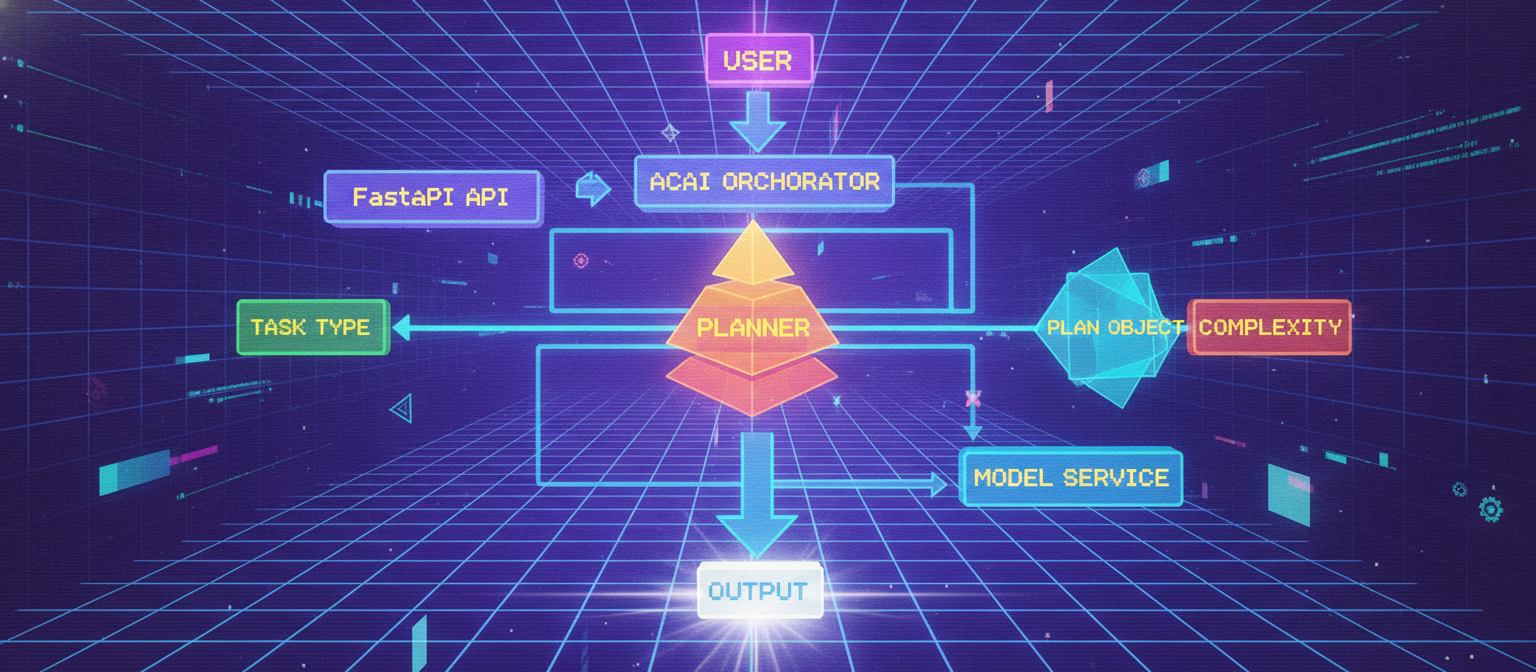
2.3 Updated Architecture
                    USER
                      │
                      ▼
                 FastAPI API
                      │
                      ▼
               ACAI Orchestrator
                      │
                      ▼
                  ┌────────┐
                  │ Planner│
                  └───┬────┘
                      │
             ┌────────┴────────┐
             ▼                 ▼
        Simple Task       Complex Task
             │                 │
             └────────┬────────┘
                      ▼
                Model Service
                      │
                      ▼
                  Response
2.4 New Project Structure
Add a planner service:
ACAI/
└── backend/
    ├── app/
    │   ├── __init__.py
    │   ├── main.py
    │   ├── config.py
    │   ├── schemas.py
    │   ├── orchestrator.py
    │   │
    │   └── services/
    │       ├── __init__.py
    │       ├── model_service.py
    │       └── planner.py
    │
    └── tests/
        ├── test_api.py
        └── test_planner.py
2.5 Planner Data Model
Create app/services/planner.py.
from dataclasses import dataclass


@dataclass
class Plan:
    task_type: str
    complexity: str
    steps: list[str]
This represents the result of planning.
For example:
task_type = research
complexity = complex
steps =
    1. Identify sources
    2. Extract evidence
    3. Compare findings
    4. Generate synthesis
2.6 Planner Implementation
Add the following to app/services/planner.py:
from dataclasses import dataclass


@dataclass
class Plan:
    task_type: str
    complexity: str
    steps: list[str]


class Planner:

    def create_plan(self, message: str) -> Plan:
        text = message.strip().lower()

        if not text:
            raise ValueError("Cannot create a plan for an empty message.")

        task_type = self._detect_task_type(text)
        complexity = self._estimate_complexity(text)
        steps = self._generate_steps(
            task_type=task_type,
            complexity=complexity,
        )

        return Plan(
            task_type=task_type,
            complexity=complexity,
            steps=steps,
        )

    def _detect_task_type(self, text: str) -> str:

        research_keywords = [
            "research",
            "paper",
            "study",
            "compare",
            "analyze",
            "analysis",
            "literature",
        ]

        coding_keywords = [
            "code",
            "program",
            "python",
            "javascript",
            "debug",
            "function",
            "api",
        ]

        writing_keywords = [
            "write",
            "article",
            "essay",
            "report",
            "email",
            "document",
        ]

        if any(word in text for word in research_keywords):
            return "research"

        if any(word in text for word in coding_keywords):
            return "coding"

        if any(word in text for word in writing_keywords):
            return "writing"

        return "general"

    def _estimate_complexity(self, text: str) -> str:

        word_count = len(text.split())

        complex_indicators = [
            "step by step",
            "compare",
            "analyze",
            "research",
            "design",
            "build",
            "implement",
            "explain in detail",
        ]

        indicator_count = sum(
            indicator in text
            for indicator in complex_indicators
        )

        if word_count > 40 or indicator_count >= 2:
            return "complex"

        if word_count > 15 or indicator_count == 1:
            return "moderate"

        return "simple"

    def _generate_steps(
        self,
        task_type: str,
        complexity: str,
    ) -> list[str]:

        if complexity == "simple":
            return [
                "Understand the request",
                "Generate the response",
            ]

        if task_type == "research":
            return [
                "Understand the research question",
                "Identify relevant information",
                "Analyze the evidence",
                "Compare important findings",
                "Generate a structured response",
            ]

        if task_type == "coding":
            return [
                "Understand the technical requirement",
                "Identify the implementation approach",
                "Design the solution",
                "Generate the implementation",
                "Check the result",
            ]

        if task_type == "writing":
            return [
                "Understand the requested format",
                "Identify the main points",
                "Create an appropriate structure",
                "Generate the content",
                "Review the final output",
            ]

        return [
            "Understand the request",
            "Break the problem into logical steps",
            "Generate the response",
            "Review the result",
        ]


planner = Planner()
2.7 Integrating the Planner
Now update app/orchestrator.py.
Replace the previous implementation with:
from app.services.model_service import model_service
from app.services.planner import planner


class ACAIOrchestrator:

    async def process(self, message: str) -> dict:
        cleaned_message = message.strip()

        if not cleaned_message:
            raise ValueError("Message cannot be empty.")

        plan = planner.create_plan(cleaned_message)

        response = await model_service.generate(
            cleaned_message
        )

        return {
            "response": response,
            "plan": {
                "task_type": plan.task_type,
                "complexity": plan.complexity,
                "steps": plan.steps,
            },
        }


orchestrator = ACAIOrchestrator()
2.8 Update the API Schema
Update app/schemas.py:
from pydantic import BaseModel, Field


class ChatRequest(BaseModel):
    message: str = Field(
        ...,
        min_length=1,
        max_length=10000,
        description="User message",
    )


class PlanResponse(BaseModel):
    task_type: str
    complexity: str
    steps: list[str]


class ChatResponse(BaseModel):
    success: bool
    response: str
    model: str
    mode: str
    plan: PlanResponse
2.9 Update main.py
Because the orchestrator now returns the plan, update the endpoint.
from fastapi import FastAPI, HTTPException

from app.config import settings
from app.orchestrator import orchestrator
from app.schemas import ChatRequest, ChatResponse


app = FastAPI(
    title=settings.app_name,
    version=settings.app_version,
    description="Adaptive Cognitive AI Architecture",
)


@app.get("/")
async def root():
    return {
        "name": settings.app_name,
        "version": settings.app_version,
        "status": "online",
    }


@app.get("/health")
async def health():
    return {
        "status": "healthy",
        "environment": settings.environment,
    }


@app.post("/api/chat", response_model=ChatResponse)
async def chat(request: ChatRequest):

    try:
        result = await orchestrator.process(
            request.message
        )

        return ChatResponse(
            success=True,
            response=result["response"],
            model=settings.model_name,
            mode=settings.model_provider,
            plan=result["plan"],
        )

    except ValueError as exc:
        raise HTTPException(
            status_code=400,
            detail=str(exc),
        )

    except Exception as exc:
        raise HTTPException(
            status_code=500,
            detail=f"ACAI processing error: {exc}",
        )
2.10 Test the Planner Directly
Create tests/test_planner.py:
from app.services.planner import planner


def test_simple_plan():

    plan = planner.create_plan(
        "What is Python?"
    )

    assert plan.complexity == "simple"
    assert plan.task_type == "general"
    assert len(plan.steps) >= 2


def test_research_plan():

    plan = planner.create_plan(
        "Compare three research papers and analyze their conclusions."
    )

    assert plan.task_type == "research"
    assert plan.complexity == "complex"
    assert len(plan.steps) >= 4


def test_coding_plan():

    plan = planner.create_plan(
        "Build a Python API and debug the function."
    )

    assert plan.task_type == "coding"
    assert len(plan.steps) >= 4


def test_writing_plan():

    plan = planner.create_plan(
        "Write an article about artificial intelligence."
    )

    assert plan.task_type == "writing"
2.11 Update API Tests
Update the chat test in tests/test_api.py:
def test_chat():

    response = client.post(
        "/api/chat",
        json={
            "message": "Compare two research papers."
        },
    )

    assert response.status_code == 200

    data = response.json()

    assert data["success"] is True
    assert "response" in data
    assert "plan" in data

    assert data["plan"]["task_type"] == "research"
    assert len(data["plan"]["steps"]) >= 4
2.12 Run the Tests
Run:
pytest
You should now have the original API tests plus the planner tests.
The exact number of tests may change depending on which tests from Chapter 1 you kept, but all implemented tests should pass.
2.13 Test Through Swagger
Start the server:
uvicorn app.main:app --reload
Open:
http://127.0.0.1:8000/docs
Send:
{
  "message": "Compare three research papers and analyze their conclusions."
}
The response should contain a plan similar to:
{
  "success": true,
  "response": "ACAI Demo Model Response ...",
  "model": "acai-demo-model",
  "mode": "mock",
  "plan": {
    "task_type": "research",
    "complexity": "complex",
    "steps": [
      "Understand the research question",
      "Identify relevant information",
      "Analyze the evidence",
      "Compare important findings",
      "Generate a structured response"
    ]
  }
}
2.14 What Has Actually Changed?
Before Chapter 2:
User
 ↓
Model
 ↓
Response
After Chapter 2:
User
 ↓
Planner
 ↓
Task Classification
 ↓
Complexity Estimation
 ↓
Plan
 ↓
Model
 ↓
Response
This is the first significant architectural improvement.
2.15 Important Limitation
The current planner uses deterministic keyword-based logic.
For example:
"research"
can trigger the research classification.
This is intentionally simple.
It is not being presented as an advanced AI planner.
Later, the planner can be upgraded to use:
Rule-Based Planner
       ↓
LLM-Assisted Planner
       ↓
Structured Planning
       ↓
Plan Validation
       ↓
Adaptive Planning
Each version can be benchmarked against the previous one.
2.16 Planner Evaluation
The planner should eventually be evaluated using a dataset such as:
Task
Expected Type
Expected Complexity
Expected Steps
Example:
| Input | Expected Type | Expected Complexity |
|---|
| What is Python? | General | Simple |
| Write a Python API | Coding | Moderate/Complex |
| Compare research papers | Research | Complex |
| Write a business article | Writing | Moderate |
| Explain a complex architecture | General | Complex |
The benchmark can then calculate classification accuracy.
2.17 Chapter 2 Architecture
The complete Chapter 2 flow is:
                       USER
                         │
                         ▼
                    FastAPI API
                         │
                         ▼
                 ACAI Orchestrator
                         │
                         ▼
                      Planner
                         │
             ┌───────────┴───────────┐
             ▼                       ▼
        Task Type              Complexity
             │                       │
             └───────────┬───────────┘
                         ▼
                    Plan Object
                         │
                         ▼
                   Model Service
                         │
                         ▼
                      Output
2.18 Chapter 2 Success Criteria
Chapter 2 is complete when:
[✓] Planner service exists
[✓] Task type detection works
[✓] Complexity estimation works
[✓] Plans contain multiple steps
[✓] Orchestrator uses Planner
[✓] API returns the generated plan
[✓] Planner tests pass
[✓] API tests pass
2.19 Next Architectural Upgrade
The next major problem is:
Where does the system obtain reliable external information?
That leads to Chapter 3:
Chapter 1
Core
   ↓
Chapter 2
Planner
   ↓
Chapter 3
Retrieval / RAG
   ↓
Documents
   ↓
Relevant Evidence
   ↓
Model
The next chapter will implement a real Retrieval-Augmented Generation foundation, including document ingestion, chunking, embeddings/vector search architecture, retrieval, and integration with the ACAI Orchestrator.
End of Chapter 2


Comments
Post a Comment