21.1 Objective
ACAI should not be limited to text.
A modern AI platform can receive and process:
TEXT
IMAGE
AUDIO
VIDEO
PDF
DOCUMENT
SCREENSHOT
CHART
TABLE
The overall architecture becomes:
MULTIMODAL INPUT
       ↓
INGESTION
       ↓
MEDIA PROCESSING
       ↓
UNDERSTANDING
       ↓
UNIFIED REPRESENTATION
       ↓
RETRIEVAL
       ↓
AGENT
       ↓
MODEL
       ↓
VERIFICATION
       ↓
MULTIMODAL OUTPUT
The objective of this chapter is to design the complete multimodal layer.
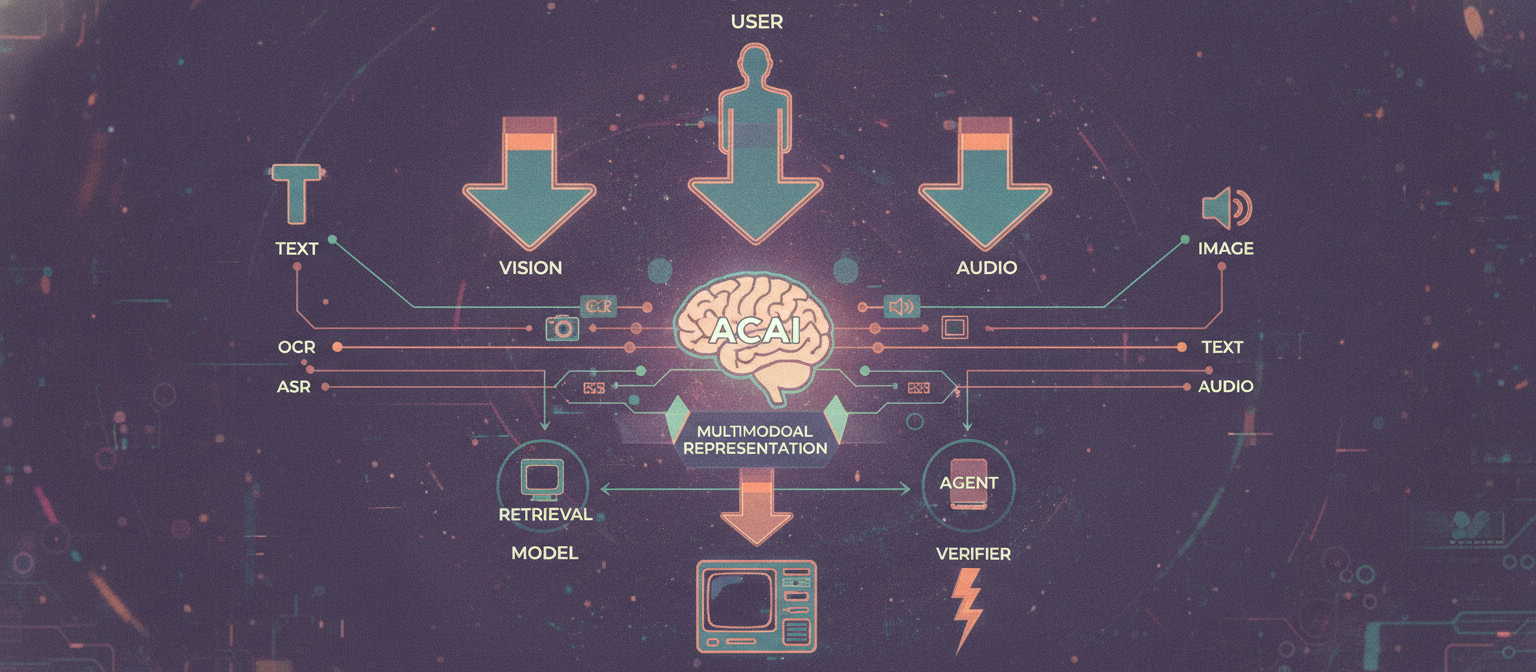
21.2 Multimodal Architecture
                         USER
                          │
        ┌─────────────────┼─────────────────┐
        ▼                 ▼                 ▼
       TEXT             IMAGE              AUDIO
        │                 │                 │
        │                 ▼                 ▼
        │                OCR               ASR
        │                 │                 │
        │                 └───────┬─────────┘
        │                         ▼
        │                    NORMALIZATION
        │                         │
        └─────────────────────────┤
                                  ▼
                            MULTIMODAL
                            REPRESENTATION
                                  │
                                  ▼
                             RETRIEVAL
                                  │
                                  ▼
                                AGENT
                                  │
                                  ▼
                                MODEL
                                  │
                                  ▼
                              VERIFIER
                                  │
                   ┌──────────────┼──────────────┐
                   ▼              ▼              ▼
                 TEXT           IMAGE          AUDIO
21.3 Input Types
ACAI can classify incoming content:
text/plain
image/*
audio/*
video/*
application/pdf
document/*
The first step is to determine what was received.
INPUT
 ↓
TYPE DETECTION
 ↓
ROUTER
21.4 Media Ingestion
Large media should not necessarily be processed directly inside an ordinary API request.
Instead:
UPLOAD
 ↓
OBJECT STORAGE
 ↓
JOB CREATED
 ↓
QUEUE
 ↓
MEDIA WORKER
This prevents large files from unnecessarily blocking API servers.
21.5 File Validation
Before processing:
File
 ↓
Size Check
 ↓
Format Check
 ↓
Security Check
 ↓
Metadata Check
 ↓
Processing
Possible limits:
Maximum file size
Maximum duration
Maximum resolution
Maximum page count
Maximum processing time
21.6 Image Processing
An image pipeline may be:
IMAGE
 ↓
VALIDATION
 ↓
DECODE
 ↓
RESIZE / NORMALIZE
 ↓
OCR
 ↓
VISION MODEL
 ↓
EMBEDDING
 ↓
INDEX
Different tasks can use different branches.
21.7 Image Understanding
A vision-capable model can potentially analyze:
Objects
Scenes
People
Text
Charts
Diagrams
Colors
Spatial relationships
Visual composition
The exact capabilities depend on the selected model.
21.8 OCR
OCR means Optical Character Recognition.
Architecture:
IMAGE
 ↓
OCR ENGINE
 ↓
TEXT
 ↓
STRUCTURE
 ↓
SEARCH INDEX
For example:
Photo of document
       ↓
"Invoice Number: 12345"
       ↓
Structured text
21.9 OCR Metadata
Do not store only extracted text.
Useful metadata can include:
{
  "text": "Example text",
  "page": 1,
  "bounding_box": {
    "x": 100,
    "y": 200,
    "width": 300,
    "height": 80
  }
}
Bounding boxes can help preserve the spatial location of text.
21.10 Document Vision
Some documents are not simply text.
Consider:
TABLE
IMAGE
HEADER
FOOTER
DIAGRAM
SIGNATURE AREA
A document-vision pipeline can preserve relationships between these elements.
DOCUMENT
 ↓
PAGE
 ↓
LAYOUT ANALYSIS
 ↓
TEXT + TABLES + IMAGES
 ↓
STRUCTURED REPRESENTATION
21.11 Tables
Tables should ideally be represented structurally.
Instead of:
Name Age City
John 25 Dhaka
Sara 31 Sylhet
the internal representation can be:
{
  "columns": ["Name", "Age", "City"],
  "rows": [
    ["John", 25, "Dhaka"],
    ["Sara", 31, "Sylhet"]
  ]
}
This makes later reasoning more reliable.
21.12 Charts
Charts require special handling.
The pipeline may be:
CHART IMAGE
 ↓
VISION ANALYSIS
 ↓
AXIS DETECTION
 ↓
LABEL EXTRACTION
 ↓
DATA INTERPRETATION
 ↓
STRUCTURED RESULT
For high-accuracy applications, extracted values should be validated rather than blindly trusted.
21.13 Audio Architecture
Audio processing can be:
AUDIO
 ↓
VALIDATION
 ↓
NORMALIZATION
 ↓
SPEECH DETECTION
 ↓
ASR
 ↓
TEXT
 ↓
LANGUAGE ANALYSIS
ASR means Automatic Speech Recognition.
21.14 Speech-to-Text
Example:
USER SPEAKS
 ↓
MICROPHONE
 ↓
AUDIO STREAM
 ↓
ASR
 ↓
TEXT
 ↓
AGENT
The agent can then process the transcribed request.
21.15 Audio Metadata
Track:
Duration
Sample rate
Channels
Language
Speaker information where supported
Timestamp
Processing status
21.16 Timestamped Transcription
Instead of only:
"Hello, welcome..."
a richer representation can contain:
{
  "start": 12.4,
  "end": 15.8,
  "text": "Hello, welcome..."
}
This allows ACAI to connect text with specific audio moments.
21.17 Speaker Diarization
Some audio contains multiple speakers.
Conceptually:
AUDIO
 ↓
SPEAKER DETECTION
 ↓
Speaker 1
Speaker 2
Speaker 1
Speaker 3
Combined with transcription:
Speaker 1: Hello.
Speaker 2: Welcome.
The accuracy depends on recording quality and the selected technology.
21.18 Text-to-Speech
ACAI can also produce spoken output:
TEXT
 ↓
TTS
 ↓
AUDIO
 ↓
USER
The system may support different:
Languages
Voices
Speaking rates
Styles
where supported by the chosen provider.
21.19 Voice Agent
The complete voice-agent loop:
USER SPEAKS
 ↓
ASR
 ↓
QUERY
 ↓
AGENT
 ↓
TOOLS / MODEL
 ↓
ANSWER
 ↓
TTS
 ↓
USER HEARS
This creates a conversational voice interface.
21.20 Streaming Voice
For low-latency interaction:
MICROPHONE
 ↓
AUDIO STREAM
 ↓
REAL-TIME PROCESSING
 ↓
PARTIAL TRANSCRIPT
 ↓
AGENT
 ↓
PARTIAL RESPONSE
 ↓
AUDIO STREAM
Streaming architecture is more complex than ordinary request/response processing.
21.21 Video Processing
Video combines multiple modalities:
VIDEO
 ├── Frames
 ├── Audio
 ├── Speech
 ├── Text
 └── Metadata
Therefore:
VIDEO
 ↓
DEMUX
 ├── VIDEO STREAM
 └── AUDIO STREAM
21.22 Video Frame Extraction
A video can be sampled:
VIDEO
 ↓
FRAME EXTRACTION
 ↓
Frame 1
Frame 2
Frame 3
...
Not every frame necessarily needs to be processed.
Sampling strategy can depend on:
Frame rate
Scene changes
Video duration
Task requirements
Compute budget
21.23 Scene Detection
Instead of processing every frame equally:
VIDEO
 ↓
SCENE DETECTION
 ↓
SCENE 1
SCENE 2
SCENE 3
Representative frames can then be selected from each scene.
21.24 Video Understanding
A video-understanding pipeline:
VIDEO
 ↓
FRAME ANALYSIS
 +
AUDIO ANALYSIS
 +
OCR
 +
TIMELINE
 ↓
MULTIMODAL REPRESENTATION
 ↓
MODEL
This allows questions such as:
"What happens in the video?"
"At what point does the scene change?"
"What does the displayed text say?"
The answer quality depends on the actual processing capabilities and evaluation of the selected models.
21.25 Video Timeline
Represent events with timestamps:
00:00 ───────────────────────── 05:00

Scene A
       ↓
       Scene B
               ↓
               Speech
                    ↓
                    Scene C
A structured timeline makes retrieval easier.
21.26 Video Retrieval
Instead of retrieving an entire 2-hour video:
QUERY
 ↓
SEARCH
 ↓
Relevant timestamps
 ↓
Relevant frames / transcript
 ↓
ANSWER
This reduces unnecessary processing.
21.27 Multimodal Embeddings
Different content types can potentially be represented in compatible vector spaces.
Conceptually:
TEXT
 ↓
VECTOR

IMAGE
 ↓
VECTOR

AUDIO
 ↓
VECTOR
If the chosen embedding technology supports cross-modal alignment, a text query can potentially retrieve related visual content.
21.28 Cross-Modal Search
Example:
USER:
"Find images related to this description."
Architecture:
TEXT QUERY
 ↓
TEXT EMBEDDING
 ↓
MULTIMODAL INDEX
 ↓
IMAGE RESULTS
Another example:
IMAGE
 ↓
IMAGE EMBEDDING
 ↓
SEARCH
 ↓
RELATED DOCUMENTS
21.29 Multimodal RAG
Traditional RAG:
TEXT QUERY
 ↓
TEXT RETRIEVAL
 ↓
TEXT CONTEXT
 ↓
MODEL
Multimodal RAG:
QUERY
 ↓
MULTIMODAL RETRIEVAL
 ↓
TEXT + IMAGE + TABLE + AUDIO
 ↓
MULTIMODAL MODEL
 ↓
ANSWER
21.30 Multimodal Context
A context package can contain:
{
  "text": ["Relevant text..."],
  "images": ["image_ref_1"],
  "tables": ["table_ref_1"],
  "audio_segments": ["audio_ref_1"],
  "video_segments": ["video_ref_1"]
}
The model then receives only the information relevant to the task.
21.31 Multimodal Agent
The agent can select tools based on input type:
INPUT
 ↓
AGENT
 ├── OCR
 ├── Vision
 ├── Audio
 ├── Video
 ├── Search
 ├── Calculator
 └── Database
Example:
Image of invoice
 ↓
OCR
 ↓
Extract fields
 ↓
Database lookup
 ↓
Verify
 ↓
Answer
21.32 Vision Agent
A vision agent can follow:
IMAGE
 ↓
UNDERSTAND
 ↓
PLAN
 ↓
TOOL
 ↓
OBSERVE
 ↓
VERIFY
 ↓
RESULT
For example, a screenshot may be analyzed to identify a UI element and explain its purpose.
21.33 Screen Understanding
Screenshots can contain:
Buttons
Menus
Text
Tables
Charts
Forms
Errors
The system can process:
SCREENSHOT
 ↓
OCR + VISION
 ↓
UI STRUCTURE
 ↓
AGENT
21.34 Document Agent
A document agent can combine:
OCR
Parsing
Retrieval
Calculation
Summarization
Question answering
Example:
PDF
 ↓
Parse
 ↓
Index
 ↓
Question
 ↓
Retrieve
 ↓
Reason
 ↓
Citation
21.35 Media Transformation
ACAI can also perform media transformations where supported:
Image
 ↓
Resize
Crop
Enhance
Convert
and:
Video
 ↓
Trim
Extract
Convert
Generate preview
These should be isolated from AI reasoning services when possible.
21.36 Media Job Queue
Large media tasks should use asynchronous jobs:
USER
 ↓
UPLOAD
 ↓
JOB
 ↓
QUEUE
 ↓
MEDIA WORKER
 ↓
PROCESSING
 ↓
STORAGE
 ↓
RESULT
21.37 Progress Tracking
The frontend can show:
Uploading       20%
Processing      50%
Analyzing       75%
Finalizing      95%
Complete        100%
The progress values should represent actual job state rather than arbitrary animation.
21.38 Large File Strategy
Large files create several problems:
Memory usage
Network time
Storage
Processing time
Timeouts
A robust architecture can use:
Direct-to-storage upload
Chunked upload
Asynchronous processing
Streaming where appropriate
Temporary files
Automatic cleanup
21.39 Direct Upload
Instead of:
USER
 ↓
API SERVER
 ↓
STORAGE
a scalable architecture can allow:
USER
 ↓
SIGNED UPLOAD
 ↓
OBJECT STORAGE
The application receives the resulting object reference.
21.40 Temporary Processing
Processing workers may need temporary local space:
OBJECT STORAGE
 ↓
WORKER TEMP STORAGE
 ↓
PROCESS
 ↓
OUTPUT STORAGE
 ↓
DELETE TEMPORARY DATA
Temporary data should have automatic cleanup.
21.41 Media Security
Uploaded media must be treated as untrusted input.
Controls can include:
File type validation
Size limits
Malware scanning where appropriate
Sandboxed processing
Resource limits
Access control
Retention policies
21.42 Prompt Injection Through Images
An image may contain text such as:
"Ignore previous instructions..."
OCR can extract it, but the agent must distinguish:
DATA
from:
INSTRUCTIONS
The fact that text appears inside an uploaded document does not automatically make it a trusted system instruction.
21.43 Prompt Injection Through Audio
The same principle applies to audio.
A user may upload a recording containing instructions directed at the AI.
The pipeline should treat transcription as untrusted content unless the application explicitly defines otherwise.
21.44 Prompt Injection Through Video
Video may contain:
On-screen text
Speech
Captions
Metadata
All of these can potentially contain adversarial instructions.
Therefore:
MEDIA
 ↓
EXTRACTED CONTENT
 ↓
UNTRUSTED DATA
 ↓
POLICY / AGENT CONTROLS
21.45 Cross-Modal Verification
Suppose OCR says:
"$100"
while the visual analysis suggests:
"$1,000"
ACAI should recognize a possible conflict.
OCR
 ↓
"$100"

VISION
 ↓
"$1,000"

       ↓
CONFLICT
       ↓
VERIFY
For important applications, ambiguous extraction should be surfaced rather than silently resolved.
21.46 Multimodal Quality Control
Evaluate:
OCR accuracy
ASR accuracy
Vision accuracy
Timestamp accuracy
Table extraction
Chart interpretation
Cross-modal consistency
Retrieval quality
Final answer quality
21.47 OCR Evaluation
Create a benchmark:
IMAGE
 ↓
OCR
 ↓
COMPARE WITH GROUND TRUTH
Measure character or word-level accuracy according to the use case.
21.48 Speech Evaluation
For speech recognition:
AUDIO
 ↓
ASR
 ↓
REFERENCE TRANSCRIPT
 ↓
COMPARE
A common metric is Word Error Rate (WER).
Lower WER generally indicates better transcription accuracy.
21.49 Video Evaluation
Video evaluation can measure:
Event detection
Scene detection
Timestamp accuracy
Object recognition
Speech alignment
Question answering
21.50 Multimodal Benchmark
Create a combined dataset:
Text Tasks
Image Tasks
Audio Tasks
Video Tasks
Document Tasks
Cross-Modal Tasks
Example:
Task 1 → Text
Task 2 → Image
Task 3 → Audio
Task 4 → PDF
Task 5 → Image + Text
Task 6 → Video + Question
21.51 Multimodal Evaluation Pipeline
DATASET
 ↓
INPUT
 ↓
ACAI
 ↓
OUTPUT
 ↓
AUTOMATED CHECK
 ↓
HUMAN REVIEW
 ↓
SCORE
 ↓
REGRESSION DATABASE
21.52 Cost Management
Multimodal processing can become expensive.
Control:
Resolution
Frame count
Audio duration
Model choice
Processing frequency
Storage retention
Embedding frequency
Do not process information at maximum quality when the task does not require it.
21.53 Adaptive Processing
Example:
Short image
 ↓
High-detail analysis
but:
2-hour video
 ↓
Scene detection
 ↓
Representative frames
 ↓
Targeted analysis
This reduces unnecessary computation.
21.54 Model Routing
Different models can handle different modalities:
Text Model
Vision Model
Speech Model
Embedding Model
Video Model
A routing layer decides which capability to use.
INPUT
 ↓
MODALITY ROUTER
 ├── TEXT
 ├── VISION
 ├── AUDIO
 └── VIDEO
21.55 Unified Agent Interface
Although the underlying models differ, the agent can expose a common interface:
analyze_text()
analyze_image()
analyze_audio()
analyze_video()
extract_document()
search_knowledge()
The internal implementation can change without changing the overall agent architecture.
21.56 Multimodal Memory
Memory can preserve references to media:
{
  "memory_id": "mem_001",
  "type": "image",
  "source": "asset_001",
  "description": "...",
  "created_at": "..."
}
For privacy and storage reasons, the system should distinguish between:
Reference to media
and:
Permanent copy of media
21.57 Media Provenance
Every derived result should be traceable:
ANSWER
 ↓
VIDEO SEGMENT
 ↓
VIDEO FILE
 ↓
ORIGINAL SOURCE
or:
ANSWER
 ↓
OCR TEXT
 ↓
IMAGE
 ↓
ORIGINAL UPLOAD
21.58 Multimodal Audit Trail
For an important operation:
USER UPLOAD
 ↓
OCR
 ↓
VISION MODEL
 ↓
AGENT
 ↓
TOOL
 ↓
VERIFICATION
 ↓
FINAL RESULT
Each important stage can produce an auditable event.
21.59 Complete Multimodal Architecture
                              USER
                                │
          ┌─────────────────────┼─────────────────────┐
          ▼                     ▼                     ▼
         TEXT                  IMAGE                 AUDIO
          │                     │                     │
          │                     ├── OCR               └── ASR
          │                     └── VISION                 │
          │                           │                    │
          └───────────────────────────┼────────────────────┘
                                      ▼
                                  NORMALIZE
                                      │
                         ┌────────────┼────────────┐
                         ▼            ▼            ▼
                      TEXT         VISUAL        AUDIO
                    REPRESENT.    REPRESENT.   REPRESENT.
                         │            │            │
                         └────────────┼────────────┘
                                      ▼
                              MULTIMODAL INDEX
                                      │
                                      ▼
                                    QUERY
                                      │
                                      ▼
                                RETRIEVAL
                                      │
                                      ▼
                                  RERANKING
                                      │
                                      ▼
                                    AGENT
                                      │
                     ┌────────────────┼────────────────┐
                     ▼                ▼                ▼
                  SEARCH            TOOLS            MODELS
                     │                │                │
                     └────────────────┼────────────────┘
                                      ▼
                                  VERIFICATION
                                      │
                    ┌─────────────────┼─────────────────┐
                    ▼                 ▼                 ▼
                   TEXT             IMAGE             AUDIO
                    │                 │                 │
                    └─────────────────┼─────────────────┘
                                      ▼
                                    USER
21.60 Complete Video Architecture
VIDEO UPLOAD
      │
      ▼
OBJECT STORAGE
      │
      ▼
MEDIA JOB
      │
      ▼
VIDEO WORKER
      │
      ├──────────────► AUDIO ──► ASR
      │
      ├──────────────► FRAMES ─► VISION
      │
      ├──────────────► TEXT ───► OCR
      │
      └──────────────► TIMELINE
                              │
                              ▼
                     MULTIMODAL INDEX
                              │
                              ▼
                           SEARCH
                              │
                              ▼
                            AGENT
                              │
                              ▼
                         VERIFICATION
                              │
                              ▼
                           ANSWER
21.61 Real-World Example
User uploads a lecture video and asks:
"Summarize the lecture and tell me where the important diagram appears."
ACAI can perform:
1. Store video
2. Extract audio
3. Transcribe speech
4. Detect scenes
5. Extract representative frames
6. Analyze diagrams
7. Create timestamps
8. Index transcript and visual information
9. Retrieve relevant sections
10. Generate summary
11. Identify diagram timestamp
12. Verify the result
13. Return summary + timestamp
The result can conceptually be:
Summary:
...

Important diagram:
Around 24:35
The timestamp should come from actual analysis, not be invented.
21.62 Real-World Document Example
User uploads a PDF containing:
Text
Tables
Charts
Images
ACAI:
PDF
 ↓
PAGE EXTRACTION
 ↓
LAYOUT ANALYSIS
 ├── TEXT
 ├── TABLE
 ├── CHART
 └── IMAGE
 ↓
INDEX
 ↓
QUESTION
 ↓
RETRIEVE
 ↓
MULTIMODAL REASONING
 ↓
CITED ANSWER
21.63 Chapter 21 Success Criteria
[✓] Multimodal input
[✓] Image processing
[✓] OCR
[✓] Document vision
[✓] Table extraction
[✓] Chart analysis
[✓] Audio processing
[✓] Speech recognition
[✓] Speaker separation
[✓] Text-to-speech
[✓] Voice agents
[✓] Streaming concepts
[✓] Video processing
[✓] Frame extraction
[✓] Scene detection
[✓] Video understanding
[✓] Timestamped retrieval
[✓] Multimodal embeddings
[✓] Cross-modal search
[✓] Multimodal RAG
[✓] Vision agents
[✓] Screen understanding
[✓] Media transformation
[✓] Large-file processing
[✓] Media security
[✓] Cross-modal verification
[✓] Multimodal evaluation
[✓] Media provenance
[✓] Multimodal memory
[✓] Cost control
[✓] Model routing
21.64 Final Result
After Chapter 21, ACAI is no longer a text-only architecture.
It becomes:
                         ACAI
                          │
        ┌─────────────────┼─────────────────┐
        ▼                 ▼                 ▼
       TEXT             VISION             AUDIO
        │                 │                 │
        └─────────────────┼─────────────────┘
                          ▼
                        VIDEO
                          │
                          ▼
                  MULTIMODAL KNOWLEDGE
                          │
                          ▼
                        AGENT
                          │
                          ▼
                       REASONING
                          │
                          ▼
                     VERIFICATION
                          │
                          ▼
                  MULTIMODAL OUTPUT
The complete principle is:
SEE
HEAR
READ
UNDERSTAND
RETRIEVE
REASON
VERIFY
RESPOND
ACAI can therefore be designed as a multimodal intelligence platform rather than simply a text-generation application.
21.65 Next Chapter
Chapter 22 — Training, Fine-Tuning, Model Adaptation, Synthetic Data, Evaluation Loops, and Building a Specialized ACAI Model
The next chapter will cover:
Base models
Pretraining
Fine-tuning
Instruction tuning
Parameter-efficient tuning
LoRA
Adapters
Synthetic datasets
Data filtering
Training pipelines
GPU infrastructure
Checkpoints
Model evaluation
Model merging
Distillation
Quantization
Inference optimization
Model registry
Versioning
Continuous improvement
Target flow:
DATA
 ↓
CLEANING
 ↓
FILTERING
 ↓
DATASET
 ↓
TRAINING
 ↓
CHECKPOINT
 ↓
EVALUATION
 ↓
IMPROVEMENT
 ↓
NEW VERSION
 ↓
REGISTRY
 ↓
DEPLOYMENT
 ↓
MONITORING
 ↓
FEEDBACK
 ↓
NEXT TRAINING CYCLE
End of Chapter 21


Comments
Post a Comment