22.1 Objective
The previous chapters established ACAI's:
Knowledge Layer
Multimodal Layer
Retrieval Layer
Agent Layer
The next step is to make the system specialized.
A practical AI platform does not always need to train a giant model from zero. In many cases, a stronger approach is:
BASE MODEL
    ↓
SPECIALIZED DATA
    ↓
FINE-TUNING / ADAPTATION
    ↓
EVALUATION
    ↓
OPTIMIZATION
    ↓
DEPLOYMENT
The goal of this chapter is to explain the complete model-development lifecycle.
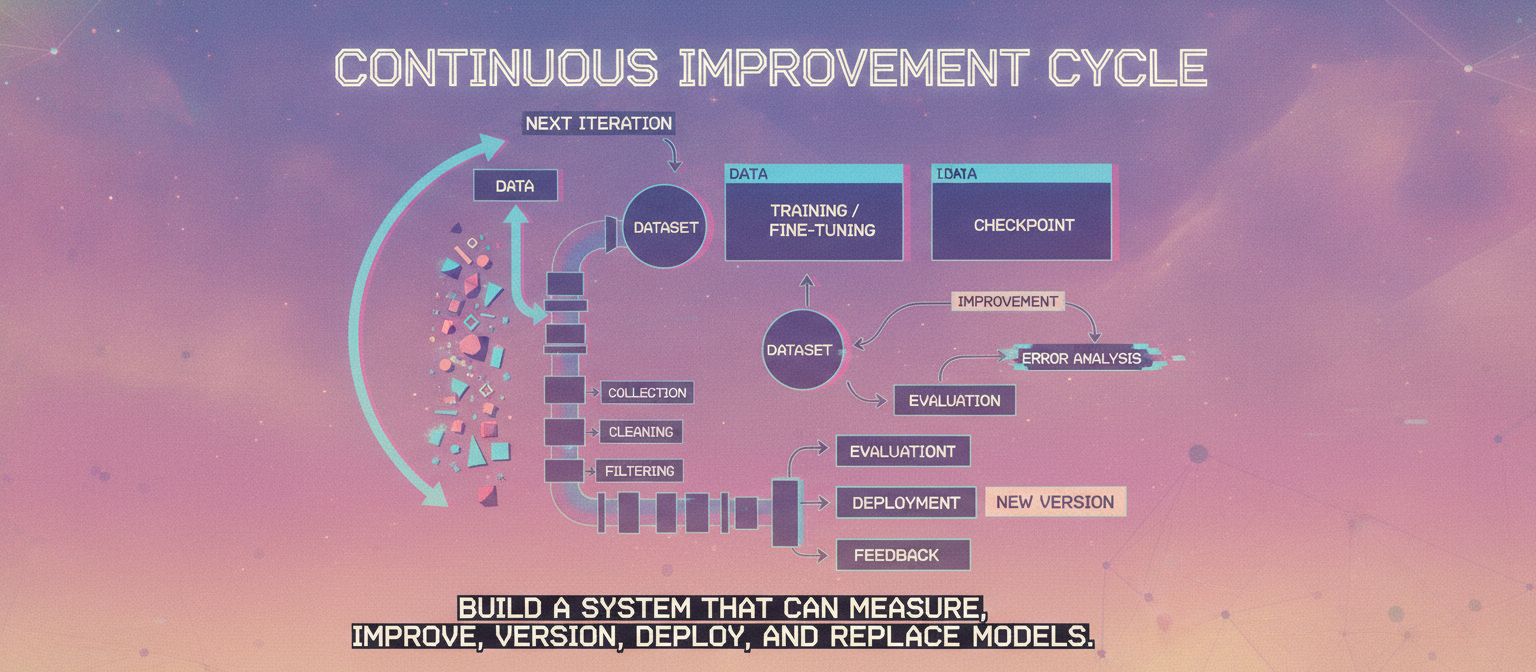
22.2 Model Development Lifecycle
DATA
 ↓
COLLECTION
 ↓
CLEANING
 ↓
FILTERING
 ↓
DATASET
 ↓
TRAINING / FINE-TUNING
 ↓
CHECKPOINT
 ↓
EVALUATION
 ↓
ERROR ANALYSIS
 ↓
IMPROVEMENT
 ↓
NEW VERSION
 ↓
DEPLOYMENT
 ↓
MONITORING
 ↓
FEEDBACK
 ↓
NEXT ITERATION
This loop is more important than simply increasing model size.
22.3 Base Model
A base model provides the initial capabilities.
Conceptually:
BASE MODEL
   +
SPECIALIZED DATA
   ↓
ACAI MODEL
The base model may already understand:
Language
Reasoning patterns
Code
General knowledge
Instruction following
The exact capabilities depend on the selected model.
22.4 Why Not Train From Zero?
Training a large model from scratch can require enormous:
Dataset
Compute
GPU capacity
Storage
Engineering
Evaluation
Time
Budget
Therefore, for a small or independent project, starting from an existing capable model and adapting it is often more practical.
22.5 Training vs Fine-Tuning
These concepts should be separated.
Pretraining
MASSIVE DATA
 ↓
MODEL
 ↓
GENERAL REPRESENTATION
Fine-Tuning
EXISTING MODEL
 ↓
SPECIALIZED DATA
 ↓
SPECIALIZED MODEL
Fine-tuning is therefore an adaptation process rather than complete model creation from nothing.
22.6 Instruction Tuning
Instruction tuning teaches a model to respond to task instructions.
Example dataset:
{
  "instruction": "Explain photosynthesis simply.",
  "input": "",
  "output": "Photosynthesis is..."
}
Another example:
{
  "instruction": "Summarize this text.",
  "input": "Long text...",
  "output": "Short summary..."
}
The model learns patterns connecting instructions to useful responses.
22.7 ACAI Dataset Structure
A training dataset can conceptually contain:
instruction
input
output
metadata
Example:
{
  "instruction": "Analyze this problem.",
  "input": "Problem statement...",
  "output": "Step-by-step solution..."
}
The exact format should match the training framework and model.
22.8 Data Quality
The most important rule is:
BAD DATA
 ↓
BAD TRAINING
 ↓
BAD MODEL
More data does not automatically mean better data.
A smaller high-quality dataset can be more useful than a much larger noisy dataset for specialization.
22.9 Data Collection
Potential sources:
Human-written examples
Licensed datasets
Public datasets
Synthetic examples
Application logs where permitted
Domain documentation
Expert demonstrations
Data must be collected and used according to applicable licenses, permissions, privacy requirements, and terms.
22.10 Data Cleaning
Cleaning may remove:
Duplicates
Corrupted records
Empty examples
Malformed JSON
Spam
Irrelevant content
Low-quality answers
Conflicting labels
Pipeline:
RAW DATA
 ↓
VALIDATION
 ↓
CLEANING
 ↓
FILTERING
 ↓
DATASET
22.11 Duplicate Removal
Duplicate examples can cause training imbalance.
Conceptually:
EXAMPLE A
EXAMPLE B
EXAMPLE A
EXAMPLE C
becomes:
EXAMPLE A
EXAMPLE B
EXAMPLE C
Near-duplicate detection can also be useful for larger datasets.
22.12 Quality Filtering
Each example can receive a quality score.
Example
 ↓
Quality Evaluation
 ↓
Score
 ├── High → Keep
 ├── Medium → Review
 └── Low → Remove
Automated filtering should ideally be combined with human review for important datasets.
22.13 Human Review
A high-quality training pipeline can include:
AUTOMATED FILTER
       ↓
HUMAN REVIEW
       ↓
APPROVED DATA
Human reviewers can identify:
Incorrect answers
Bad reasoning
Ambiguous instructions
Unsafe content
Poor formatting
Unwanted biases
22.14 Data Splits
Do not train and evaluate on exactly the same examples.
A dataset can be divided into:
TRAIN
VALIDATION
TEST
Conceptually:
DATASET
 ├── TRAIN
 ├── VALIDATION
 └── TEST
The test set should remain protected from repeated tuning whenever possible.
22.15 Data Leakage
Data leakage occurs when evaluation information unintentionally enters training or tuning.
Example:
TEST DATA
 ↓
TRAINING DATA
This can produce misleadingly high evaluation results.
The goal is:
TRAIN ≠ TEST
22.16 Synthetic Data
AI-generated examples can supplement human-created data.
SEED EXAMPLES
 ↓
TEACHER MODEL
 ↓
SYNTHETIC DATA
 ↓
FILTER
 ↓
HUMAN REVIEW
 ↓
TRAINING DATA
Synthetic data can increase coverage of specific tasks, but generated examples can also reproduce errors.
22.17 Synthetic Data Risks
Potential problems:
Model hallucinations
Repeated patterns
Low diversity
Incorrect reasoning
Bias amplification
Teacher-model limitations
Therefore:
GENERATE
 ↓
VERIFY
 ↓
FILTER
 ↓
USE
not:
GENERATE
 ↓
TRAIN EVERYTHING
22.18 Teacher-Student Architecture
A stronger model can act as a teacher.
TEACHER MODEL
      ↓
GENERATES EXAMPLES
      ↓
STUDENT MODEL
      ↓
LEARNING
This connects to knowledge distillation and synthetic-data generation.
22.19 LoRA
LoRA means Low-Rank Adaptation.
Instead of updating every parameter of a large model, training can introduce smaller trainable components.
Conceptually:
BASE MODEL
   │
   ├── Mostly Frozen
   │
   └── LoRA Parameters
           ↓
        TRAINING
This can substantially reduce trainable parameter count compared with full fine-tuning.
22.20 Why LoRA Is Useful
Advantages can include:
Lower memory requirements
Smaller training artifacts
Faster experimentation
Easy adapter swapping
Preservation of the base model
It is particularly useful when experimenting with multiple specialized behaviors.
22.21 Adapter Architecture
Conceptually:
BASE MODEL
   +
ADAPTER A → Coding
ADAPTER B → Research
ADAPTER C → Customer Support
The application can select the appropriate adapter depending on the task, if the model stack supports this architecture.
22.22 Full Fine-Tuning
Full fine-tuning updates a much larger portion of the model parameters.
Conceptually:
BASE MODEL
 ↓
TRAIN
 ↓
NEW MODEL
This can require considerably more compute and memory than parameter-efficient approaches.
22.23 Choosing an Adaptation Method
A practical decision tree:
Need specialization?
      │
      ├── NO → Use base model
      │
      └── YES
            │
            ├── Small/medium adaptation → PEFT / LoRA
            │
            └── Stronger full adaptation needed
                    ↓
                Full fine-tuning
The correct choice should be validated experimentally.
22.24 Training Infrastructure
A training environment typically needs:
GPU
CPU
RAM
Fast storage
Training framework
Dataset loader
Checkpoint storage
Monitoring
For large models, distributed training may also be required.
22.25 GPU Memory
Training memory can be consumed by:
Model parameters
Gradients
Optimizer states
Activations
Batch data
Temporary buffers
Therefore model size alone does not determine the total GPU requirement.
22.26 Batch Size
Training processes examples in batches.
DATA
 ↓
Batch 1
Batch 2
Batch 3
...
Larger batches can improve throughput but require more memory.
When GPU memory is limited, gradient accumulation can simulate a larger effective batch size.
22.27 Learning Rate
The learning rate controls how strongly parameters are updated.
Conceptually:
Too High
 ↓
Unstable Training

Too Low
 ↓
Very Slow Learning
The correct value depends on:
Model
Dataset
Optimizer
Batch size
Fine-tuning method
22.28 Training Loop
Conceptually:
BATCH
 ↓
FORWARD PASS
 ↓
LOSS
 ↓
BACKPROPAGATION
 ↓
OPTIMIZER UPDATE
 ↓
NEXT BATCH
Repeated over many steps:
STEP 1
STEP 2
STEP 3
...
STEP N
22.29 Loss
Loss is a training signal indicating how far the model's prediction is from the training target according to the chosen objective.
Conceptually:
PREDICTION
     +
TARGET
     ↓
LOSS
Training attempts to reduce the relevant loss.
22.30 Checkpoints
Training should periodically save checkpoints.
TRAINING
 ↓
CHECKPOINT 1000
 ↓
CHECKPOINT 2000
 ↓
CHECKPOINT 3000
If training fails, a previous checkpoint may allow recovery.
22.31 Checkpoint Selection
The latest checkpoint is not automatically the best.
Instead:
CHECKPOINTS
 ↓
VALIDATION
 ↓
COMPARE
 ↓
BEST VERSION
This helps reduce overfitting.
22.32 Overfitting
A model can become too specialized to its training examples.
TRAIN PERFORMANCE
       ↑
       │
       │       Excellent
       │
       │
VALIDATION
       │      ↓
       │    Degrading
       └──────────────────→
              Training
A model should generalize beyond memorized training examples.
22.33 Underfitting
If the model fails to learn the target behavior:
TRAIN PERFORMANCE
 ↓
LOW
Possible causes include:
Insufficient training
Poor dataset
Wrong training configuration
Insufficient model capacity
22.34 Evaluation
Evaluate the model on tasks it was not trained directly on.
Example:
TASK
 ↓
MODEL
 ↓
ANSWER
 ↓
EVALUATOR
 ↓
SCORE
Evaluation should include both automated metrics and human assessment where appropriate.
22.35 Capability Evaluation
Measure:
Instruction following
Reasoning
Coding
Knowledge use
Summarization
Classification
Extraction
Domain-specific tasks
The benchmark should reflect the actual purpose of ACAI.
22.36 Regression Testing
Whenever a new model version is created:
MODEL V1
 ↓
BENCHMARK

MODEL V2
 ↓
SAME BENCHMARK
Compare:
V2 better?
V2 worse?
New failure?
Old failure fixed?
22.37 Model Evaluation Matrix
A useful internal table:
Task                  V1       V2       V3
------------------------------------------------
Instruction following  82%      87%      89%
Coding                 71%      75%      78%
Summarization          85%      86%      88%
Domain QA              69%      81%      84%
Safety                 ...      ...      ...
The exact metrics should be defined for each task.
22.38 Human Evaluation
Human evaluators can score:
Correctness
Relevance
Clarity
Completeness
Instruction following
Factual support
For subjective tasks, human evaluation can complement automated metrics.
22.39 Pairwise Evaluation
Instead of scoring independently:
QUESTION
 ↓
MODEL A
 ↓
ANSWER A

MODEL B
 ↓
ANSWER B
A reviewer chooses:
A better
B better
Tie
This can make model-version comparison easier for some tasks.
22.40 Error Analysis
Scores alone are not enough.
Create:
QUESTION
 ↓
BAD ANSWER
 ↓
ERROR CATEGORY
 ↓
ROOT CAUSE
 ↓
FIX
Possible categories:
Retrieval failure
Reasoning failure
Instruction failure
Knowledge failure
Formatting failure
Tool failure
Hallucination
22.41 Error-Driven Training
Suppose ACAI repeatedly fails at:
TABLE REASONING
Collect representative failures:
FAILURES
 ↓
CURATED EXAMPLES
 ↓
TRAINING / ADAPTATION
 ↓
NEW MODEL
 ↓
EVALUATION
This creates a continuous improvement cycle.
22.42 Model Registry
Every production model should have a version.
acai-model
 ├── v1.0
 ├── v1.1
 ├── v1.2
 └── v2.0
Metadata can include:
Model name
Base model
Training dataset version
Training configuration
Evaluation results
Created date
Status
22.43 Dataset Versioning
Models depend on datasets.
Therefore:
Dataset v1
Dataset v2
Dataset v3
should be tracked.
Then:
Model v2
 ← Dataset v3
 ← Training Config 14
can be reproduced or investigated later.
22.44 Experiment Tracking
Each experiment should record:
Experiment ID
Model
Dataset
Hyperparameters
Hardware
Training duration
Validation score
Test score
Checkpoint
Notes
This prevents successful experiments from becoming impossible to reproduce.
22.45 Reproducibility
A robust training pipeline should preserve:
Code version
Dataset version
Configuration
Model version
Environment
Random seeds where relevant
Dependencies
Then another run can be compared meaningfully.
22.46 Quantization
Quantization reduces numerical precision.
Conceptually:
FP32
 ↓
FP16 / BF16
 ↓
INT8
 ↓
Lower precision variants
The available formats and quality tradeoffs depend on the model and inference stack.
22.47 Why Quantize?
Potential benefits:
Lower memory
Faster inference
Lower hardware requirements
Lower deployment cost
Potential downside:
Quality may decrease
Therefore quantized models must be evaluated.
22.48 Distillation
Knowledge distillation trains a smaller student model to reproduce useful behavior from a larger teacher.
LARGE TEACHER
      ↓
TARGET SIGNAL
      ↓
SMALL STUDENT
The goal is often:
Smaller model
+
Lower latency
+
Lower cost
while preserving as much useful capability as possible.
22.49 Model Routing
ACAI does not necessarily need one model for everything.
Example:
Simple Question → Small Model
Complex Reasoning → Large Model
Code → Specialized Model
Vision → Vision Model
Speech → Speech Model
Architecture:
USER
 ↓
MODEL ROUTER
 ├── SMALL
 ├── LARGE
 ├── CODE
 ├── VISION
 └── AUDIO
22.50 Model Cascading
A model cascade can use progressively stronger models:
QUESTION
 ↓
MODEL A
 ↓
CONFIDENCE?
 ├── HIGH → RETURN
 └── LOW
       ↓
     MODEL B
       ↓
     VERIFY
This can reduce average inference cost if the simpler model handles many requests successfully.
22.51 Specialized ACAI Model
A practical specialized model architecture:
                    ACAI
                     │
              MODEL ROUTER
                     │
       ┌─────────────┼─────────────┐
       ▼             ▼             ▼
   GENERAL        SPECIALIZED    MULTIMODAL
    MODEL           MODEL          MODEL
       │             │             │
       └─────────────┼─────────────┘
                     ▼
                  VERIFIER
                     │
                     ▼
                   USER
22.52 Model + RAG
Fine-tuning and RAG solve different problems.
FINE-TUNING
 ↓
Behavior / style / task specialization
while:
RAG
 ↓
External / changing knowledge
A strong system may use both:
SPECIALIZED MODEL
       +
RAG
       ↓
ACAI
22.53 Model + Tools
The model should not be expected to perform every operation internally.
MODEL
 ├── Search
 ├── Database
 ├── Calculator
 ├── Code Execution
 ├── Media Processing
 └── External APIs
This creates a hybrid intelligence architecture.
22.54 Training Pipeline Architecture
                    DATA SOURCES
                         │
                         ▼
                    DATA INGESTION
                         │
                         ▼
                      CLEANING
                         │
                         ▼
                     FILTERING
                         │
                         ▼
                    DATASET STORE
                         │
                         ▼
                  DATASET VERSIONING
                         │
                         ▼
                    TRAINING JOB
                         │
                         ▼
                     CHECKPOINT
                         │
                         ▼
                    VALIDATION
                         │
                         ▼
                    TESTING
                         │
                         ▼
                  ERROR ANALYSIS
                         │
                         ▼
                   MODEL REGISTRY
                         │
                         ▼
                     DEPLOYMENT
                         │
                         ▼
                    MONITORING
                         │
                         ▼
                    USER FEEDBACK
                         │
                         └──────────────┐
                                        ▼
                                   NEXT CYCLE
22.55 Complete Model Factory
                         ACAI MODEL FACTORY

DATA
 │
 ├── Human Examples
 ├── Licensed Data
 ├── Synthetic Data
 └── Domain Data
 │
 ▼
QUALITY CONTROL
 │
 ▼
DATASET VERSION
 │
 ▼
TRAINING
 │
 ├── LoRA
 ├── PEFT
 └── Full Fine-Tuning
 │
 ▼
CHECKPOINTS
 │
 ▼
EVALUATION
 │
 ├── Automated
 ├── Human
 └── Regression
 │
 ▼
MODEL REGISTRY
 │
 ▼
QUANTIZATION / OPTIMIZATION
 │
 ▼
DEPLOYMENT
 │
 ▼
PRODUCTION
 │
 ▼
MONITORING
 │
 ▼
FAILURE COLLECTION
 │
 ▼
NEW DATA
 │
 └──────────────────────► TRAINING
22.56 Production Deployment
After validation:
MODEL
 ↓
PACKAGE
 ↓
REGISTRY
 ↓
DEPLOYMENT
 ↓
INFERENCE SERVER
The deployment environment must expose a stable API to ACAI's application layer.
22.57 Model API
Conceptually:
POST /v1/generate
Request:
{
  "model": "acai-model-v1",
  "input": "Hello"
}
Response:
{
  "output": "Hello! How can I help?"
}
The actual API schema can be designed according to the chosen serving infrastructure.
22.58 Streaming Inference
For long responses:
REQUEST
 ↓
MODEL
 ↓
TOKEN 1
TOKEN 2
TOKEN 3
...
The client can receive partial output rather than waiting for the entire response.
22.59 Inference Monitoring
Monitor:
Latency
Tokens
Errors
GPU utilization
Memory
Throughput
Timeouts
Model version
User feedback
22.60 Model Rollout
Do not necessarily send every user to a new model immediately.
A safer strategy:
MODEL V1
   │
   ├── 95% traffic
   │
MODEL V2
   │
   └── 5% traffic
Then compare production metrics.
22.61 Canary Deployment
If V2 performs well:
5%
 ↓
25%
 ↓
50%
 ↓
100%
If serious problems appear:
V2
 ↓
ROLLBACK
 ↓
V1
22.62 A/B Testing
Two models can be tested under controlled conditions:
USER GROUP A → MODEL A
USER GROUP B → MODEL B
Compare:
Quality
Latency
Cost
User satisfaction
Failure rate
The experiment should be designed carefully to avoid misleading conclusions.
22.63 Continuous Improvement
Production creates new information:
USER REQUEST
 ↓
MODEL RESPONSE
 ↓
FEEDBACK
 ↓
FAILURE?
 ├── NO → KEEP
 └── YES
       ↓
     ANALYSIS
       ↓
     DATASET
       ↓
     RETRAIN
This is the core learning loop.
22.64 Feedback Quality
Not every user interaction should automatically become training data.
Instead:
RAW FEEDBACK
 ↓
VALIDATE
 ↓
CLASSIFY
 ↓
FILTER
 ↓
APPROVE
 ↓
TRAINING DATA
This prevents noisy or malicious feedback from corrupting the model.
22.65 Final ACAI Training Architecture
                           ACAI
                            │
                     ┌──────┴──────┐
                     ▼             ▼
                  MODELS        KNOWLEDGE
                     │             │
              ┌──────┼──────┐      │
              ▼      ▼      ▼      ▼
           GENERAL  CODE  VISION   RAG
              │      │      │      │
              └──────┼──────┼──────┘
                     ▼
                  ROUTER
                     │
                     ▼
                   AGENT
                     │
          ┌──────────┼──────────┐
          ▼          ▼          ▼
        TOOLS      MEMORY     RETRIEVAL
          │          │          │
          └──────────┼──────────┘
                     ▼
                  VERIFIER
                     │
                     ▼
                   OUTPUT
22.66 The Complete Training-to-Production Loop
                ┌──────────────────────┐
                │       DATA           │
                └──────────┬───────────┘
                           ▼
                     CLEAN / FILTER
                           │
                           ▼
                      DATASET V1
                           │
                           ▼
                      TRAIN / ADAPT
                           │
                           ▼
                       MODEL V1
                           │
                           ▼
                       EVALUATE
                           │
                ┌──────────┴──────────┐
                │                     │
              FAIL                  PASS
                │                     │
                ▼                     ▼
          ERROR ANALYSIS          DEPLOY
                │                     │
                ▼                     ▼
          NEW TRAINING DATA      MONITOR
                │                     │
                └──────────┐          │
                           ▼          ▼
                         IMPROVE ◄ FEEDBACK
                           │
                           ▼
                       MODEL V2
                           │
                           ▼
                         REPEAT
22.67 Chapter 22 Success Criteria
[✓] Base model
[✓] Fine-tuning
[✓] Instruction tuning
[✓] Dataset design
[✓] Data collection
[✓] Data cleaning
[✓] Data filtering
[✓] Human review
[✓] Train/validation/test split
[✓] Data leakage prevention
[✓] Synthetic data
[✓] Teacher-student approach
[✓] LoRA
[✓] PEFT
[✓] Full fine-tuning
[✓] Training infrastructure
[✓] Batch processing
[✓] Learning rate concepts
[✓] Training loop
[✓] Checkpoints
[✓] Overfitting
[✓] Underfitting
[✓] Evaluation
[✓] Regression testing
[✓] Human evaluation
[✓] Error analysis
[✓] Dataset versioning
[✓] Model versioning
[✓] Experiment tracking
[✓] Quantization
[✓] Distillation
[✓] Model routing
[✓] Model cascading
[✓] RAG integration
[✓] Tool integration
[✓] Model deployment
[✓] Streaming
[✓] Monitoring
[✓] Canary rollout
[✓] A/B testing
[✓] Continuous improvement
22.68 Final Result
After Chapter 22, ACAI has a complete model-development lifecycle:
DATA
 ↓
QUALITY CONTROL
 ↓
TRAINING
 ↓
ADAPTATION
 ↓
EVALUATION
 ↓
OPTIMIZATION
 ↓
REGISTRY
 ↓
DEPLOYMENT
 ↓
MONITORING
 ↓
FEEDBACK
 ↓
CONTINUOUS IMPROVEMENT
The key principle is:
DO NOT JUST TRAIN A MODEL.

BUILD A SYSTEM
THAT CAN
MEASURE,
IMPROVE,
VERSION,
DEPLOY,
AND REPLACE
MODELS.
This turns ACAI into a platform capable of continuously developing specialized AI capabilities rather than depending on a single static model.
22.69 Next Chapter
Chapter 23 — Production Infrastructure: Backend, APIs, Databases, Queues, Caching, Storage, Authentication, Scaling, Monitoring, and Deployment
The next layer will connect everything into a real production system:
FRONTEND
 ↓
API GATEWAY
 ↓
AUTHENTICATION
 ↓
BACKEND SERVICES
 ↓
AGENT ORCHESTRATOR
 ↓
MODEL SERVICES
 ↓
DATABASE
 ↓
VECTOR DATABASE
 ↓
OBJECT STORAGE
 ↓
QUEUE / WORKERS
 ↓
CACHE
 ↓
MONITORING
It will cover:
Project architecture
Backend services
REST APIs
WebSockets
Authentication
Authorization
Database design
Redis/cache
Queues
Workers
Object storage
Vector databases
Secrets
Environment variables
Rate limiting
API security
Logging
Metrics
Tracing
Docker
CI/CD
Cloud deployment
Scaling
Load balancing
Backups
Disaster recovery
Production checklist
End of Chapter 22


Comments
Post a Comment