3.1 Objective
Chapter 2 introduced the Planner.
The system can now determine the type and complexity of a request:
User
 ↓
API
 ↓
Orchestrator
 ↓
Planner
 ↓
Plan
 ↓
Model
 ↓
Response
The next problem is that the model may not have the information required to answer a specific question.
Chapter 3 introduces a Retrieval-Augmented Generation (RAG) layer.
The new architecture becomes:
User
 ↓
API
 ↓
Orchestrator
 ↓
Planner
 ↓
Retrieval
 ↓
Relevant Context
 ↓
Model
 ↓
Response
The goal is to allow ACAI to work with external documents instead of relying exclusively on the model's built-in knowledge.
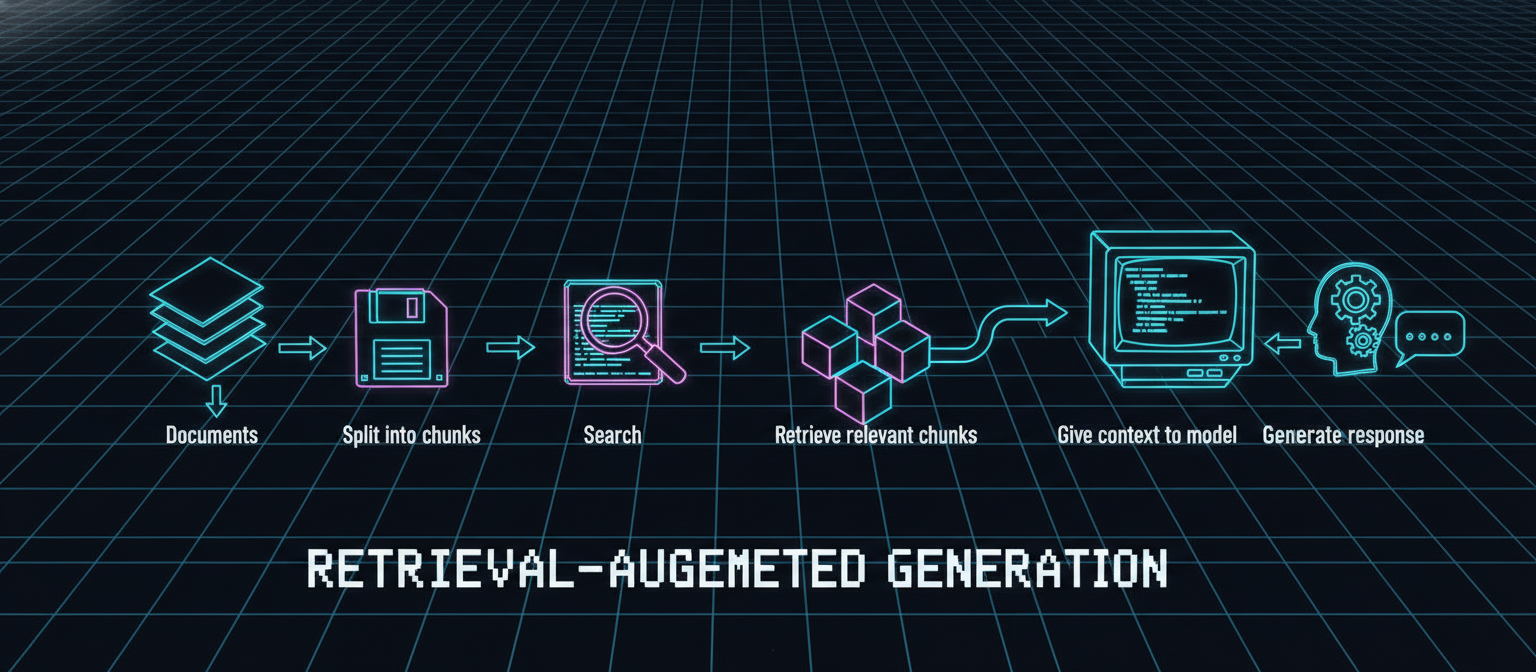
3.2 What Is RAG?
RAG stands for:
Retrieval-Augmented Generation.
The basic idea is:
Documents
   ↓
Split into chunks
   ↓
Index
   ↓
Search
   ↓
Retrieve relevant chunks
   ↓
Give context to model
   ↓
Generate response
For example, suppose the user uploads a document containing:
ACAI Architecture Specification
The system can search that document when the user asks:
"What does the architecture say about model routing?"
Instead of asking the model to answer from memory alone, ACAI first retrieves relevant information.
3.3 Why Retrieval Is Important
Without retrieval:
Question
   ↓
Model
   ↓
Possible answer
With retrieval:
Question
   ↓
Search knowledge
   ↓
Relevant evidence
   ↓
Model
   ↓
Evidence-based answer
This can be particularly useful for:
Private documents
Project documentation
Research papers
Internal knowledge bases
Product documentation
User-uploaded files
3.4 Chapter 3 Architecture
                         USER
                           │
                           ▼
                      FastAPI API
                           │
                           ▼
                   ACAI Orchestrator
                           │
                           ▼
                        Planner
                           │
                           ▼
                      Retrieval
                           │
                 ┌─────────┴─────────┐
                 ▼                   ▼
            User Query          Knowledge Base
                                      │
                                      ▼
                               Relevant Chunks
                                      │
                 └─────────┬─────────┘
                           ▼
                     Model Service
                           │
                           ▼
                        Response
3.5 Practical Chapter 3 Strategy
For the first implementation, we will deliberately avoid introducing a large external vector database.
Instead, we will create a simple local retrieval engine.
This gives us:
✓ Document storage
✓ Text chunking
✓ Keyword retrieval
✓ Context construction
✓ Orchestrator integration
✓ Tests
Later, this can be replaced by an embedding/vector database implementation.
This approach keeps the architecture understandable and runnable.
3.6 Updated Project Structure
Add the following files:
ACAI/
└── backend/
    ├── app/
    │   ├── __init__.py
    │   ├── main.py
    │   ├── config.py
    │   ├── schemas.py
    │   ├── orchestrator.py
    │   │
    │   └── services/
    │       ├── __init__.py
    │       ├── model_service.py
    │       ├── planner.py
    │       └── retrieval.py
    │
    ├── data/
    │   └── documents/
    │
    └── tests/
        ├── test_api.py
        ├── test_planner.py
        └── test_retrieval.py
3.7 Retrieval Data Model
Create app/services/retrieval.py.
from dataclasses import dataclass


@dataclass
class DocumentChunk:
    document_id: str
    chunk_id: str
    text: str
A document can contain multiple chunks:
Document
   │
   ├── Chunk 1
   ├── Chunk 2
   ├── Chunk 3
   └── Chunk 4
3.8 Document Chunking
Add:
class DocumentStore:

    def __init__(self) -> None:
        self.chunks: list[DocumentChunk] = []

    def add_document(
        self,
        document_id: str,
        text: str,
        chunk_size: int = 500,
    ) -> None:

        words = text.split()

        for index in range(0, len(words), chunk_size):
            chunk_words = words[index:index + chunk_size]

            if not chunk_words:
                continue

            chunk = DocumentChunk(
                document_id=document_id,
                chunk_id=f"{document_id}-{index}",
                text=" ".join(chunk_words),
            )

            self.chunks.append(chunk)

    def clear(self) -> None:
        self.chunks.clear()
This is a simple word-based chunker.
It is intentionally not pretending to be a sophisticated semantic chunking algorithm.
3.9 Keyword Retrieval
Add:
class RetrievalService:

    def __init__(self) -> None:
        self.store = DocumentStore()

    def add_document(
        self,
        document_id: str,
        text: str,
    ) -> None:

        self.store.add_document(
            document_id=document_id,
            text=text,
        )

    def search(
        self,
        query: str,
        top_k: int = 3,
    ) -> list[DocumentChunk]:

        query_words = self._tokenize(query)

        if not query_words:
            return []

        scored_chunks = []

        for chunk in self.store.chunks:

            chunk_words = self._tokenize(chunk.text)

            score = sum(
                word in chunk_words
                for word in query_words
            )

            if score > 0:
                scored_chunks.append(
                    (score, chunk)
                )

        scored_chunks.sort(
            key=lambda item: item[0],
            reverse=True,
        )

        return [
            chunk
            for _, chunk in scored_chunks[:top_k]
        ]

    def build_context(
        self,
        query: str,
        top_k: int = 3,
    ) -> str:

        chunks = self.search(
            query=query,
            top_k=top_k,
        )

        if not chunks:
            return ""

        return "\n\n".join(
            f"[Source: {chunk.document_id}]\n"
            f"{chunk.text}"
            for chunk in chunks
        )

    @staticmethod
    def _tokenize(text: str) -> set[str]:

        return {
            word.strip(".,!?;:()[]{}\"'").lower()
            for word in text.split()
            if word.strip()
        }


retrieval_service = RetrievalService()
3.10 Understanding the Retrieval Process
Suppose the knowledge base contains:
ACAI uses a model router to select an appropriate
model according to task requirements, latency,
cost, and model availability.
User query:
"How does ACAI select models?"
The retrieval system extracts terms such as:
how
does
acai
select
models
It searches the stored chunks and identifies the chunk containing matching terms.
The result is then provided to the model.
3.11 Improving the Model Prompt
The model service should now be able to receive optional context.
Update app/services/model_service.py:
from app.config import settings


class ModelService:

    def __init__(self) -> None:
        self.provider = settings.model_provider
        self.model_name = settings.model_name

    async def generate(
        self,
        prompt: str,
        context: str = "",
    ) -> str:

        if self.provider == "mock":
            return self._mock_generate(
                prompt=prompt,
                context=context,
            )

        raise RuntimeError(
            f"Unsupported model provider: {self.provider}"
        )

    def _mock_generate(
        self,
        prompt: str,
        context: str = "",
    ) -> str:

        if context:
            return (
                "ACAI Demo Model Response\n\n"
                f"Question:\n{prompt}\n\n"
                f"Retrieved Context:\n{context}\n\n"
                "The response was generated using "
                "retrieved context."
            )

        return (
            "ACAI Demo Model Response\n\n"
            f"Question:\n{prompt}\n\n"
            "No relevant context was retrieved."
        )


model_service = ModelService()
3.12 Integrating Retrieval into the Orchestrator
Update app/orchestrator.py:
from app.services.model_service import model_service
from app.services.planner import planner
from app.services.retrieval import retrieval_service


class ACAIOrchestrator:

    async def process(self, message: str) -> dict:

        cleaned_message = message.strip()

        if not cleaned_message:
            raise ValueError(
                "Message cannot be empty."
            )

        plan = planner.create_plan(
            cleaned_message
        )

        context = retrieval_service.build_context(
            query=cleaned_message,
            top_k=3,
        )

        response = await model_service.generate(
            prompt=cleaned_message,
            context=context,
        )

        return {
            "response": response,
            "plan": {
                "task_type": plan.task_type,
                "complexity": plan.complexity,
                "steps": plan.steps,
            },
            "retrieval": {
                "used": bool(context),
                "context": context,
            },
        }


orchestrator = ACAIOrchestrator()
3.13 Update the API Schema
Update app/schemas.py:
from pydantic import BaseModel, Field


class ChatRequest(BaseModel):

    message: str = Field(
        ...,
        min_length=1,
        max_length=10000,
    )


class PlanResponse(BaseModel):

    task_type: str
    complexity: str
    steps: list[str]


class RetrievalResponse(BaseModel):

    used: bool
    context: str


class ChatResponse(BaseModel):

    success: bool
    response: str
    model: str
    mode: str
    plan: PlanResponse
    retrieval: RetrievalResponse
3.14 Add a Knowledge Document
Create:
data/documents/acai.txt
Example:
ACAI is a modular AI architecture.

The architecture contains an orchestrator responsible
for coordinating system components.

The planner analyzes incoming requests and determines
the task type and complexity.

The retrieval layer searches a knowledge base and
provides relevant context to the model.

The model router can select different models according
to task requirements.

The verification layer evaluates generated results
before the final response is returned.

The system should be evaluated using benchmarks,
baselines, controlled experiments, and ablation studies.
3.15 Load the Document
For the initial prototype, add a simple startup loader.
Create app/services/knowledge_loader.py:
from pathlib import Path

from app.services.retrieval import retrieval_service


def load_knowledge_base() -> None:

    documents_path = Path("data/documents")

    if not documents_path.exists():
        return

    for file_path in documents_path.glob("*.txt"):

        text = file_path.read_text(
            encoding="utf-8"
        )

        retrieval_service.add_document(
            document_id=file_path.name,
            text=text,
        )
3.16 Load Knowledge at Startup
Update app/main.py:
from fastapi import FastAPI, HTTPException

from app.config import settings
from app.orchestrator import orchestrator
from app.schemas import ChatRequest, ChatResponse
from app.services.knowledge_loader import load_knowledge_base


app = FastAPI(
    title=settings.app_name,
    version=settings.app_version,
    description="Adaptive Cognitive AI Architecture",
)


@app.on_event("startup")
async def startup_event():
    load_knowledge_base()


@app.get("/")
async def root():

    return {
        "name": settings.app_name,
        "version": settings.app_version,
        "status": "online",
    }


@app.get("/health")
async def health():

    return {
        "status": "healthy",
        "environment": settings.environment,
    }


@app.post(
    "/api/chat",
    response_model=ChatResponse,
)
async def chat(request: ChatRequest):

    try:

        result = await orchestrator.process(
            request.message
        )

        return ChatResponse(
            success=True,
            response=result["response"],
            model=settings.model_name,
            mode=settings.model_provider,
            plan=result["plan"],
            retrieval=result["retrieval"],
        )

    except ValueError as exc:

        raise HTTPException(
            status_code=400,
            detail=str(exc),
        )

    except Exception as exc:

        raise HTTPException(
            status_code=500,
            detail=f"ACAI processing error: {exc}",
        )
3.17 Test Retrieval
Create tests/test_retrieval.py:
from app.services.retrieval import RetrievalService


def test_document_storage():

    service = RetrievalService()

    service.add_document(
        document_id="test",
        text=(
            "ACAI uses a planner to analyze "
            "complex tasks."
        ),
    )

    results = service.search(
        "planner complex tasks"
    )

    assert len(results) > 0


def test_relevant_context():

    service = RetrievalService()

    service.add_document(
        document_id="research",
        text=(
            "The verification layer evaluates "
            "generated results."
        ),
    )

    context = service.build_context(
        "verification generated results"
    )

    assert "verification" in context.lower()


def test_no_results():

    service = RetrievalService()

    service.add_document(
        document_id="test",
        text="ACAI has a planner.",
    )

    results = service.search(
        "completely unrelated topic"
    )

    assert results == []
3.18 Test the Complete Pipeline
Start the server:
uvicorn app.main:app --reload
Open:
http://127.0.0.1:8000/docs
Send:
{
  "message": "How does ACAI use a planner?"
}
The system should now return information showing that retrieval was performed.
Conceptually:
{
  "success": true,
  "retrieval": {
    "used": true,
    "context": "[Source: acai.txt] ..."
  }
}
3.19 Complete Chapter 3 Flow
The architecture is now:
                         USER
                           │
                           ▼
                      FastAPI API
                           │
                           ▼
                   ACAI Orchestrator
                           │
                           ▼
                        Planner
                           │
                           ▼
                      Retrieval
                           │
                    ┌──────┴──────┐
                    ▼             ▼
                 Query       Knowledge Base
                                  │
                                  ▼
                           Relevant Chunks
                                  │
                    └──────┬──────┘
                           ▼
                     Model Service
                           │
                           ▼
                        Response
3.20 Why This Is Only Version 1 of RAG
The current implementation uses keyword matching.
It does not yet use:
Embeddings
Vector Database
Semantic Similarity
Reranking
Hybrid Search
Metadata Filtering
That is intentional.
The architecture can later evolve:
Keyword Search
      ↓
Embedding Search
      ↓
Vector Database
      ↓
Hybrid Retrieval
      ↓
Reranking
      ↓
Context Optimization
3.21 Future Vector Retrieval Architecture
A production-oriented version may eventually look like:
                 USER QUERY
                     │
                     ▼
                 Embedding
                     │
                     ▼
              Vector Database
                     │
              Top-K Candidates
                     │
                     ▼
                 Reranker
                     │
                     ▼
              Relevant Context
                     │
                     ▼
                   Model
This should be implemented only after the simpler retrieval system has been tested.
3.22 Retrieval Quality Metrics
Retrieval itself should be evaluated.
Important metrics include:
Precision
Recall
Top-K Retrieval Accuracy
Context Relevance
Context Coverage
Latency
For example:
Query
 ↓
Expected Relevant Chunk
 ↓
Retriever
 ↓
Top-3 Results
The benchmark can determine whether the relevant chunk appears in those results.
3.23 Retrieval Ablation Experiment
A useful experiment is:
Experiment A
Model Only

vs

Experiment B
Model + Retrieval
Then compare:
Accuracy
Completeness
Factuality
Latency
Cost
If retrieval does not provide meaningful improvement for a particular task, the architecture should not automatically use it.
3.24 Chapter 3 Success Criteria
Chapter 3 is complete when:
[✓] Retrieval service exists
[✓] Documents can be stored
[✓] Documents are chunked
[✓] Queries can retrieve chunks
[✓] Context can be constructed
[✓] Orchestrator uses retrieval
[✓] Knowledge files can be loaded
[✓] Retrieval tests pass
[✓] API exposes retrieval information
3.25 Important Engineering Principle
RAG should not be treated as:
"Put documents into AI."
A better mental model is:
Question
   ↓
Find evidence
   ↓
Select useful evidence
   ↓
Give evidence to model
   ↓
Generate
   ↓
Verify
This becomes particularly important when Chapter 6 introduces the verification layer.
3.26 Chapter 3 Summary
ACAI now has three fundamental layers:
Chapter 1
Core API
     ↓
Chapter 2
Planning
     ↓
Chapter 3
Retrieval
The resulting architecture is:
User
 ↓
API
 ↓
Orchestrator
 ├── Planner
 ├── Retrieval
 └── Model
 ↓
Response
The next major capability is persistent context.
That leads to:
Chapter 4 — Adaptive Memory System
The next chapter will introduce:
Short-Term Memory
Long-Term Memory
Memory Retrieval
Memory Importance
Memory Updates
Memory Tests
and integrate memory directly into the ACAI orchestration pipeline.
End of Chapter 3


Comments
Post a Comment