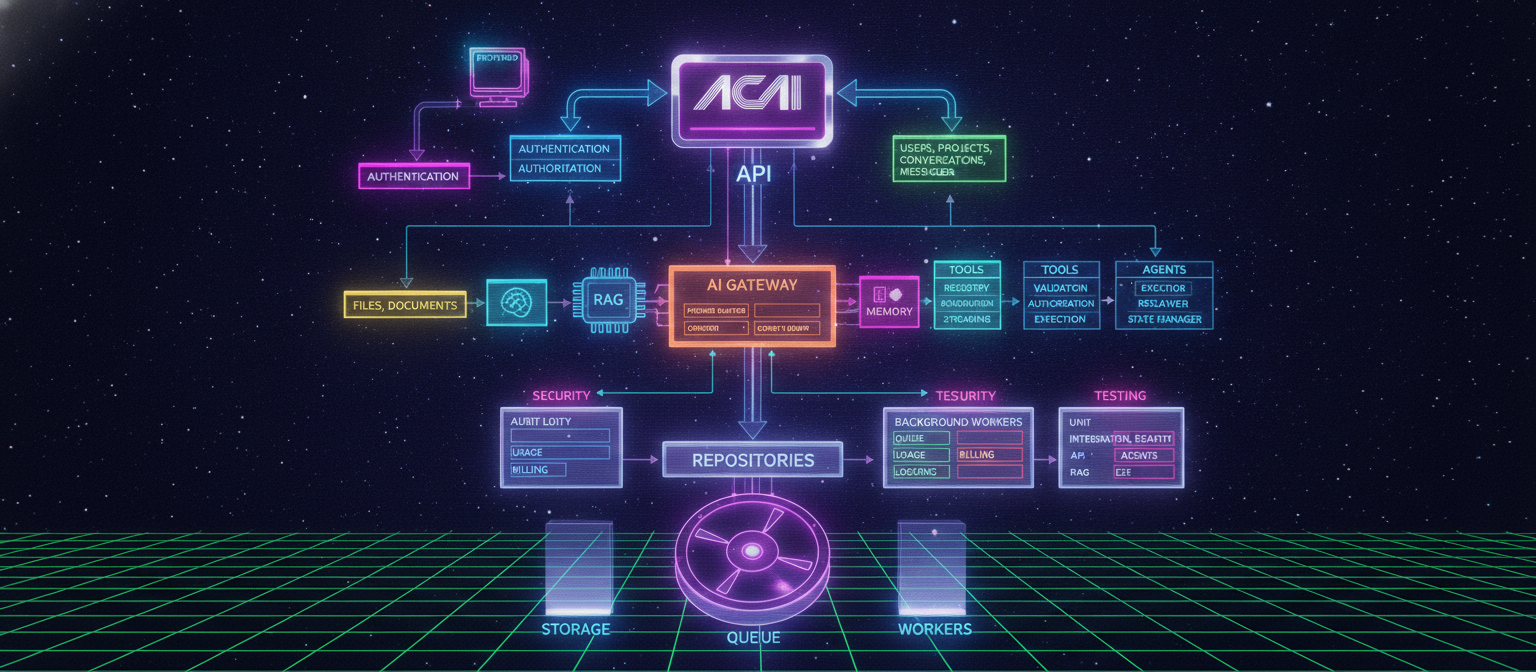
33.1 Chapter Objective
In Chapter 32, we completed the Agent System architecture.
Now we need to organize the actual ACAI backend so that all major systems have clear locations.
The backend must support:
Authentication
Authorization
Users
Projects
Conversations
Messages
Files
Document Processing
RAG
Memory
AI Gateway
Model Router
Tools
Agents
Usage Tracking
Rate Limiting
Security
Logging
The objective of this chapter is to define a scalable backend architecture and a clean folder structure.
33.2 Backend Architecture Philosophy
The backend should be:
Modular
Scalable
Secure
Testable
Maintainable
Observable
Avoid putting everything inside one large file.
Bad structure:
server.ts
  ├── authentication
  ├── database
  ├── AI
  ├── RAG
  ├── agents
  ├── files
  └── everything else
Better structure:
API
 ↓
Controllers
 ↓
Services
 ↓
Domain Logic
 ↓
Repositories
 ↓
Database
33.3 High-Level Backend Architecture
The complete backend can be visualized as:
                         CLIENT
                           │
                           ▼
                    API / HTTP LAYER
                           │
                           ▼
                  AUTHENTICATION
                           │
                           ▼
                   AUTHORIZATION
                           │
                           ▼
                    CONTROLLERS
                           │
                           ▼
                      SERVICES
                           │
        ┌──────────────────┼──────────────────┐
        ▼                  ▼                  ▼
     AI CORE             RAG CORE          AGENT CORE
        │                  │                  │
        └──────────────────┼──────────────────┘
                           ▼
                       REPOSITORIES
                           │
                           ▼
                        DATABASE
External infrastructure can connect through dedicated adapters.
33.4 Recommended Project Structure
A scalable backend could use:
acai/
│
├── src/
│   │
│   ├── app/
│   │
│   ├── api/
│   │
│   ├── modules/
│   │
│   ├── services/
│   │
│   ├── repositories/
│   │
│   ├── lib/
│   │
│   ├── config/
│   │
│   ├── middleware/
│   │
│   ├── types/
│   │
│   └── utils/
│
├── tests/
│
├── scripts/
│
├── public/
│
├── .env
├── .env.example
├── package.json
├── tsconfig.json
└── README.md
33.5 Modules Directory
The modules directory contains major business domains.
Example:
src/modules/

├── auth/
├── users/
├── projects/
├── conversations/
├── files/
├── documents/
├── rag/
├── memory/
├── ai/
├── tools/
├── agents/
├── usage/
├── billing/
└── notifications/
Each module owns its own business logic.
33.6 Authentication Module
Authentication manages identity.
modules/auth/

├── auth.controller.ts
├── auth.service.ts
├── auth.repository.ts
├── auth.schema.ts
├── auth.types.ts
└── auth.utils.ts
Responsibilities:
Sign up
Sign in
Sign out
Session handling
Token validation
Password management
Account verification
33.7 Authorization Module
Authentication answers:
Who are you?
Authorization answers:
What are you allowed to do?
Possible structure:
modules/authorization/

├── authorization.service.ts
├── permission.service.ts
├── policy.service.ts
└── authorization.types.ts
Example:
User
 ↓
Permission Check
 ↓
Project Access
 ↓
Allow / Deny
33.8 Users Module
User management:
modules/users/

├── user.controller.ts
├── user.service.ts
├── user.repository.ts
├── user.schema.ts
└── user.types.ts
Possible responsibilities:
User profile
Preferences
Account settings
Usage information
User metadata
33.9 Projects Module
Projects organize user work.
modules/projects/

├── project.controller.ts
├── project.service.ts
├── project.repository.ts
├── project.schema.ts
└── project.types.ts
Possible hierarchy:
User
 │
 ├── Project A
 │
 ├── Project B
 │
 └── Project C
33.10 Conversations Module
Conversation management:
modules/conversations/

├── conversation.controller.ts
├── conversation.service.ts
├── conversation.repository.ts
├── message.service.ts
├── conversation.schema.ts
└── conversation.types.ts
Responsibilities:
Create conversation
Get conversation
Add message
List messages
Archive conversation
Delete conversation
33.11 Files Module
The Files module manages uploaded files.
modules/files/

├── file.controller.ts
├── file.service.ts
├── file.repository.ts
├── storage.service.ts
├── file.schema.ts
└── file.types.ts
The actual binary data should normally be stored in object storage rather than directly inside the application database.
33.12 Document Processing Module
Uploaded documents may require processing.
modules/documents/

├── document.service.ts
├── document.parser.ts
├── document.chunker.ts
├── document.repository.ts
├── document.schema.ts
└── document.types.ts
Pipeline:
Upload
 ↓
Validate
 ↓
Extract Text
 ↓
Normalize
 ↓
Chunk
 ↓
Create Embeddings
 ↓
Store
33.13 RAG Module
RAG should be an independent module.
modules/rag/

├── rag.service.ts
├── retrieval.service.ts
├── embedding.service.ts
├── vector.service.ts
├── reranker.service.ts
├── rag.repository.ts
└── rag.types.ts
Flow:
Query
 ↓
Embedding
 ↓
Vector Search
 ↓
Retrieve
 ↓
Rerank
 ↓
Context
33.14 Memory Module
The Memory System from Chapter 31 belongs here.
modules/memory/

├── memory.service.ts
├── memory.extractor.ts
├── memory.retriever.ts
├── memory.repository.ts
├── memory.schema.ts
└── memory.types.ts
Possible memory types:
Conversation Memory
Project Memory
User Memory
Long-Term Memory
33.15 AI Module
The AI module provides the common AI infrastructure.
modules/ai/

├── ai.service.ts
├── model-router.ts
├── context-builder.ts
├── provider-manager.ts
├── streaming.service.ts
├── token.service.ts
└── ai.types.ts
This becomes the central AI layer.
33.16 AI Provider Adapters
Different AI providers should be isolated.
Example:
modules/ai/providers/

├── provider.interface.ts
├── provider-a.adapter.ts
├── provider-b.adapter.ts
├── provider-c.adapter.ts
└── local-model.adapter.ts
The rest of ACAI should communicate with a common interface rather than depending directly on a specific provider.
33.17 Model Router
The Model Router decides which model should handle a request.
User Request
     ↓
Model Router
     ├── Fast Model
     ├── Reasoning Model
     ├── Long Context Model
     └── Local Model
Possible file:
model-router.ts
Responsibilities:
Model selection
Fallback
Capability matching
Cost awareness
Latency awareness
Provider availability
33.18 Context Builder
The Context Builder combines relevant information before sending a request to a model.
User Message
     +
Conversation
     +
Memory
     +
RAG Context
     +
Project Context
     +
System Instructions
     ↓
Context Builder
     ↓
Model
Possible structure:
modules/ai/context/

├── context-builder.ts
├── context-policy.ts
├── context-types.ts
└── context-utils.ts
33.19 Tools Module
The Tool System from Chapter 32 belongs here.
modules/tools/

├── tool.registry.ts
├── tool.interface.ts
├── tool.validator.ts
├── tool.executor.ts
├── tool.policy.ts
├── tool.types.ts
└── built-in/
Built-in tools:
built-in/

├── file-search.tool.ts
├── file-read.tool.ts
├── rag-search.tool.ts
├── calculator.tool.ts
└── document-generation.tool.ts
33.20 Tool Registry
The Tool Registry stores available tools.
Conceptually:
Tool Registry
│
├── file_search
├── file_read
├── rag_search
├── calculator
└── document_generator
Each tool should provide:
name
description
inputSchema
outputSchema
permissions
handler
33.21 Agents Module
The complete Agent system belongs here.
modules/agents/

├── agent.service.ts
├── agent.planner.ts
├── agent.executor.ts
├── agent.observer.ts
├── agent.replanner.ts
├── agent.state.ts
├── agent.policy.ts
├── agent.repository.ts
├── agent.schema.ts
└── agent.types.ts
33.22 Agent Components
The Agent system can be divided into:
Agent Service
      │
      ├── Planner
      ├── Executor
      ├── Observer
      ├── Replanner
      ├── State Manager
      └── Policy Manager
This prevents the Agent service from becoming one huge file.
33.23 Usage Module
Every AI request can contribute to usage.
modules/usage/

├── usage.service.ts
├── usage.repository.ts
├── usage.calculator.ts
├── usage.schema.ts
└── usage.types.ts
Track:
Requests
Tokens
Tool calls
Model calls
Execution time
Storage usage
33.24 Billing Module
If ACAI eventually supports paid plans:
modules/billing/

├── billing.service.ts
├── subscription.service.ts
├── invoice.service.ts
├── payment.adapter.ts
└── billing.types.ts
The billing layer should remain separate from AI logic.
33.25 Notifications Module
Notifications can include:
Task completed
Task failed
Approval required
Usage warning
System notification
Structure:
modules/notifications/

├── notification.service.ts
├── notification.repository.ts
└── notification.types.ts
33.26 API Layer
The API layer exposes backend functionality to the frontend.
Example:
src/api/

├── auth/
├── users/
├── projects/
├── conversations/
├── files/
├── rag/
├── memory/
├── ai/
├── tools/
└── agents/
Each endpoint should call the appropriate service instead of containing all business logic itself.
33.27 Controller Pattern
A clean request flow:
HTTP Request
     ↓
Controller
     ↓
Validation
     ↓
Authorization
     ↓
Service
     ↓
Repository
     ↓
Database
Controller responsibility:
Receive request
Validate basic input
Call service
Return response
Business logic should live in services.
33.28 Service Layer
Example:
project.controller.ts
        ↓
project.service.ts
        ↓
project.repository.ts
        ↓
database
The service handles business rules.
Example:
Create Project
 ↓
Check user
 ↓
Validate project
 ↓
Create record
 ↓
Return project
33.29 Repository Layer
Repositories isolate database access.
Example:
project.repository.ts
Possible operations:
create()
findById()
findByUser()
update()
delete()
The service should not need to know the low-level database implementation.
33.30 Database Layer
A dedicated database configuration can live in:
src/lib/database/
Example:
database/
├── client.ts
├── connection.ts
├── migrations/
└── index.ts
The exact files depend on the selected database technology.
33.31 Configuration
Application configuration should be centralized.
src/config/

├── app.config.ts
├── database.config.ts
├── ai.config.ts
├── storage.config.ts
├── security.config.ts
└── environment.ts
Environment variables should be validated during startup.
33.32 Environment Variables
Example:
DATABASE_URL=
AUTH_SECRET=
STORAGE_ENDPOINT=
AI_PROVIDER_KEY=
VECTOR_DATABASE_URL=
Use:
.env
for local development.
Provide:
.env.example
without real secrets.
Never commit actual API keys to source control.
33.33 Middleware
Middleware can handle common request-level operations.
src/middleware/

├── auth.middleware.ts
├── rate-limit.middleware.ts
├── request-id.middleware.ts
├── security.middleware.ts
└── error.middleware.ts
Typical flow:
Request
 ↓
Request ID
 ↓
Security
 ↓
Authentication
 ↓
Rate Limit
 ↓
Controller
33.34 Error Handling
The backend should use consistent errors.
Example categories:
VALIDATION_ERROR
AUTHENTICATION_ERROR
AUTHORIZATION_ERROR
NOT_FOUND
RATE_LIMITED
TOOL_ERROR
MODEL_ERROR
DATABASE_ERROR
INTERNAL_ERROR
Avoid exposing internal stack traces to users in production.
33.35 API Response Format
A consistent response format makes frontend development easier.
Success:
{
  "success": true,
  "data": {}
}
Error:
{
  "success": false,
  "error": {
    "code": "NOT_FOUND",
    "message": "Resource not found"
  }
}
The exact format can be adjusted to the framework.
33.36 Request Validation
Every external request should be validated.
Example:
Client
 ↓
Request
 ↓
Schema Validation
 ↓
Service
Never assume that frontend validation is sufficient.
The server must validate independently.
33.37 Authentication Flow
Complete flow:
User
 ↓
Login
 ↓
Authentication Service
 ↓
Credential Verification
 ↓
Session / Token
 ↓
Authenticated Request
 ↓
Authentication Middleware
 ↓
User Identity
33.38 Authorization Flow
After authentication:
Request
 ↓
Identify User
 ↓
Identify Resource
 ↓
Check Permission
 ↓
ALLOW / DENY
For example:
User A
 ↓
Project B
 ↓
Ownership Check
 ↓
DENY
33.39 File Upload Flow
Complete upload pipeline:
Client
 ↓
Upload Request
 ↓
Authentication
 ↓
Authorization
 ↓
File Validation
 ↓
Storage
 ↓
File Record
 ↓
Document Processing
33.40 Document Processing Flow
Uploaded File
      ↓
File Type Detection
      ↓
Text Extraction
      ↓
Normalization
      ↓
Chunking
      ↓
Embedding
      ↓
Vector Storage
      ↓
Ready for RAG
33.41 Chat Request Flow
A normal ACAI chat request:
Client
 ↓
API
 ↓
Authentication
 ↓
Authorization
 ↓
Conversation Service
 ↓
Context Builder
 ↓
Memory
 ↓
RAG
 ↓
Model Router
 ↓
AI Provider
 ↓
Streaming
 ↓
Client
33.42 Agent Request Flow
An Agent request:
Client
 ↓
API
 ↓
Authentication
 ↓
Authorization
 ↓
Agent Service
 ↓
Load Memory
 ↓
Load Context
 ↓
Plan
 ↓
Tool Selection
 ↓
Tool Validation
 ↓
Tool Authorization
 ↓
Tool Execution
 ↓
Observation
 ↓
Replan / Finish
 ↓
Final Result
33.43 Background Jobs
Some tasks should not block a normal HTTP request.
Examples:
Large document processing
Embedding generation
Long Agent tasks
Video processing
Large exports
Email notifications
These can use a background job system.
Architecture:
API
 ↓
Queue
 ↓
Worker
 ↓
Task
 ↓
Database
33.44 Worker Architecture
Possible structure:
src/workers/

├── document.worker.ts
├── embedding.worker.ts
├── agent.worker.ts
├── notification.worker.ts
└── export.worker.ts
Workers execute long-running operations separately from API requests.
33.45 Queue Flow
Example:
User Uploads Document
       ↓
API
       ↓
Create Processing Job
       ↓
Queue
       ↓
Worker
       ↓
Extract Text
       ↓
Chunk
       ↓
Embed
       ↓
Store
       ↓
Mark Complete
33.46 Agent Worker
Long-running Agents can use:
Agent API
   ↓
Create Task
   ↓
Queue
   ↓
Agent Worker
   ↓
Plan
   ↓
Execute
   ↓
Observe
   ↓
Replan
   ↓
Complete
This architecture is more suitable for tasks that may take significant time.
33.47 Event System
ACAI can optionally use internal events.
Examples:
USER_CREATED
PROJECT_CREATED
FILE_UPLOADED
DOCUMENT_PROCESSED
AGENT_STARTED
AGENT_COMPLETED
AGENT_FAILED
Flow:
Service
 ↓
Event
 ↓
Event Handler
This helps decouple independent systems.
33.48 Security Layer
Security should exist across the entire backend.
Authentication
Authorization
Input Validation
Rate Limiting
Secret Management
Audit Logging
Data Isolation
File Validation
Tool Policies
Agent Policies
Security should not be implemented only at the frontend.
33.49 Audit Logging
Important actions can be recorded.
Example:
audit_logs

userId
action
resource
resourceId
timestamp
result
Examples:
PROJECT_CREATED
FILE_UPLOADED
FILE_DELETED
AGENT_STARTED
AGENT_CANCELLED
PUBLISH_APPROVED
33.50 Data Isolation
User data must be isolated.
Example:
User A
 ├── Project A1
 ├── Project A2
 └── Files

User B
 ├── Project B1
 ├── Project B2
 └── Files
A request from User A must never retrieve User B's private resources.
33.51 Testing Architecture
Testing should exist at multiple levels.
Unit Tests
Integration Tests
API Tests
Security Tests
Agent Tests
RAG Tests
End-to-End Tests
Example:
tests/

├── unit/
├── integration/
├── api/
├── security/
├── agents/
├── rag/
└── e2e/
33.52 Unit Testing
Test individual components.
Examples:
model-router.test.ts
memory-service.test.ts
tool-validator.test.ts
agent-planner.test.ts
The goal is to verify individual behavior.
33.53 Integration Testing
Test multiple components together.
Example:
Agent
 ↓
Memory
 ↓
RAG
 ↓
Tool
 ↓
Database
Verify that the complete interaction works correctly.
33.54 API Testing
Test endpoints such as:
POST /auth/login
POST /projects
GET /projects
POST /files
POST /chat
POST /agents
GET /agents/:id
POST /agents/:id/cancel
The exact route naming depends on the API design.
33.55 Security Testing
Test:
Unauthorized access
Cross-user access
Invalid tokens
Invalid permissions
Rate limits
Malicious file uploads
Tool authorization
Agent authorization
Input injection
33.56 Observability
Backend observability should include:
Logs
Metrics
Traces
Errors
Request IDs
Agent traces
Tool traces
Model usage
Example:
Request ID
   ↓
API
   ↓
Agent
   ↓
Tool
   ↓
Database
The same request identifier helps connect these events.
33.57 Recommended Complete Folder Structure
A more complete structure:
acai/
│
├── src/
│   │
│   ├── api/
│   │   ├── auth/
│   │   ├── users/
│   │   ├── projects/
│   │   ├── conversations/
│   │   ├── files/
│   │   ├── documents/
│   │   ├── rag/
│   │   ├── memory/
│   │   ├── ai/
│   │   ├── tools/
│   │   └── agents/
│   │
│   ├── modules/
│   │   ├── auth/
│   │   ├── users/
│   │   ├── projects/
│   │   ├── conversations/
│   │   ├── files/
│   │   ├── documents/
│   │   ├── rag/
│   │   ├── memory/
│   │   ├── ai/
│   │   ├── tools/
│   │   ├── agents/
│   │   ├── usage/
│   │   ├── billing/
│   │   └── notifications/
│   │
│   ├── repositories/
│   │
│   ├── workers/
│   │
│   ├── middleware/
│   │
│   ├── config/
│   │
│   ├── lib/
│   │
│   ├── types/
│   │
│   └── utils/
│
├── tests/
│   ├── unit/
│   ├── integration/
│   ├── api/
│   ├── security/
│   ├── agents/
│   ├── rag/
│   └── e2e/
│
├── scripts/
│
├── public/
│
├── .env
├── .env.example
├── .gitignore
├── package.json
├── tsconfig.json
└── README.md
33.58 Dependency Direction
A clean architecture should avoid circular dependencies.
Preferred direction:
API
 ↓
Modules / Services
 ↓
Repositories
 ↓
Infrastructure
Not:
Database
 ↓
Controller
 ↓
Service
 ↓
Controller
Keep dependencies predictable.
33.59 Infrastructure Isolation
External services should be isolated behind adapters.
Examples:
AI Provider
Storage Provider
Vector Database
Email Provider
Payment Provider
Instead of:
Business Logic
 ↓
Specific Vendor SDK
prefer:
Business Logic
 ↓
Internal Interface
 ↓
Adapter
 ↓
External Provider
This makes future provider changes easier.
33.60 Backend Scalability
As ACAI grows, services can be scaled independently.
For example:
API Servers
   × N

Worker Servers
   × N

Agent Workers
   × N

Document Workers
   × N
The database and infrastructure should be designed to support the expected workload.
33.61 Caching
Frequently accessed data can be cached.
Possible targets:
User settings
Project metadata
Model configuration
RAG results
Rate-limit counters
Session information
However, caching should not bypass authorization or expose another user's data.
33.62 Rate Limiting
Rate limits can exist at multiple levels:
Per IP
Per User
Per API Key
Per Model
Per Tool
Per Agent Task
Example:
User
 ↓
100 API requests / minute
The exact limits depend on the product plan and infrastructure.
33.63 Request Lifecycle
The complete backend request lifecycle:
REQUEST
  ↓
Request ID
  ↓
Security Middleware
  ↓
Authentication
  ↓
Rate Limit
  ↓
Validation
  ↓
Authorization
  ↓
Controller
  ↓
Service
  ↓
Repository / External Adapter
  ↓
Database / Provider
  ↓
Service Result
  ↓
Controller Response
  ↓
LOGGING
  ↓
RESPONSE
33.64 Complete ACAI Backend
After this chapter, the backend architecture becomes:
ACAI BACKEND
│
├── API
│
├── Authentication
├── Authorization
│
├── Users
├── Projects
├── Conversations
├── Messages
│
├── Files
├── Documents
├── RAG
├── Memory
│
├── AI Gateway
├── Model Router
├── Provider Adapters
├── Context Builder
├── Streaming
│
├── Tools
│   ├── Registry
│   ├── Validation
│   ├── Authorization
│   └── Execution
│
├── Agents
│   ├── Planner
│   ├── Executor
│   ├── Observer
│   ├── Replanner
│   └── State Manager
│
├── Background Workers
├── Queue
├── Usage
├── Billing
├── Notifications
│
├── Security
├── Audit Logs
├── Metrics
├── Logging
└── Testing
33.65 Chapter 33 Implementation Checklist
Before moving forward:
[✓] Backend architecture defined
[✓] API layer defined
[✓] Authentication module defined
[✓] Authorization module defined
[✓] Users module defined
[✓] Projects module defined
[✓] Conversations module defined
[✓] Files module defined
[✓] Document processing defined
[✓] RAG module defined
[✓] Memory module defined
[✓] AI module defined
[✓] Model Router defined
[✓] Provider adapters defined
[✓] Context Builder defined
[✓] Tools module defined
[✓] Agent module defined
[✓] Usage module defined
[✓] Billing structure defined
[✓] Notification structure defined
[✓] Worker architecture defined
[✓] Queue architecture defined
[✓] Security architecture defined
[✓] Testing architecture defined
[✓] Observability defined
[✓] Complete folder structure defined
33.66 Final Result
The most important outcome of Chapter 33 is that every major ACAI capability now has a clear architectural location.
The complete system can be represented as:
                         ACAI
                           │
                           ▼
                        FRONTEND
                           │
                           ▼
                         API
                           │
            ┌──────────────┼──────────────┐
            ▼              ▼              ▼
          AUTH            CHAT          AGENTS
            │              │              │
            └──────────────┼──────────────┘
                           ▼
                        SERVICES
                           │
       ┌───────────────────┼───────────────────┐
       ▼                   ▼                   ▼
      AI                  RAG                MEMORY
       │                   │                   │
       └───────────────────┼───────────────────┘
                           ▼
                         TOOLS
                           │
                           ▼
                      REPOSITORIES
                           │
                           ▼
                       DATABASE
                           │
              ┌────────────┼────────────┐
              ▼            ▼            ▼
           STORAGE       QUEUE        WORKERS
The architecture is now ready for the next stage: turning this design into an actual working backend implementation.
END OF CHAPTER 33


Comments
Post a Comment