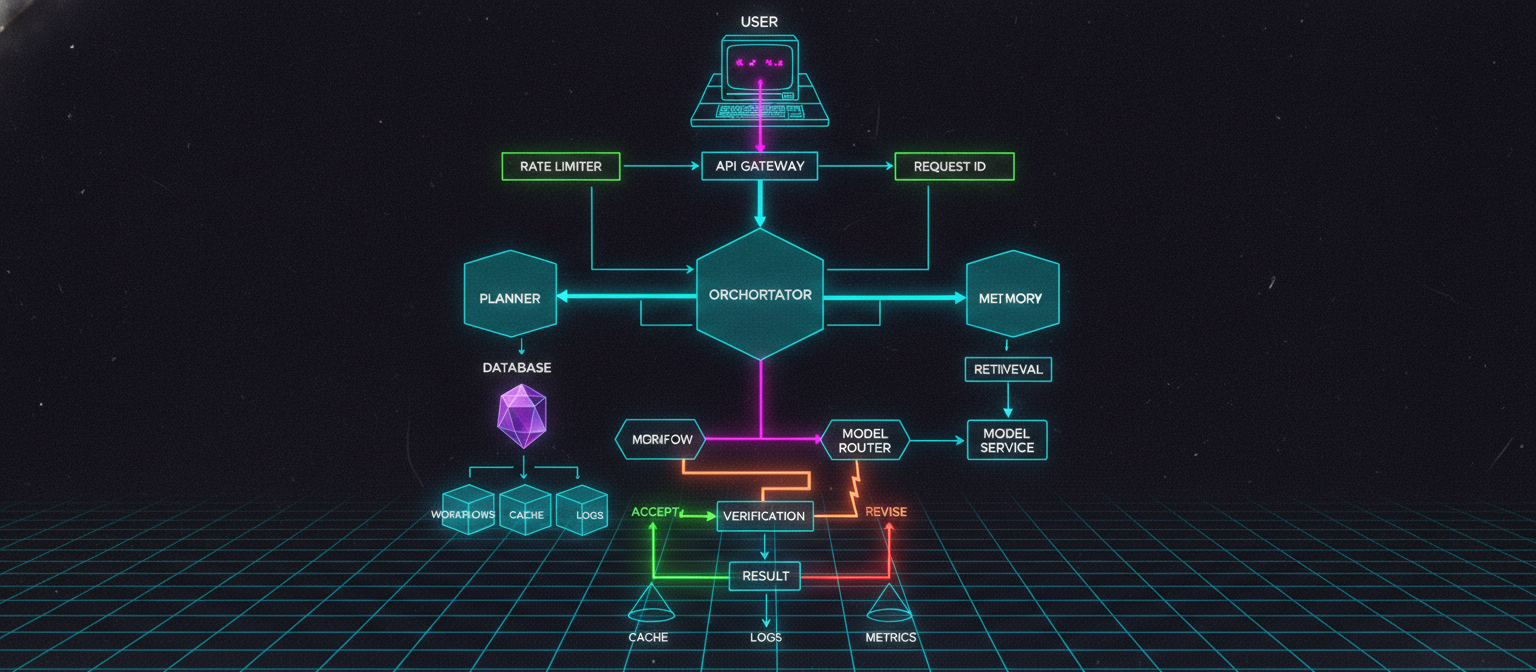
8.1 Objective
Up to Chapter 7, ACAI has evolved into a modular AI orchestration system:
Chapter 1 → Core API
Chapter 2 → Planner
Chapter 3 → Retrieval
Chapter 4 → Memory
Chapter 5 → Model Router
Chapter 6 → Verification
Chapter 7 → Workflow Engine
However, most of the current prototype state exists only while the application is running.
If the server stops:
Memory
   ↓
Lost

Workflow State
   ↓
Lost

Runtime Data
   ↓
Lost
A production system therefore needs persistent infrastructure.
Chapter 8 introduces:
Database
Persistent Memory
Workflow Persistence
Request IDs
Error Handling
Rate Limiting
Caching
Health Checks
Background Jobs
Production Configuration
8.2 Production Architecture
The architecture now becomes:
                           USER
                             │
                             ▼
                        API Gateway
                             │
                             ▼
                       FastAPI Server
                             │
                    ┌────────┴────────┐
                    ▼                 ▼
               Rate Limiter       Request ID
                    │                 │
                    └────────┬────────┘
                             ▼
                       ORCHESTRATOR
                             │
        ┌────────────────────┼────────────────────┐
        ▼                    ▼                    ▼
     Planner              Memory              Retrieval
        │                    │                    │
        └────────────────────┼────────────────────┘
                             ▼
                       Model Router
                             │
                             ▼
                       Model Service
                             │
                             ▼
                         Workflow
                             │
                             ▼
                       Verification
                             │
                             ▼
                          Response
                             │
             ┌───────────────┼───────────────┐
             ▼               ▼               ▼
          Database         Cache          Monitoring
8.3 Why Persistence Matters
Consider a user interaction:
User:
"I prefer Python."
ACAI stores it in memory.
Then the server restarts.
If the memory was only:
self.items = {}
the information disappears.
A persistent implementation changes this:
Memory
 ↓
Database
 ↓
Restart
 ↓
Database
 ↓
Memory restored
8.4 Database Layer
For the first production-oriented prototype, SQLite is a convenient starting point.
It requires no separate database server.
Create:
app/database.py
Add:
import sqlite3
from pathlib import Path


DATABASE_PATH = Path(
    "data/acai.db"
)


def get_connection():

    DATABASE_PATH.parent.mkdir(
        parents=True,
        exist_ok=True,
    )

    connection = sqlite3.connect(
        DATABASE_PATH
    )

    connection.row_factory = (
        sqlite3.Row
    )

    return connection
This creates:
data/
    acai.db
8.5 Database Initialization
Add:
def initialize_database():

    connection = get_connection()

    cursor = connection.cursor()

    cursor.execute(
        """
        CREATE TABLE IF NOT EXISTS memories (
            memory_id TEXT PRIMARY KEY,
            content TEXT NOT NULL,
            memory_type TEXT NOT NULL,
            importance REAL NOT NULL,
            created_at TEXT NOT NULL,
            updated_at TEXT NOT NULL
        )
        """
    )

    cursor.execute(
        """
        CREATE TABLE IF NOT EXISTS workflows (
            workflow_id TEXT PRIMARY KEY,
            status TEXT NOT NULL,
            result TEXT,
            created_at TEXT NOT NULL,
            updated_at TEXT NOT NULL
        )
        """
    )

    connection.commit()

    connection.close()
8.6 Application Startup
Update the FastAPI startup process.
For example:
from fastapi import FastAPI

from app.database import (
    initialize_database,
)


app = FastAPI(
    title="ACAI",
    version="0.8.0",
)


@app.on_event("startup")
def startup():

    initialize_database()
The database is initialized when the application starts.
8.7 Persistent Memory
The existing memory service can now write to SQLite.
Create:
app/services/persistent_memory.py
Add:
from datetime import datetime
from uuid import uuid4

from app.database import (
    get_connection,
)


class PersistentMemoryService:

    def remember(
        self,
        content: str,
        memory_type: str = "general",
        importance: float = 0.5,
    ) -> str:

        memory_id = str(uuid4())

        now = datetime.utcnow().isoformat()

        connection = get_connection()

        connection.execute(
            """
            INSERT INTO memories (
                memory_id,
                content,
                memory_type,
                importance,
                created_at,
                updated_at
            )
            VALUES (?, ?, ?, ?, ?, ?)
            """,
            (
                memory_id,
                content,
                memory_type,
                importance,
                now,
                now,
            ),
        )

        connection.commit()

        connection.close()

        return memory_id
8.8 Reading Persistent Memories
Add:
    def search(
        self,
        query: str,
        limit: int = 5,
    ):

        connection = get_connection()

        rows = connection.execute(
            """
            SELECT *
            FROM memories
            ORDER BY importance DESC
            LIMIT ?
            """,
            (limit,),
        ).fetchall()

        connection.close()

        return [
            dict(row)
            for row in rows
        ]
This is a simple baseline.
A production semantic-memory system would later add embeddings and vector search.
8.9 Memory Architecture Upgrade
The memory architecture is now:
                    MEMORY
                       │
              ┌────────┴────────┐
              ▼                 ▼
        Short-Term          Long-Term
          Memory              Memory
              │                 │
              │                 ▼
              │              Database
              │                 │
              └────────┬────────┘
                       ▼
                  Memory Context
8.10 Workflow Persistence
Long-running workflows also need persistence.
Add:
def save_workflow(
    workflow_id: str,
    status: str,
    result: str | None = None,
):

    from datetime import datetime

    now = datetime.utcnow().isoformat()

    connection = get_connection()

    connection.execute(
        """
        INSERT INTO workflows (
            workflow_id,
            status,
            result,
            created_at,
            updated_at
        )
        VALUES (?, ?, ?, ?, ?)
        ON CONFLICT(workflow_id)
        DO UPDATE SET
            status = excluded.status,
            result = excluded.result,
            updated_at = excluded.updated_at
        """,
        (
            workflow_id,
            status,
            result,
            now,
            now,
        ),
    )

    connection.commit()

    connection.close()
Now a workflow can survive process restarts.
8.11 Workflow Lifecycle
The persistent lifecycle becomes:
Created
   ↓
Saved
   ↓
Running
   ↓
Task A
   ↓
Task B
   ↓
Task C
   ↓
Completed
   ↓
Saved
If the process crashes:
Database
   ↓
Last known state
   ↓
Recovery
   ↓
Resume / Retry
A full recovery system requires additional task-level persistence, which can be added later.
8.12 Request IDs
Every API request should have a unique identifier.
Example:
request_id:
9c4d...
This makes debugging much easier.
Create:
import uuid


def generate_request_id():

    return str(
        uuid.uuid4()
    )
8.13 Request Middleware
In FastAPI:
from fastapi import Request


@app.middleware("http")
async def request_tracking(
    request: Request,
    call_next,
):

    request_id = (
        request.headers.get(
            "X-Request-ID"
        )
        or generate_request_id()
    )

    response = await call_next(
        request
    )

    response.headers[
        "X-Request-ID"
    ] = request_id

    return response
Now every response carries a request ID.
8.14 Why Request IDs Matter
Suppose a user reports:
"My request failed."
Without an ID, debugging may require searching through thousands of logs.
With:
Request ID:
abc123
developers can search:
abc123
and find the complete request path.
8.15 Structured Error Handling
Errors should be predictable.
Create:
app/errors.py
Add:
class ACAIError(Exception):

    def __init__(
        self,
        message: str,
        code: str = "ACAI_ERROR",
    ) -> None:

        super().__init__(message)

        self.message = message

        self.code = code
Specific errors can inherit from it:
class ValidationError(ACAIError):

    def __init__(
        self,
        message: str,
    ) -> None:

        super().__init__(
            message,
            code="VALIDATION_ERROR",
        )


class ModelError(ACAIError):

    def __init__(
        self,
        message: str,
    ) -> None:

        super().__init__(
            message,
            code="MODEL_ERROR",
        )


class WorkflowError(ACAIError):

    def __init__(
        self,
        message: str,
    ) -> None:

        super().__init__(
            message,
            code="WORKFLOW_ERROR",
        )
8.16 Error Response
The API should return structured errors.
Example:
{
  "success": false,
  "error": {
    "code": "MODEL_ERROR",
    "message": "Model request failed.",
    "request_id": "abc123"
  }
}
Avoid exposing internal stack traces to normal users.
8.17 Global Exception Handler
FastAPI can handle ACAI-specific errors:
from fastapi.responses import JSONResponse


@app.exception_handler(
    ACAIError
)
async def acai_error_handler(
    request,
    exc: ACAIError,
):

    request_id = (
        request.headers.get(
            "X-Request-ID",
            "unknown",
        )
    )

    return JSONResponse(
        status_code=400,
        content={
            "success": False,
            "error": {
                "code": exc.code,
                "message": exc.message,
                "request_id": request_id,
            },
        },
    )
8.18 Rate Limiting
Public APIs need protection against excessive requests.
Conceptually:
User
 ↓
Rate Limiter
 ↓
Allowed?
 ┌──┴──┐
YES    NO
 │      │
 ▼      ▼
API    429
A simple conceptual policy:
100 requests / minute / client
The actual production limit should be selected according to expected traffic and infrastructure capacity.
8.19 Simple Rate-Limit Prototype
For demonstration:
import time


class RateLimiter:

    def __init__(
        self,
        limit: int = 100,
        window: int = 60,
    ):

        self.limit = limit

        self.window = window

        self.requests = {}

    def allow(
        self,
        client_id: str,
    ) -> bool:

        now = time.time()

        timestamps = (
            self.requests
            .setdefault(
                client_id,
                [],
            )
        )

        timestamps[:] = [
            timestamp
            for timestamp in timestamps
            if now - timestamp
            < self.window
        ]

        if len(timestamps) >= self.limit:

            return False

        timestamps.append(now)

        return True
This is a prototype only.
For multiple application servers, a shared store such as Redis is more appropriate.
8.20 Caching
Some operations are repeated frequently.
For example:
Same query
 ↓
Same retrieval
 ↓
Repeated computation
A cache can reduce unnecessary work.
Architecture:
Request
 ↓
Cache
 ↓
┌───────┴───────┐
▼               ▼
HIT             MISS
│               │
▼               ▼
Result        Compute
                │
                ▼
              Cache
8.21 Simple Cache
Create:
class SimpleCache:

    def __init__(self):

        self.data = {}

    def get(
        self,
        key: str,
    ):

        return self.data.get(
            key
        )

    def set(
        self,
        key: str,
        value,
    ):

        self.data[key] = value

    def delete(
        self,
        key: str,
    ):

        self.data.pop(
            key,
            None,
        )

    def clear(self):

        self.data.clear()
8.22 Cache Safety
Not every operation should be cached.
Good candidates can include:
Stable retrieval results
Configuration
Public metadata
Repeated deterministic calculations
Potentially unsafe candidates include:
Private user data
Sensitive responses
Time-sensitive information
Requests whose result depends on changing state
A production cache therefore needs:
TTL
Invalidation
User isolation
Permission checks
Size limits
8.23 Health Checks
A production API should expose:
/health
Example:
@app.get("/health")
async def health():

    return {
        "status": "ok",
        "service": "acai",
    }
This confirms that the application process is responding.
8.24 Readiness vs Liveness
These should eventually be separate.
Liveness
"Is the application process alive?"
Readiness
"Can the application actually serve requests?"
For example:
/health/live
/health/ready
Readiness can verify:
Database
Model provider
Required services
Configuration
8.25 Production Configuration
Configuration should not be hardcoded.
Create:
.env
Example:
ACAI_ENV=development
ACAI_LOG_LEVEL=INFO
ACAI_DATABASE_URL=sqlite:///data/acai.db
ACAI_MODEL_PROVIDER=mock
ACAI_MAX_WORKFLOW_STEPS=10
Do not commit real secrets.
For example:
API_KEY=actual-secret
should never be placed into source control.
8.26 Configuration Class
Update:
app/config.py
Example:
import os


class Settings:

    environment = os.getenv(
        "ACAI_ENV",
        "development",
    )

    log_level = os.getenv(
        "ACAI_LOG_LEVEL",
        "INFO",
    )

    database_url = os.getenv(
        "ACAI_DATABASE_URL",
        "sqlite:///data/acai.db",
    )

    model_provider = os.getenv(
        "ACAI_MODEL_PROVIDER",
        "mock",
    )

    max_workflow_steps = int(
        os.getenv(
            "ACAI_MAX_WORKFLOW_STEPS",
            "10",
        )
    )


settings = Settings()
8.27 Logging
Create:
import logging


logging.basicConfig(
    level=logging.INFO,
)

logger = logging.getLogger(
    "acai"
)
Then:
logger.info(
    "Workflow started: %s",
    workflow_id,
)
Errors:
logger.exception(
    "Workflow failed: %s",
    workflow_id,
)
8.28 Logging Architecture
                     ACAI
                       │
                       ▼
                    Events
                       │
          ┌────────────┼────────────┐
          ▼            ▼            ▼
        INFO         ERROR       METRICS
          │            │            │
          └────────────┼────────────┘
                       ▼
                  Log System
8.29 Background Jobs
Some tasks should not block the API request.
For example:
Large document processing
Long workflow
Batch evaluation
Embedding generation
Dataset indexing
Instead of:
HTTP Request
 ↓
Wait 10 minutes
 ↓
Response
use:
HTTP Request
 ↓
Create Job
 ↓
Return Job ID
Then:
Worker
 ↓
Process Job
 ↓
Save Result
The user can query:
/jobs/{job_id}
8.30 Job Architecture
                  API
                   │
                   ▼
                Job Queue
                   │
          ┌────────┼────────┐
          ▼        ▼        ▼
       Worker 1 Worker 2 Worker 3
          │        │        │
          └────────┼────────┘
                   ▼
                Database
                   │
                   ▼
                 Result
For a simple prototype, FastAPI background tasks can be used.
For larger systems, a dedicated queue/worker architecture is more appropriate.
8.31 Production Deployment
A typical deployment could be:
Internet
   │
   ▼
Reverse Proxy
   │
   ▼
FastAPI
   │
   ├── Database
   ├── Cache
   ├── Model APIs
   └── Workers
Multiple application instances can be added:
             Load Balancer
              /    |    \
             ▼     ▼     ▼
          API-1  API-2  API-3
             \     |     /
              \    |    /
               Database
This is where shared state becomes important.
8.32 Stateless API Design
The API layer should ideally be stateless.
Instead of:
API Server
 ↓
Own local memory
use:
API Server
 ↓
Shared Database / Cache
Then any API instance can process the next request.
8.33 Containerization
A production deployment can use Docker.
Example:
FROM python:3.12-slim

WORKDIR /app

COPY requirements.txt .

RUN pip install \
    --no-cache-dir \
    -r requirements.txt

COPY app ./app

COPY data ./data

CMD [
    "uvicorn",
    "app.main:app",
    "--host",
    "0.0.0.0",
    "--port",
    "8000"
]
Build:
docker build -t acai .
Run:
docker run -p 8000:8000 acai
The exact deployment configuration depends on the target environment.
8.34 Database Migration Strategy
As the schema evolves, manually editing production tables becomes dangerous.
A production system should use migrations.
Conceptually:
Schema v1
 ↓
Migration 001
 ↓
Schema v2
 ↓
Migration 002
 ↓
Schema v3
This allows controlled database evolution.
8.35 Security Fundamentals
ACAI should implement basic security before public deployment.
Important areas:
Authentication
Authorization
Input validation
Rate limiting
Secret management
TLS
Database permissions
Audit logging
Dependency updates
Never assume:
"AI application"
means security is automatically handled by the model.
8.36 Input Validation
Existing Pydantic validation should remain enabled.
Example:
class ChatRequest(BaseModel):

    message: str = Field(
        ...,
        min_length=1,
        max_length=10000,
    )
This prevents obviously invalid requests from entering the pipeline.
8.37 Resource Limits
Every expensive operation should have a limit.
Examples:
Maximum input size
Maximum output tokens
Maximum workflow steps
Maximum retries
Maximum execution time
Maximum uploaded file size
Maximum concurrent jobs
This protects the system from accidental or malicious resource exhaustion.
8.38 Persistent Architecture
After Chapter 8:
                         USER
                           │
                           ▼
                      API Gateway
                           │
                     Rate Limiter
                           │
                     Request ID
                           │
                           ▼
                     ORCHESTRATOR
                           │
          ┌────────────────┼────────────────┐
          ▼                ▼                ▼
       Planner           Memory          Retrieval
                           │
                           ▼
                        Database
                           │
          ┌────────────────┼────────────────┐
          ▼                ▼                ▼
       Workflows         Cache          Logs
          │
          ▼
      Model Router
          │
          ▼
      Model Service
          │
          ▼
      Verification
          │
          ▼
        Result
8.39 Testing Production Infrastructure
Create:
tests/test_database.py
Example:
def test_database_initialization():

    from app.database import (
        initialize_database,
        get_connection,
    )

    initialize_database()

    connection = get_connection()

    rows = connection.execute(
        """
        SELECT name
        FROM sqlite_master
        WHERE type='table'
        """
    ).fetchall()

    tables = {
        row["name"]
        for row in rows
    }

    assert "memories" in tables

    assert "workflows" in tables

    connection.close()
8.40 Test Persistent Memory
def test_persistent_memory():

    from app.services.persistent_memory import (
        PersistentMemoryService,
    )

    service = (
        PersistentMemoryService()
    )

    memory_id = service.remember(
        content=(
            "The project uses "
            "FastAPI."
        ),
        memory_type="project",
        importance=0.8,
    )

    assert memory_id
8.41 Test Rate Limiting
def test_rate_limiter():

    from app.services.rate_limiter import (
        RateLimiter,
    )

    limiter = RateLimiter(
        limit=2,
        window=60,
    )

    assert limiter.allow(
        "client"
    )

    assert limiter.allow(
        "client"
    )

    assert not limiter.allow(
        "client"
    )
8.42 Test Health Endpoint
def test_health(client):

    response = client.get(
        "/health"
    )

    assert response.status_code == 200

    assert response.json()[
        "status"
    ] == "ok"
8.43 Full Test Command
Run:
pytest -v
For coverage:
pytest --cov=app
The exact coverage percentage should come from the actual test run.
Do not claim a coverage percentage without running the command.
8.44 Production Readiness Checklist
Before deployment:
[ ] Environment variables configured
[ ] Secrets removed from source
[ ] Database persistence tested
[ ] Database backups planned
[ ] Rate limiting enabled
[ ] Input limits enabled
[ ] Request IDs implemented
[ ] Error handling implemented
[ ] Logging configured
[ ] Health checks available
[ ] Workflow limits configured
[ ] Retry limits configured
[ ] Timeout limits configured
[ ] Authentication implemented
[ ] Authorization implemented
[ ] Dependencies reviewed
[ ] HTTPS configured
[ ] Monitoring configured
[ ] Recovery strategy tested
8.45 Important Reality Check
A production architecture is not automatically production-ready simply because it contains:
Database
Docker
FastAPI
Redis
Workers
AI Models
Production readiness requires testing.
For example:
Architecture
       ↓
Implementation
       ↓
Unit Tests
       ↓
Integration Tests
       ↓
Load Tests
       ↓
Failure Tests
       ↓
Security Tests
       ↓
Monitoring
       ↓
Production
8.46 Failure Testing
ACAI should deliberately test failures.
Examples:
Model unavailable
Database unavailable
Retrieval timeout
Worker crashes
Invalid model response
Rate limit reached
Workflow cycle
Memory database error
Network failure
The objective is to determine:
Does the system fail safely and predictably?
8.47 Recovery Testing
A useful experiment:
Start Workflow
      ↓
Execute Task A
      ↓
Crash Application
      ↓
Restart
      ↓
Read Persistent State
      ↓
Resume / Retry
If the workflow cannot recover, identify exactly where state was lost.
8.48 Chapter 8 Success Criteria
Chapter 8 is complete when:
[✓] Persistent database exists
[✓] Memory can be stored persistently
[✓] Workflow state can be persisted
[✓] Request IDs exist
[✓] Structured errors exist
[✓] Rate limiting is designed
[✓] Caching layer is defined
[✓] Health checks exist
[✓] Background jobs are defined
[✓] Configuration is externalized
[✓] Logging is implemented
[✓] Deployment architecture is defined
[✓] Infrastructure tests exist
8.49 Current ACAI Architecture
At this point:
                              USER
                                │
                                ▼
                           API GATEWAY
                                │
                    ┌───────────┴───────────┐
                    ▼                       ▼
               RATE LIMITER             REQUEST ID
                    │                       │
                    └───────────┬───────────┘
                                ▼
                         ORCHESTRATOR
                                │
       ┌────────────────────────┼────────────────────────┐
       ▼                        ▼                        ▼
    PLANNER                   MEMORY                 RETRIEVAL
       │                        │                        │
       │                        ▼                        │
       │                    DATABASE                    │
       │                        │                        │
       └────────────────────────┼────────────────────────┘
                                ▼
                         MODEL ROUTER
                                │
                                ▼
                         MODEL SERVICE
                                │
                                ▼
                           WORKFLOW
                                │
                                ▼
                         VERIFICATION
                                │
                         ┌──────┴──────┐
                         ▼             ▼
                      ACCEPT        REVISE
                         │             │
                         └──────┬──────┘
                                ▼
                             RESULT
                                │
               ┌────────────────┼────────────────┐
               ▼                ▼                ▼
             CACHE            LOGS           METRICS
8.50 What Comes Next?
ACAI now has architecture, execution, persistence, and basic production infrastructure.
The next major step is to connect the system to real external model providers and tools while keeping the architecture provider-independent.
That leads to:
Chapter 9 — Multi-Provider AI Integration and Fallback Architecture
The next layer will cover:
Provider Interface
      ↓
OpenAI-compatible providers
      ↓
Cloud Models
      ↓
Local Models
      ↓
Fallback Models
      ↓
Timeouts
      ↓
Retries
      ↓
Provider Health
      ↓
Automatic Routing
The goal is not to claim that every provider will always work.
The goal is to design ACAI so that:
Provider A fails
      ↓
Health Check
      ↓
Fallback Policy
      ↓
Provider B
      ↓
Response
can happen in a controlled and measurable way.
End of Chapter 8


Comments
Post a Comment