36.1 Chapter Objective
In Chapter 35, we created the implementation-ready database blueprint.
Now we select the concrete technology stack and prepare the database layer for ACAI.
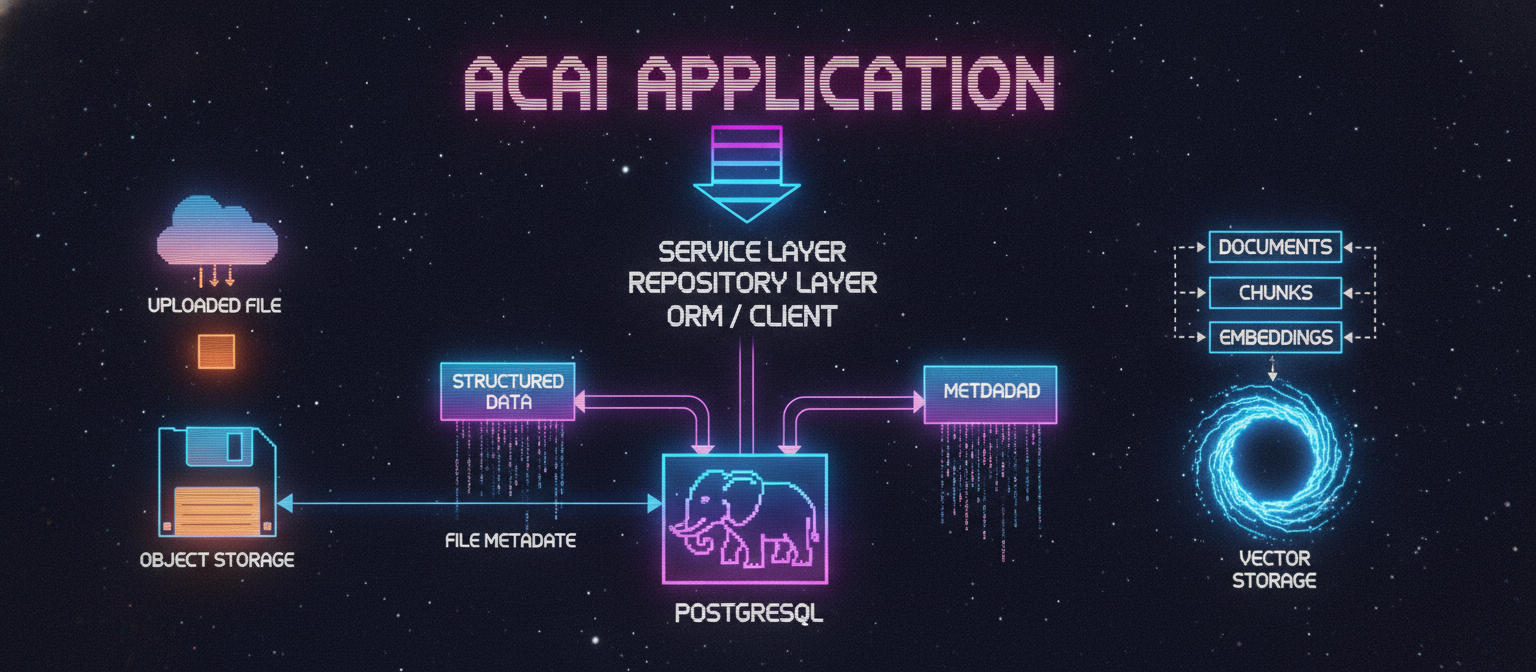
The recommended architecture is:
ACAI Application
      │
      ▼
Next.js / Backend
      │
      ▼
ORM / Database Client
      │
      ▼
PostgreSQL
      │
      ├── Structured Data
      │
      └── Metadata
For retrieval:
Documents
   ↓
Chunks
   ↓
Embeddings
   ↓
Vector Search
The database architecture should remain modular so that individual infrastructure components can be replaced later if necessary.
36.2 Recommended Primary Database
For the primary relational database, use:
PostgreSQL
PostgreSQL is suitable for ACAI because the application requires:
Users
Relationships
Transactions
Indexes
Constraints
JSON metadata
Complex queries
Scalability
36.3 Why PostgreSQL?
ACAI contains many strongly related entities.
For example:
User
 ↓
Project
 ↓
Conversation
 ↓
Message
and:
Project
 ↓
File
 ↓
Document
 ↓
Chunk
A relational database is well suited to these relationships.
36.4 ORM Layer
A database abstraction layer should sit between the application and PostgreSQL.
Conceptually:
ACAI Services
      ↓
Repository Layer
      ↓
ORM
      ↓
PostgreSQL
An ORM can provide:
Schema Definition
Type Safety
Queries
Migrations
Relationships
Transactions
The exact ORM can be selected according to the project's implementation preferences.
36.5 Database Environment
The project should support multiple environments:
Development
Testing
Staging
Production
Each environment should have its own database configuration.
Example:
Development DB
Testing DB
Staging DB
Production DB
Do not use the production database for local development.
36.6 Environment Variable
The application should obtain the database connection from an environment variable.
Conceptually:
DATABASE_URL
Example structure:
postgresql://USER:PASSWORD@HOST:PORT/DATABASE
The real production value must remain secret.
36.7 Environment File
Local development can use:
.env
A safe template can use:
.env.example
The example file should contain placeholders rather than real credentials.
Example:
DATABASE_URL="postgresql://USER:PASSWORD@HOST:5432/acai"
This is documentation only.
36.8 Never Commit Secrets
The repository should normally ignore:
.env
.env.local
.env.production
unless a particular environment requires a non-secret configuration file.
Never commit:
Database passwords
API keys
Private tokens
Authentication secrets
Production credentials
36.9 Database Naming Convention
Use consistent naming.
Recommended:
snake_case
Examples:
user_id
project_id
created_at
updated_at
deleted_at
conversation_id
Consistency becomes especially important as the schema grows.
36.10 Table Naming
Use plural table names:
users
projects
conversations
messages
files
documents
document_chunks
memories
agent_tasks
agent_steps
tool_calls
usage_records
audit_logs
This creates a predictable schema.
36.11 Primary Key Convention
Every major table should have:
id
as its primary identifier.
Example:
users
---------
id
email
name
The exact underlying ID format can be UUID, ULID, or another suitable strategy.
36.12 Foreign Key Convention
Use explicit names:
user_id
project_id
conversation_id
file_id
document_id
task_id
step_id
Example:
messages.conversation_id
references:
conversations.id
36.13 Timestamp Convention
Use:
created_at
updated_at
For lifecycle-specific events:
started_at
completed_at
deleted_at
This provides a consistent temporal model.
36.14 User Table
Conceptual SQL:
CREATE TABLE users (
    id UUID PRIMARY KEY,
    email TEXT NOT NULL UNIQUE,
    name TEXT,
    status TEXT NOT NULL,
    created_at TIMESTAMP NOT NULL,
    updated_at TIMESTAMP NOT NULL
);
The actual production schema should use the database and ORM conventions selected for the project.
36.15 Project Table
CREATE TABLE projects (
    id UUID PRIMARY KEY,
    user_id UUID NOT NULL,
    name TEXT NOT NULL,
    description TEXT,
    status TEXT NOT NULL,
    created_at TIMESTAMP NOT NULL,
    updated_at TIMESTAMP NOT NULL,
    deleted_at TIMESTAMP,

    FOREIGN KEY (user_id)
        REFERENCES users(id)
);
36.16 Conversation Table
CREATE TABLE conversations (
    id UUID PRIMARY KEY,
    user_id UUID NOT NULL,
    project_id UUID,
    title TEXT,
    status TEXT NOT NULL,
    created_at TIMESTAMP NOT NULL,
    updated_at TIMESTAMP NOT NULL,
    deleted_at TIMESTAMP,

    FOREIGN KEY (user_id)
        REFERENCES users(id),

    FOREIGN KEY (project_id)
        REFERENCES projects(id)
);
36.17 Message Table
CREATE TABLE messages (
    id UUID PRIMARY KEY,
    conversation_id UUID NOT NULL,
    role TEXT NOT NULL,
    content TEXT NOT NULL,
    model TEXT,
    provider TEXT,
    input_tokens INTEGER,
    output_tokens INTEGER,
    created_at TIMESTAMP NOT NULL,

    FOREIGN KEY (conversation_id)
        REFERENCES conversations(id)
);
36.18 File Table
CREATE TABLE files (
    id UUID PRIMARY KEY,
    user_id UUID NOT NULL,
    project_id UUID,
    name TEXT NOT NULL,
    mime_type TEXT NOT NULL,
    size BIGINT NOT NULL,
    storage_key TEXT NOT NULL,
    status TEXT NOT NULL,
    created_at TIMESTAMP NOT NULL,
    updated_at TIMESTAMP NOT NULL,
    deleted_at TIMESTAMP,

    FOREIGN KEY (user_id)
        REFERENCES users(id),

    FOREIGN KEY (project_id)
        REFERENCES projects(id)
);
36.19 Document Table
CREATE TABLE documents (
    id UUID PRIMARY KEY,
    file_id UUID NOT NULL,
    project_id UUID,
    status TEXT NOT NULL,
    page_count INTEGER,
    text_length INTEGER,
    parser TEXT,
    processing_version TEXT,
    error_code TEXT,
    started_at TIMESTAMP,
    completed_at TIMESTAMP,
    created_at TIMESTAMP NOT NULL,
    updated_at TIMESTAMP NOT NULL,

    FOREIGN KEY (file_id)
        REFERENCES files(id),

    FOREIGN KEY (project_id)
        REFERENCES projects(id)
);
36.20 Document Chunk Table
CREATE TABLE document_chunks (
    id UUID PRIMARY KEY,
    document_id UUID NOT NULL,
    project_id UUID,
    content TEXT NOT NULL,
    chunk_index INTEGER NOT NULL,
    token_count INTEGER,
    page_number INTEGER,
    section TEXT,
    created_at TIMESTAMP NOT NULL,

    FOREIGN KEY (document_id)
        REFERENCES documents(id)
);
Recommended constraint:
UNIQUE(document_id, chunk_index)
This prevents duplicate chunk positions within one document.
36.21 Memory Table
CREATE TABLE memories (
    id UUID PRIMARY KEY,
    user_id UUID NOT NULL,
    project_id UUID,
    type TEXT NOT NULL,
    content TEXT NOT NULL,
    importance REAL,
    confidence REAL,
    source TEXT,
    status TEXT NOT NULL,
    last_used_at TIMESTAMP,
    created_at TIMESTAMP NOT NULL,
    updated_at TIMESTAMP NOT NULL,

    FOREIGN KEY (user_id)
        REFERENCES users(id),

    FOREIGN KEY (project_id)
        REFERENCES projects(id)
);
36.22 Agent Task Table
CREATE TABLE agent_tasks (
    id UUID PRIMARY KEY,
    user_id UUID NOT NULL,
    project_id UUID,
    conversation_id UUID,
    goal TEXT NOT NULL,
    status TEXT NOT NULL,
    current_step INTEGER,
    created_at TIMESTAMP NOT NULL,
    updated_at TIMESTAMP NOT NULL,
    started_at TIMESTAMP,
    completed_at TIMESTAMP,

    FOREIGN KEY (user_id)
        REFERENCES users(id),

    FOREIGN KEY (project_id)
        REFERENCES projects(id),

    FOREIGN KEY (conversation_id)
        REFERENCES conversations(id)
);
36.23 Agent Step Table
CREATE TABLE agent_steps (
    id UUID PRIMARY KEY,
    task_id UUID NOT NULL,
    step_number INTEGER NOT NULL,
    action TEXT NOT NULL,
    status TEXT NOT NULL,
    input JSONB,
    output JSONB,
    started_at TIMESTAMP,
    completed_at TIMESTAMP,
    created_at TIMESTAMP NOT NULL,

    FOREIGN KEY (task_id)
        REFERENCES agent_tasks(id),

    UNIQUE(task_id, step_number)
);
36.24 Tool Call Table
CREATE TABLE tool_calls (
    id UUID PRIMARY KEY,
    task_id UUID NOT NULL,
    step_id UUID,
    tool_name TEXT NOT NULL,
    input JSONB,
    output JSONB,
    status TEXT NOT NULL,
    started_at TIMESTAMP,
    completed_at TIMESTAMP,
    created_at TIMESTAMP NOT NULL,

    FOREIGN KEY (task_id)
        REFERENCES agent_tasks(id),

    FOREIGN KEY (step_id)
        REFERENCES agent_steps(id)
);
36.25 Usage Table
CREATE TABLE usage_records (
    id UUID PRIMARY KEY,
    user_id UUID NOT NULL,
    project_id UUID,
    request_type TEXT NOT NULL,
    model TEXT,
    provider TEXT,
    input_tokens INTEGER,
    output_tokens INTEGER,
    tool_calls INTEGER,
    duration INTEGER,
    created_at TIMESTAMP NOT NULL,

    FOREIGN KEY (user_id)
        REFERENCES users(id),

    FOREIGN KEY (project_id)
        REFERENCES projects(id)
);
36.26 Audit Log Table
CREATE TABLE audit_logs (
    id UUID PRIMARY KEY,
    user_id UUID,
    action TEXT NOT NULL,
    resource_type TEXT,
    resource_id UUID,
    result TEXT,
    metadata JSONB,
    created_at TIMESTAMP NOT NULL,

    FOREIGN KEY (user_id)
        REFERENCES users(id)
);
36.27 Index Creation
Initial indexes can be created for common access patterns.
CREATE INDEX idx_projects_user_id
ON projects(user_id);

CREATE INDEX idx_conversations_user_id
ON conversations(user_id);

CREATE INDEX idx_messages_conversation_id_created_at
ON messages(conversation_id, created_at);

CREATE INDEX idx_files_project_id
ON files(project_id);

CREATE INDEX idx_documents_file_id
ON documents(file_id);

CREATE INDEX idx_chunks_document_id
ON document_chunks(document_id);

CREATE INDEX idx_memories_user_id
ON memories(user_id);

CREATE INDEX idx_agent_tasks_user_id_status
ON agent_tasks(user_id, status);

CREATE INDEX idx_agent_steps_task_id
ON agent_steps(task_id);

CREATE INDEX idx_tool_calls_task_id
ON tool_calls(task_id);

CREATE INDEX idx_usage_user_id_created_at
ON usage_records(user_id, created_at);

CREATE INDEX idx_audit_logs_user_id_created_at
ON audit_logs(user_id, created_at);
These indexes should later be validated using actual query performance.
36.28 PostgreSQL JSONB
Some ACAI entities need flexible structured data.
PostgreSQL provides:
JSONB
This is useful for:
Tool inputs
Tool outputs
Agent metadata
Audit metadata
Configuration
Example:
input JSONB
However, frequently queried fields should not be hidden unnecessarily inside JSON.
36.29 Structured vs Flexible Data
Use normal columns for:
user_id
project_id
status
created_at
model
provider
Use JSONB for:
dynamic tool parameters
optional metadata
variable tool output
This produces a balanced schema.
36.30 Migration System
The database schema should be created using migrations.
Example:
migrations/
│
├── 001_create_users
├── 002_create_projects
├── 003_create_conversations
├── 004_create_messages
├── 005_create_files
├── 006_create_documents
├── 007_create_chunks
├── 008_create_memories
├── 009_create_agent_tasks
├── 010_create_agent_steps
├── 011_create_tool_calls
├── 012_create_usage_records
└── 013_create_audit_logs
36.31 Migration Rule
A migration should be:
Versioned
Repeatable in a new environment
Reviewable
Traceable
Never depend on undocumented manual production changes.
36.32 Migration Workflow
Development:
Modify Schema
      ↓
Generate Migration
      ↓
Review Migration
      ↓
Apply Migration
      ↓
Test
Production:
Approved Migration
      ↓
Backup / Safety Check
      ↓
Apply Migration
      ↓
Verify
      ↓
Monitor
36.33 Repository Structure
The database implementation can be organized as:
src/
└── server/
    └── database/
        ├── client
        ├── schema
        ├── migrations
        ├── repositories
        └── seed
The exact paths can vary depending on the ACAI codebase.
36.34 Repository Example
Conceptually:
ProjectRepository
│
├── create()
├── findById()
├── findByUserId()
├── update()
└── softDelete()
Then:
ProjectService
        ↓
ProjectRepository
        ↓
Database
36.35 Why Use a Repository Layer?
Without a repository layer:
Route
 ↓
Raw SQL
 ↓
Database
can spread database-specific logic across the entire application.
With a repository:
Route
 ↓
Service
 ↓
Repository
 ↓
Database
database operations remain centralized.
36.36 Transaction Layer
Transactions should be exposed where multiple changes must remain consistent.
Example:
createAgentTask()
may perform:
Create Task
Create Initial Step
Create Audit Log
inside one transaction.
36.37 Database Error Handling
Database errors should not be returned directly to end users.
Instead:
Database Error
      ↓
Repository
      ↓
Service Error
      ↓
API Error
The API should expose a safe, meaningful error response.
36.38 Connection Management
The backend should reuse database connections efficiently.
Avoid:
Request
 ↓
Create new database connection
 ↓
Query
 ↓
Destroy connection
for every request.
Instead, use the connection management mechanism provided by the selected database client.
36.39 Development Database
For local development, use a dedicated PostgreSQL instance.
Conceptually:
Windows
  ↓
PostgreSQL
  ↓
ACAI Development Database
Alternatively, a containerized PostgreSQL environment can be used.
The important rule is isolation from production.
36.40 Testing Database
Automated tests should not modify the production database.
Use:
ACAI_TEST_DB
or an isolated database/container.
Example:
Tests
 ↓
Test Database
 ↓
Cleanup
36.41 Staging Database
Before production:
Development
    ↓
Testing
    ↓
Staging
    ↓
Production
The staging environment should be sufficiently similar to production to detect deployment issues.
36.42 Production Database
Production should include:
Secure Credentials
Encrypted Connections
Backups
Monitoring
Access Control
Migration Management
Recovery Plan
Only authorized backend infrastructure should have database access.
36.43 Vector Database Integration
The relational database does not necessarily need to perform all vector-search operations.
Architecture:
PostgreSQL
   │
   └── Document Metadata
          │
          ▼
Vector Storage
          │
          └── Embeddings
The exact vector technology can be selected later.
36.44 RAG Metadata Link
Every vector record should be traceable back to:
vector
 ↓
chunk
 ↓
document
 ↓
file
 ↓
project
 ↓
user
This is essential for authorization.
A search result must not be returned merely because its vector is similar; it must also belong to an accessible project/user scope.
36.45 Database Security Boundary
The security architecture should look like:
Browser
   │
   ▼
API
   │
   ▼
Authorization
   │
   ▼
Service
   │
   ▼
Repository
   │
   ▼
Database
The browser should never connect directly to the primary database.
36.46 Chapter 36 Checklist
[✓] PostgreSQL selected
[✓] ORM/database abstraction planned
[✓] Environment configuration defined
[✓] User schema defined
[✓] Project schema defined
[✓] Conversation schema defined
[✓] Message schema defined
[✓] File schema defined
[✓] Document schema defined
[✓] Chunk schema defined
[✓] Memory schema defined
[✓] Agent task schema defined
[✓] Agent step schema defined
[✓] Tool call schema defined
[✓] Usage schema defined
[✓] Audit schema defined
[✓] Foreign keys defined
[✓] Initial indexes defined
[✓] Migration strategy defined
[✓] Repository layer defined
[✓] Transaction strategy defined
[✓] Environment separation defined
[✓] Security boundary defined
36.47 Final Architecture
The resulting database stack is:
                 ACAI APPLICATION
                        │
                        ▼
                SERVICE LAYER
                        │
                        ▼
              REPOSITORY LAYER
                        │
                        ▼
                 ORM / CLIENT
                        │
                        ▼
                  POSTGRESQL
                        │
            ┌───────────┴───────────┐
            ▼                       ▼
      Structured Data          Metadata
RAG extends the architecture:
Documents
    ↓
Chunks
    ↓
Embeddings
    ↓
Vector Storage
And files are handled separately:
Uploaded File
     ↓
Object Storage
     +
File Metadata
     ↓
PostgreSQL
36.48 Next Stage
The database technology and implementation blueprint are now established.
The next chapter will move from schema design into the actual ACAI backend database connection, ORM configuration, migrations, seed system, and first working database operations.
END OF CHAPTER 36


Comments
Post a Comment