49.1 Introduction
AI creative applications increasingly operate as media-processing platforms.
A single application may accept:
photographs,
illustrations,
scanned documents,
PDFs,
videos,
audio recordings,
generated images,
generated videos,
subtitles,
text files,
archives,
metadata,
model-generated assets.
These files are not simply data.
They can become inputs to complex software components such as:
Therefore, media processing must be treated as a security-sensitive workload.
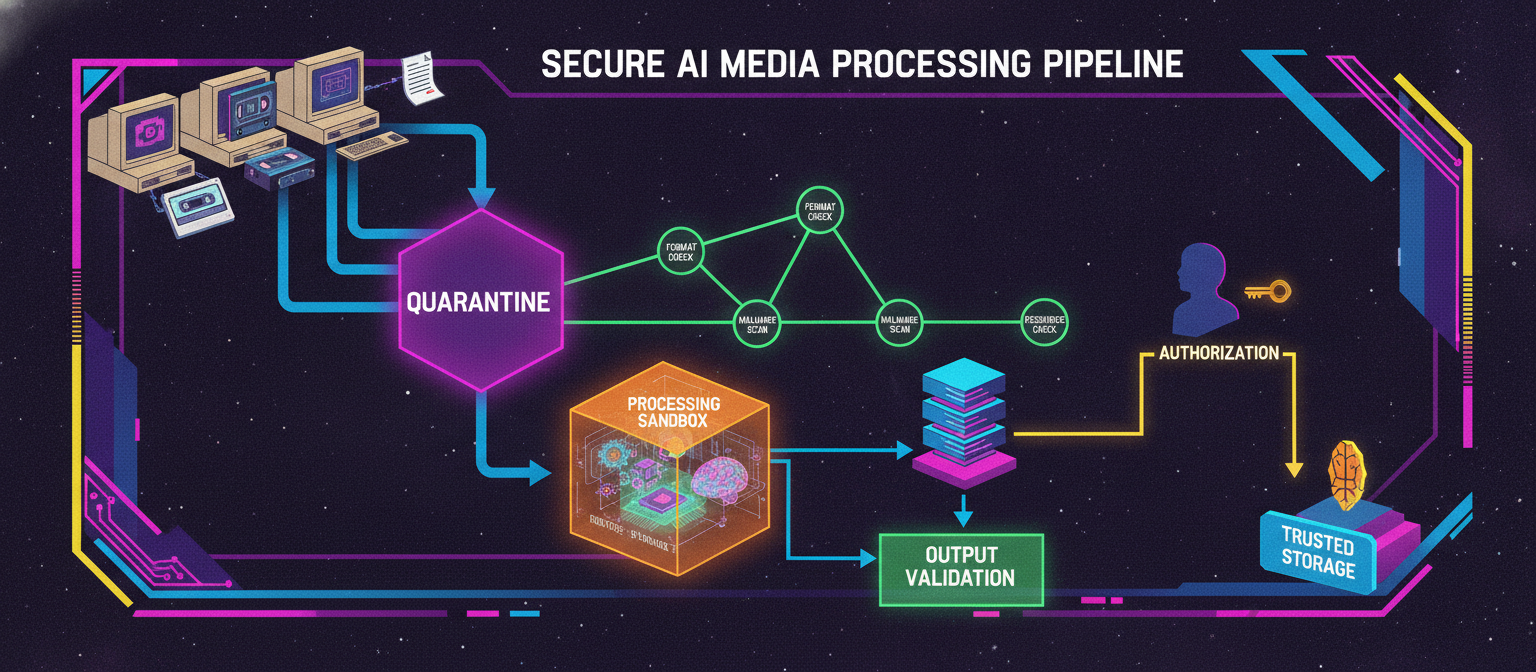
A strong architecture separates:
Upload
   ↓
Quarantine
   ↓
Validation
   ↓
Security Scanning
   ↓
Controlled Processing
   ↓
Output Validation
   ↓
Trusted Storage
   ↓
User Delivery
The key principle is:
Untrusted media should never be treated as trusted merely because a user successfully uploaded it.
49.2 Media Processing Threat Model
A media-processing service should consider several threat categories.
Input threats
Resource threats
Software threats
Privacy threats
AI-specific threats
malicious instructions embedded in documents,
adversarial media,
unsafe generated content,
prompt injection through uploaded material,
model-processing resource exhaustion.
49.3 Trusted and Untrusted Zones
A secure architecture should clearly separate untrusted media from trusted application data.
                    USER
                      │
                      ▼
                Upload Gateway
                      │
                      ▼
              ┌──────────────┐
              │  QUARANTINE  │
              └──────┬───────┘
                     │
              Security Checks
                     │
             ┌───────┴────────┐
             │                │
          Reject            Accept
             │                │
             ▼                ▼
          Isolate       Processing Zone
                              │
                              ▼
                        Output Validation
                              │
                              ▼
                         Trusted Storage
The quarantine area should not be treated as ordinary user storage.
49.4 Upload Gateway
The upload gateway provides the first control layer.
It can enforce:
Example:
POST /api/media/upload
The gateway should not assume that frontend validation is sufficient.
49.5 Frontend Validation
The frontend can reject obviously invalid files before transmission.
For example:
const allowedTypes = [
  "image/jpeg",
  "image/png",
  "image/webp",
  "video/mp4",
  "audio/mpeg",
];

function isAllowedType(type: string) {
  return allowedTypes.includes(type);
}
This improves user experience.
However:
Frontend validation is not a security boundary.
The server must repeat important validation.
49.6 Backend Validation
The backend should independently inspect:
Conceptually:
Client declaration
       ↓
Server inspection
       ↓
Independent decision
The server should not blindly trust:
filename
extension
client MIME type
client-provided metadata
49.7 File Signature Validation
Many file formats contain recognizable signatures or structural markers.
The processing pipeline can use appropriate format-detection mechanisms to determine whether a file is consistent with its declared type.
Conceptually:
Filename: image.jpg
Declared MIME: image/jpeg
Detected format: JPEG
             ↓
          Consistent
If the values conflict:
Filename: image.jpg
Declared MIME: image/jpeg
Detected format: unrelated format
             ↓
          Investigate
This does not replace deeper security analysis, but it adds an important validation layer.
49.8 Quarantine Storage
Uploaded content should initially enter controlled temporary storage.
Example:
/quarantine/
    upload-001
    upload-002
    upload-003
Only the processing pipeline should be able to move validated objects into trusted storage.
A useful state machine is:
UPLOADED
   ↓
QUARANTINED
   ↓
SCANNING
   ↓
VALIDATED
   ↓
PROCESSING
   ↓
VALIDATED_OUTPUT
   ↓
STORED
Failure states should also exist:
REJECTED
EXPIRED
PROCESSING_FAILED
SECURITY_REVIEW
49.9 Malware Scanning
Where appropriate, uploaded content can pass through a malware-scanning layer.
Conceptually:
Upload
  ↓
Quarantine
  ↓
Malware Scan
  ↓
┌──────────────┐
│              │
Safe         Detected
│              │
▼              ▼
Process       Reject
Scanning should be treated as one layer rather than a guarantee that a file is completely safe.
49.10 Why Scanning Is Not Enough
A file can be free of known malware signatures and still create problems through:
excessive resource consumption,
malformed structures,
unsupported features,
privacy-sensitive metadata,
unexpected processing behavior.
Therefore:
Malware Scan
      +
Format Validation
      +
Resource Limits
      +
Sandboxing
      +
Output Validation
provides stronger defense in depth.
49.11 Resource Controls
Every processing job should have bounded resource consumption.
Potential controls include:
Maximum file size
Maximum image dimensions
Maximum video duration
Maximum frame rate
Maximum audio duration
Maximum document pages
Maximum memory
Maximum CPU time
Maximum GPU time
Maximum queue duration
The exact limits should be based on application requirements.
49.12 Image Processing Security
Images can vary enormously in computational cost.
A small file may contain extremely large dimensions.
Therefore, the pipeline should consider both:
File Size
+
Decoded Dimensions
For example:
10 MB compressed image
        ↓
Very large decoded image
        ↓
Potentially high memory usage
Resource validation should occur before expensive processing where practical.
49.13 Image Decompression
Compressed media can expand substantially when decoded.
Therefore, applications should not determine resource safety solely from compressed file size.
A better conceptual model is:
Compressed Size
      ↓
Expected Decoded Size
      ↓
Memory Budget
      ↓
Accept / Reject
49.14 Image Transformation Pipeline
A secure image transformation pipeline can look like:
Upload
  ↓
Quarantine
  ↓
Format Detection
  ↓
Security Scan
  ↓
Dimension Check
  ↓
Metadata Policy
  ↓
Sandboxed Decode
  ↓
Transformation
  ↓
Output Re-encoding
  ↓
Output Validation
  ↓
Trusted Storage
Re-encoding into an approved output format can help establish a controlled output representation.
49.15 Image Metadata Privacy
Images can contain metadata such as:
camera information,
creation time,
editing software,
device identifiers,
geographic coordinates.
Whether metadata should be preserved depends on the application.
A privacy-focused default can be:
User Upload
     ↓
Inspect Metadata
     ↓
Privacy Policy
     ↓
Remove Sensitive Metadata
     ↓
Process Image
If metadata is necessary for a particular professional workflow, the user should understand that it is being retained.
49.16 Video Processing Security
Video processing is more resource-intensive than many image operations.
Important dimensions include:
File Size
Duration
Resolution
Frame Rate
Number of Streams
Codec
Audio Tracks
A secure video pipeline can be:
Upload
  ↓
Quarantine
  ↓
Format Validation
  ↓
Security Scan
  ↓
Duration/Resolution Limits
  ↓
Sandboxed Decoder
  ↓
Processing
  ↓
Output Validation
  ↓
Storage
49.17 Video Frame Limits
An apparently ordinary video may contain an unexpectedly large number of frames.
For example:
Duration
   ×
Frame Rate
   =
Approximate Frame Count
The system should consider this before launching computationally expensive frame-level processing.
49.18 Audio Processing Security
Audio pipelines should validate:
duration,
file size,
format,
sample characteristics,
channel count,
processing requirements.
A safe architecture is:
Audio Upload
    ↓
Validation
    ↓
Quarantine
    ↓
Controlled Decoder
    ↓
Processing
    ↓
Output Validation
49.19 Document Processing
AI applications frequently process:
PDFs,
DOCX files,
spreadsheets,
text files,
presentations,
scanned documents.
Documents can contain:
Therefore, document ingestion should be isolated from the main application.
49.20 Document Ingestion Pipeline
A robust architecture is:
Document Upload
       ↓
Quarantine
       ↓
Format Detection
       ↓
Security Scan
       ↓
Parser Selection
       ↓
Sandboxed Extraction
       ↓
Content Normalization
       ↓
Metadata Policy
       ↓
Chunking
       ↓
Embedding / Indexing
This connects directly with the RAG architecture discussed earlier.
49.21 Prompt Injection Through Documents
An important AI-specific concern is that documents may contain instructions intended to influence an AI system.
For example, a document could contain text resembling:
"Ignore previous instructions..."
The document should therefore be treated as data, not automatically as an authoritative instruction.
A safe conceptual architecture is:
Document
   ↓
Extract Text
   ↓
Mark as Untrusted Content
   ↓
Policy Layer
   ↓
AI Processing
The AI system should maintain a clear distinction between:
System Policy
Developer Policy
Application Instructions
User Request
External Document Content
External content should not silently become higher-priority instructions.
49.22 Document Metadata
Documents can contain:
A privacy policy should define which metadata is retained.
49.23 Archive Files
Archives introduce additional complexity because one uploaded file can contain many internal files.
Security controls may include:
Maximum archive size
Maximum extracted size
Maximum file count
Maximum nesting depth
Allowed internal formats
Processing timeout
The important concept is to prevent the compressed size from hiding an unexpectedly large extraction workload.
49.24 Sandboxing
Complex media processing should preferably occur in an isolated environment.
Conceptually:
                 APPLICATION
                      │
                      ▼
                Processing Queue
                      │
                      ▼
              ┌───────────────┐
              │   SANDBOX     │
              │               │
              │ Decoder       │
              │ Converter     │
              │ OCR           │
              │ Media Tools   │
              └───────┬───────┘
                      │
                      ▼
               Sanitized Output
The sandbox should have restricted:
filesystem access,
network access,
credentials,
service permissions,
runtime duration,
resource usage.
49.25 Network Isolation
A media-processing worker often does not need arbitrary outbound network access.
A useful architecture is:
Media Worker
    │
    ├── Local input storage
    ├── Required processing services
    └── Controlled output storage
Unnecessary outbound communication should be blocked where practical.
This reduces the potential impact of compromised processing software.
49.26 Credential Isolation
A media-processing worker should generally not receive:
database administrator credentials
cloud administrator credentials
authentication signing keys
payment credentials
Instead, it should receive narrowly scoped permissions.
For example:
media-worker
    ├── read quarantine object
    ├── write processed object
    └── update processing status
49.27 Temporary Processing Workspace
Each processing job can receive an isolated workspace.
Conceptually:
/job/123/
    input/
    working/
    output/
After completion:
working/
    ↓
Deleted
Temporary workspace cleanup should be automatic.
49.28 Output Validation
Security should not stop at input validation.
Generated output should also be checked.
Processed Output
      ↓
Format Validation
      ↓
Size Validation
      ↓
Metadata Policy
      ↓
Content Policy
      ↓
Storage
This is especially important for AI-generated media.
49.29 Trusted Output
The term “trusted output” should mean:
Output that has passed the application's defined validation and policy controls.
It does not mean:
Output that is guaranteed to be universally safe.
This distinction is important when communicating security properties.
49.30 Generated Media Security
AI-generated media may require validation for:
The output should pass through the same controlled storage architecture as uploaded media.
49.31 Media Storage
A secure storage architecture can separate:
Quarantine Storage
      │
      ▼
Processing Storage
      │
      ▼
Trusted User Storage
      │
      ▼
Public/Shared Storage
These should not automatically have identical access policies.
49.32 Access Control
Every media object should have an ownership or authorization relationship.
Conceptually:
Media Object
     │
     ▼
Owner / Organization
     │
     ▼
Access Policy
A user should not gain access merely by guessing an object identifier.
49.33 Object Identifiers
Object identifiers should not be treated as authorization.
For example:
GET /media/12345
The presence of 12345 does not establish that the requester owns the object.
The backend should perform:
Authenticate
   ↓
Find Object
   ↓
Check Ownership/Permission
   ↓
Allow / Deny
49.34 Signed Access
Private media can be served through controlled short-lived access mechanisms.
Conceptually:
User
 ↓
Authorization Check
 ↓
Temporary Access
 ↓
Object Storage
The access should be:
49.35 Media Deletion
Deletion should be treated as a lifecycle rather than a UI button.
Delete Request
      ↓
Authorization
      ↓
Logical Deletion
      ↓
Retention Window
      ↓
Physical Cleanup
      ↓
Backup Lifecycle
The exact lifecycle should match the organization's retention policy.
49.36 Media Lifecycle State Machine
A complete state model might be:
UPLOADED
   ↓
QUARANTINED
   ↓
SCANNING
   ↓
VALIDATED
   ↓
PROCESSING
   ↓
OUTPUT_VALIDATION
   ↓
STORED
   ↓
SHARED
   ↓
ARCHIVED
   ↓
DELETED
Possible error states:
REJECTED
PROCESSING_FAILED
SECURITY_REVIEW
EXPIRED
Explicit states make the pipeline easier to monitor and audit.
49.37 Asynchronous Processing
Large AI media operations should usually be decoupled from the request/response cycle.
Instead of:
HTTP Request
    ↓
10-minute video generation
    ↓
HTTP Response
use:
HTTP Request
    ↓
Create Job
    ↓
Return Job ID
    ↓
Queue
    ↓
Worker
    ↓
Processing
    ↓
Result
This improves resilience and scalability.
49.38 Job State
A job model might contain:
type MediaJobStatus =
  | "queued"
  | "scanning"
  | "processing"
  | "validating"
  | "completed"
  | "rejected"
  | "failed"
  | "expired";
The frontend can display safe progress information without exposing internal implementation details.
49.39 Idempotency
Media processing jobs should ideally be designed so that retries do not accidentally create uncontrolled duplicate operations.
A conceptual pattern is:
Request
  ↓
Idempotency Key
  ↓
Existing Job?
  │
  ├── Yes → Return Existing Job
  │
  └── No  → Create Job
This is particularly useful for unreliable networks and retrying clients.
49.40 Processing Timeouts
Every expensive operation should have a bounded processing time.
Start
  ↓
Processing
  ↓
Timeout?
  │
  ├── No → Continue
  │
  └── Yes → Stop / Cleanup / Fail
Timeouts prevent indefinitely running jobs from consuming infrastructure.
49.41 Cancellation
Users may cancel large operations.
A cancellation mechanism can move jobs through:
QUEUED
  ↓
CANCEL_REQUESTED
  ↓
CANCELLED
Workers should periodically check whether cancellation is required.
49.42 Backpressure
If users submit more work than the infrastructure can process, the system needs backpressure.
Users
  ↓
Queue
  ↓
Worker Capacity
When capacity is reached:
Queue grows
   ↓
Quota / Admission Control
   ↓
Delay or Reject
This protects the system from uncontrolled workload growth.
49.43 Priority Queues
Some applications may need job priorities.
For example:
Priority 1 → interactive user generation
Priority 2 → standard processing
Priority 3 → batch processing
Priority systems should be designed carefully so that low-priority work does not become permanently starved.
49.44 Processing Observability
Every job should have a traceable identifier.
Example:
jobId = "job_..."
Logs can then associate:
Upload
 ↓
Scan
 ↓
Decode
 ↓
AI Processing
 ↓
Encode
 ↓
Storage
with the same job identifier.
This makes troubleshooting significantly easier.
49.45 Privacy-Aware Logging
Media systems should avoid placing entire user files into logs.
Bad conceptual practice:
LOG:
full user image
full document contents
authentication token
Better:
LOG:
job ID
object ID
processing status
duration
result code
error category
This reduces accidental information exposure.
49.46 Error Classification
Processing errors can be categorized:
USER_INPUT_ERROR
UNSUPPORTED_FORMAT
RESOURCE_LIMIT
SECURITY_REJECTION
PROVIDER_ERROR
PROCESSING_ERROR
INTERNAL_ERROR
The frontend can map these to understandable messages without exposing sensitive internal details.
49.47 Secure Processing Service Interface
A conceptual service interface might be:
interface MediaProcessingService {
  validate(input: MediaInput): Promise<ValidationResult>;

  scan(input: MediaInput): Promise<ScanResult>;

  process(
    input: MediaInput,
    options: ProcessingOptions
  ): Promise<ProcessingResult>;

  validateOutput(
    output: ProcessedMedia
  ): Promise<OutputValidationResult>;
}
The separation encourages explicit security stages.
49.48 Defense-in-Depth Architecture
The complete security model can be visualized as:
                  USER
                    │
                    ▼
              Authentication
                    │
                    ▼
               Upload API
                    │
                    ▼
             Rate / Size Limits
                    │
                    ▼
               QUARANTINE
                    │
             ┌──────┴──────┐
             ▼             ▼
          Format        Malware
          Check         Scan
             │             │
             └──────┬──────┘
                    ▼
             Resource Check
                    │
                    ▼
                SANDBOX
                    │
                    ▼
             Media Processing
                    │
                    ▼
             Output Validation
                    │
                    ▼
             Metadata Policy
                    │
                    ▼
             Trusted Storage
                    │
                    ▼
          Authorization Check
                    │
                    ▼
                 USER
Each layer addresses different failure modes.
49.49 Security Testing Strategy
Testing should occur at multiple stages.
Unit testing
Validate individual components.
Integration testing
Validate communication between services.
File-format testing
Test supported and unsupported formats.
Resource testing
Test maximum allowed sizes and processing characteristics.
Failure testing
Simulate:
timeout,
queue failure,
storage failure,
scanner failure,
provider failure.
Security testing
Verify that untrusted inputs remain isolated and unauthorized users cannot access media.
49.50 Fuzz Testing
Complex parsers can benefit from controlled fuzz testing.
The concept is:
Generated Test Inputs
       ↓
Parser
       ↓
Observe
       ↓
Crash / Error / Unexpected Behavior
The goal is to discover robustness problems before production.
Testing should be performed in controlled environments with safe test infrastructure.
49.51 Dependency Management for Media Libraries
Media-processing dependencies should be monitored carefully.
Inventory should include:
Image libraries
Video codecs
Audio libraries
PDF parsers
OCR engines
Compression libraries
AI runtimes
Native dependencies
A vulnerability in any component can affect the processing pipeline.
49.52 Patch Management
A mature process is:
Vulnerability Identified
       ↓
Affected Components
       ↓
Risk Assessment
       ↓
Patch / Upgrade
       ↓
Regression Testing
       ↓
Deployment
       ↓
Verification
Emergency patches may require accelerated procedures.
49.53 Secure Media Architecture for the AI Platform
The recommended architecture is:
                    ┌──────────────┐
                    │   Browser    │
                    └──────┬───────┘
                           │
                           ▼
                    ┌──────────────┐
                    │ Upload API   │
                    └──────┬───────┘
                           │
                           ▼
                    ┌──────────────┐
                    │ Quarantine   │
                    └──────┬───────┘
                           │
                  ┌────────┼────────┐
                  │        │        │
                  ▼        ▼        ▼
                Format   Malware  Resource
                Check    Scan     Check
                  │        │        │
                  └────────┼────────┘
                           ▼
                    ┌──────────────┐
                    │ Processing   │
                    │ Sandbox      │
                    └──────┬───────┘
                           │
                           ▼
                    ┌──────────────┐
                    │ AI Pipeline  │
                    └──────┬───────┘
                           │
                           ▼
                    ┌──────────────┐
                    │ Output Check │
                    └──────┬───────┘
                           │
                           ▼
                    ┌──────────────┐
                    │ Trusted      │
                    │ Storage      │
                    └──────┬───────┘
                           │
                           ▼
                    Authorization
                           │
                           ▼
                         User
49.54 Implementation Checklist
Upload
Validation
Scanning
Processing
Output
Operations
49.55 Final Principle
A secure AI media pipeline should never have the conceptual shape:
Upload
  ↓
Process
  ↓
Store
A mature architecture instead looks like:
Upload
  ↓
Authenticate
  ↓
Authorize
  ↓
Quarantine
  ↓
Validate
  ↓
Scan
  ↓
Limit Resources
  ↓
Isolate
  ↓
Process
  ↓
Validate Output
  ↓
Apply Privacy Policy
  ↓
Store
  ↓
Authorize Access
  ↓
Deliver
This approach creates a strong separation between untrusted input, controlled processing, and trusted application output.
For an AI creative platform, that separation is fundamental.
Images, videos, audio, documents, and AI-generated media should all be treated as potentially complex and untrusted objects until they have passed the appropriate controls.
The objective is not to eliminate every possible failure.
The objective is to make failures:
END OF CHAPTER 49


Comments
Post a Comment