Chapter 85 — Secure AI Platform Dependency & Package Management
85.1 Introduction
Modern AI platforms depend on a large software ecosystem.
A typical application may depend on:
Application Code
     ↓
Frameworks
     ↓
Libraries
     ↓
SDKs
     ↓
AI Providers
     ↓
Database Drivers
     ↓
Media Libraries
     ↓
Operating System Packages
     ↓
Container Images
A vulnerability or supply-chain compromise in any layer can affect the entire platform.
Therefore dependency management is not merely an installation task.
It is a core part of:
application security
supply-chain security
reliability
reproducibility
compliance
incident response
The fundamental principle is:
Every dependency is trusted code that must have an owner, version, provenance, lifecycle, and security posture.
85.2 What Is a Dependency?
A dependency is any external component required for the application or infrastructure to operate.
Examples:
npm packages
Python packages
Java libraries
OS packages
container base images
SDKs
AI model runtimes
database clients
browser libraries
build tools
CI/CD actions
Dependencies may be direct or transitive.
85.3 Direct vs Transitive Dependencies
A direct dependency is explicitly selected by the project.
Example:
Application
   ↓
React
A transitive dependency is brought in by another dependency.
Application
   ↓
Library A
   ↓
Library B
   ↓
Library C
Library C may never appear directly in the application's configuration, but it still executes as part of the software stack.
This is why dependency visibility matters.
85.4 Dependency Attack Surface
A dependency can introduce risks such as:
The number of dependencies is therefore part of the platform's attack surface.
85.5 Dependency Inventory
A production platform should maintain an inventory of dependencies.
Example:
Package
Version
Type
Owner
License
Source
Environment
Risk
Last Reviewed
The inventory should include both direct and transitive dependencies where practical.
85.6 Lockfiles
Package managers commonly provide lockfiles.
Examples include:
package-lock.json
pnpm-lock.yaml
yarn.lock
Lockfiles record the resolved dependency graph.
They improve:
reproducibility
consistency
debugging
security analysis
The same project should produce predictable dependency resolution across environments.
85.7 Dependency Pinning
Version ranges can allow unexpected upgrades.
For sensitive production software, controlled versions are generally safer.
Conceptually:
Dependency
     ↓
Approved Version
     ↓
Lockfile
     ↓
Reproducible Build
Pinning strategy should be balanced against timely security updates.
85.8 Why Automatic Upgrades Can Be Dangerous
Suppose a package changes from:
v4.2
to:
v4.3
The update may introduce:
breaking behavior
new vulnerabilities
changed defaults
dependency changes
performance regressions
Therefore production systems should not blindly accept arbitrary dependency updates.
85.9 Dependency Update Strategy
A controlled strategy can be:
Update Available
      ↓
Security / Risk Assessment
      ↓
Automated Tests
      ↓
Security Scan
      ↓
AI Regression Tests
      ↓
Staging
      ↓
Production
Critical security fixes may use an expedited process.
85.10 Vulnerability Scanning
Dependency scanning should identify known vulnerabilities.
Potential severity categories:
Critical
High
Medium
Low
Informational
Severity alone is not enough.
Risk should also consider:
85.11 False Positives
Automated vulnerability scanners can produce false positives.
Example:
Scanner:
Package X vulnerable.

Analysis:
Vulnerable feature is not reachable in this application.
This does not mean scanners are useless.
It means findings require triage.
85.12 Vulnerability Triage
A vulnerability workflow can be:
Finding
 ↓
Validate
 ↓
Identify Affected Component
 ↓
Determine Exposure
 ↓
Assess Risk
 ↓
Fix / Mitigate / Accept
 ↓
Verify
 ↓
Close
Risk acceptance should be documented rather than silently ignored.
85.13 Dependency Ownership
Every important dependency should have an owner.
Ownership means someone is responsible for:
Without ownership, dependency debt accumulates.
85.14 Dependency Lifecycle
Dependencies should move through a lifecycle:
Candidate
 ↓
Approved
 ↓
Used
 ↓
Maintained
 ↓
Deprecated
 ↓
Removed
This prevents permanent accumulation.
85.15 Approved Dependency List
Organizations can maintain an allowlist or preferred dependency catalog.
For example:
Approved
 ├── Framework A
 ├── Database Driver B
 ├── Validation Library C
 └── Security Library D
This reduces unnecessary dependency proliferation.
85.16 Dependency Review
Before introducing a new dependency, evaluate:
project maintenance
release history
security history
package provenance
community adoption
license
dependency tree
native components
required permissions
alternatives
The goal is not to reject every dependency.
The goal is informed selection.
85.17 Minimal Dependency Principle
Use only dependencies that provide meaningful value.
Every additional package can increase:
Attack Surface
+
Maintenance Cost
+
Build Complexity
+
Supply-Chain Risk
Therefore:
Prefer the smallest trustworthy dependency set that satisfies the requirement.
85.18 Dependency Confusion
Dependency confusion occurs when package resolution unexpectedly selects a malicious package from an unintended source.
Controls include:
Build systems should have predictable dependency resolution.
85.19 Typosquatting
Attackers may publish packages with names resembling legitimate packages.
Example concept:
legitimate-package
legitmate-package
A small naming difference can lead to a malicious installation.
Therefore package names should be reviewed carefully before installation.
85.20 Malicious Package Detection
Potential indicators include:
suspicious maintainer changes
unexpected installation scripts
obfuscated code
unusual network behavior
credential access
sudden unexplained ownership transfer
Automated tools can assist, but human review may be necessary for high-risk packages.
85.21 Install Scripts
Some package ecosystems allow packages to execute code during installation.
This creates additional supply-chain risk.
Build environments should therefore minimize privileges and avoid giving arbitrary dependency installation scripts unnecessary access to:
secrets
production systems
internal networks
85.22 Dependency Source Control
Dependencies should originate from approved sources.
Example:
Developer
 ↓
Trusted Registry
 ↓
Dependency Lock
 ↓
CI Validation
 ↓
Artifact
Avoid uncontrolled package sources in production builds.
85.23 Private Packages
Organizations may maintain private packages.
Private registries require:
authentication
authorization
package ownership
versioning
integrity controls
audit logs
CI systems should receive only the permissions required to retrieve approved packages.
85.24 Dependency Integrity
Integrity can be strengthened using:
The objective is to ensure:
Expected Dependency
        =
Resolved Dependency
85.25 Software Bill of Materials
An SBOM is an inventory describing software components included in an application or artifact.
Conceptually:
Application
 ├── Framework
 ├── Library A
 ├── Library B
 ├── Library C
 └── OS Components
SBOMs improve:
vulnerability response
asset visibility
compliance
incident investigation
supply-chain management
85.26 SBOM Lifecycle
An SBOM should be generated from actual build artifacts where possible.
Source
 ↓
Build
 ↓
Artifact
 ↓
SBOM
 ↓
Security Analysis
 ↓
Registry
This provides stronger evidence than manually maintained dependency lists.
85.27 SBOM and AI Models
AI platforms should consider model artifacts as supply-chain components.
The inventory may include:
Model Name
Model Version
Source
Hash
License
Format
Runtime
Dependencies
Security Review
This extends SBOM thinking into AI model supply chains.
85.28 Container Dependencies
Container images contain more than application packages.
They may include:
Therefore container images must also be scanned and inventoried.
85.29 Base Image Selection
Choose trusted and maintained base images.
Consider:
Avoid unnecessarily large images.
85.30 Minimal Containers
A smaller runtime image can reduce:
attack surface
vulnerabilities
image size
deployment time
A common pattern is:
Build Environment
       ↓
Compile / Package
       ↓
Minimal Runtime Image
Build-only tools do not need to remain in the production runtime.
85.31 Reproducible Builds
A reproducible build aims to produce equivalent artifacts from the same declared inputs.
Conceptually:
Source
+
Locked Dependencies
+
Build Configuration
+
Toolchain
        ↓
Deterministic Artifact
Reproducibility improves trust and incident investigation.
85.32 Build Environment Control
Build environments should themselves be controlled.
Track:
Otherwise two builds may unexpectedly produce different results.
85.33 Dependency Caching
CI systems often cache dependencies for performance.
Caching introduces security considerations.
A malicious or corrupted cache can influence builds.
Therefore caches should have:
controlled ownership
integrity validation
appropriate isolation
predictable invalidation
85.34 CI Runner Isolation
Build runners should not have unnecessary privileges.
Avoid giving ordinary dependency-installation jobs access to:
Production Credentials
Production Database
Production Storage
Administrative APIs
Build systems should follow least privilege.
85.35 Dependency Secrets
Some packages may require authentication to private registries.
Those credentials should be:
Do not place registry credentials directly into repository files.
85.36 License Governance
Dependencies have licenses.
The platform should maintain a license inventory.
Examples include:
MIT
Apache-2.0
BSD
GPL
LGPL
License compatibility should be reviewed according to the organization's legal and distribution requirements.
Security and licensing are separate concerns, but both belong in dependency governance.
85.37 Abandoned Dependencies
A package can be technically secure today but become risky if it is no longer maintained.
Warning signs:
A replacement strategy should exist before a critical dependency becomes obsolete.
85.38 End-of-Life Dependencies
When a runtime reaches end-of-life:
Old Runtime
     ↓
No Security Updates
     ↓
Increasing Risk
Migration should be planned before support ends.
85.39 Dependency Update Windows
Organizations may define regular dependency maintenance windows.
Example:
Weekly:
security review

Monthly:
routine dependency updates

Quarterly:
major dependency review
The exact schedule should reflect system risk and operational capacity.
85.40 Security Patch Prioritization
A critical security patch should not necessarily wait for the normal update cycle.
A prioritized process can be:
Critical vulnerability
 ↓
Immediate assessment
 ↓
Emergency patch
 ↓
Focused testing
 ↓
Controlled deployment
 ↓
Verification
85.41 Dependency Regression Testing
A package upgrade can change application behavior.
Therefore run:
unit tests
integration tests
API tests
frontend tests
media tests
AI evaluation
performance tests
after meaningful upgrades.
85.42 AI Dependency Regression
AI platforms have special dependencies such as:
An update may change generated output even when application tests pass.
Therefore AI quality regression should be included.
85.43 Media Dependency Risk
Creative AI platforms often process:
JPEG
PNG
WebP
GIF
MP4
WebM
WAV
MP3
PDF
Media libraries can have serious security implications because they process complex untrusted inputs.
Therefore media-processing dependencies should receive high-priority vulnerability management.
85.44 Native Dependencies
Libraries that interface with native code may have additional risk.
Examples:
image codecs
video codecs
audio codecs
database drivers
GPU runtimes
These should be inventoried separately where appropriate.
85.45 Dependency Isolation
High-risk processing dependencies should ideally be isolated.
For example:
Upload
 ↓
Validation
 ↓
Isolated Media Worker
 ↓
Media Library
 ↓
Sanitized Output
This limits the impact of a vulnerable parser.
85.46 Dependency Risk Scoring
A platform can assign risk scores based on:
Vulnerability Severity
+
Exploitability
+
Exposure
+
Privilege
+
Data Sensitivity
+
Maintenance Status
+
Dependency Criticality
This produces a more useful prioritization than vulnerability counts alone.
85.47 Dependency Exceptions
Sometimes an organization cannot immediately remove a vulnerable dependency.
An exception should document:
Dependency
Vulnerability
Reason
Risk
Mitigation
Owner
Expiration
Review Date
Exceptions should expire.
Permanent exceptions create hidden technical debt.
85.48 Dependency Removal
When a dependency is no longer required:
Identify
 ↓
Remove
 ↓
Update Lockfile
 ↓
Run Tests
 ↓
Scan
 ↓
Deploy
Removing unnecessary dependencies reduces attack surface.
85.49 Dependency Monitoring
Monitor:
Security tooling can automate much of this.
85.50 Dependency Incident Response
If a dependency is compromised:
Alert
 ↓
Identify Affected Versions
 ↓
Determine Exposure
 ↓
Block / Pin / Upgrade
 ↓
Rebuild
 ↓
Verify Artifact
 ↓
Deploy
 ↓
Investigate
If compromise may have exposed secrets, rotate affected credentials.
85.51 Compromised Dependency Containment
A compromised package should be treated as potentially hostile code.
Possible containment measures:
85.52 Dependency Provenance
Provenance answers:
Where did this component come from?
Track:
Source Repository
Package Registry
Maintainer
Version
Hash
Build
Artifact
Deployment
This improves incident investigation.
85.53 Dependency Graph
Maintain a graph:
Application
 ├── Framework
 │    ├── Library A
 │    └── Library B
 ├── AI SDK
 │    └── Library C
 └── Media Processor
      ├── Codec A
      └── Codec B
When a vulnerability appears in Library C, the platform can quickly determine which applications are affected.
85.54 Dependency Blast Radius
Knowing a vulnerable dependency exists is not enough.
Determine:
Which applications?
Which environments?
Which containers?
Which users?
Which data?
Which workflows?
This enables faster incident response.
85.55 Dependency Governance Dashboard
A useful dashboard can contain:
Total Dependencies
Critical Vulnerabilities
High Vulnerabilities
Outdated Packages
End-of-Life Packages
Unowned Packages
License Findings
Exceptions
Dependency Age
SBOM Coverage
The dashboard should prioritize actionable findings.
85.56 Dependency Security Architecture
A complete architecture can be:
Developer
   ↓
Approved Registry
   ↓
Dependency Review
   ↓
Lockfile
   ↓
CI Security Scan
   ↓
SBOM Generation
   ↓
Artifact Verification
   ↓
Trusted Registry
   ↓
Deployment
   ↓
Runtime Monitoring
   ↓
Continuous Vulnerability Monitoring
85.57 Secure Dependency Lifecycle
The complete lifecycle is:
Discover
  ↓
Evaluate
  ↓
Approve
  ↓
Pin / Lock
  ↓
Build
  ↓
Scan
  ↓
Test
  ↓
Deploy
  ↓
Monitor
  ↓
Update
  ↓
Retire
This turns dependency management into a continuous process.
85.58 Master Dependency Checklist
Inventory
Integrity
Security
Maintenance
Supply Chain
85.59 Final Architecture
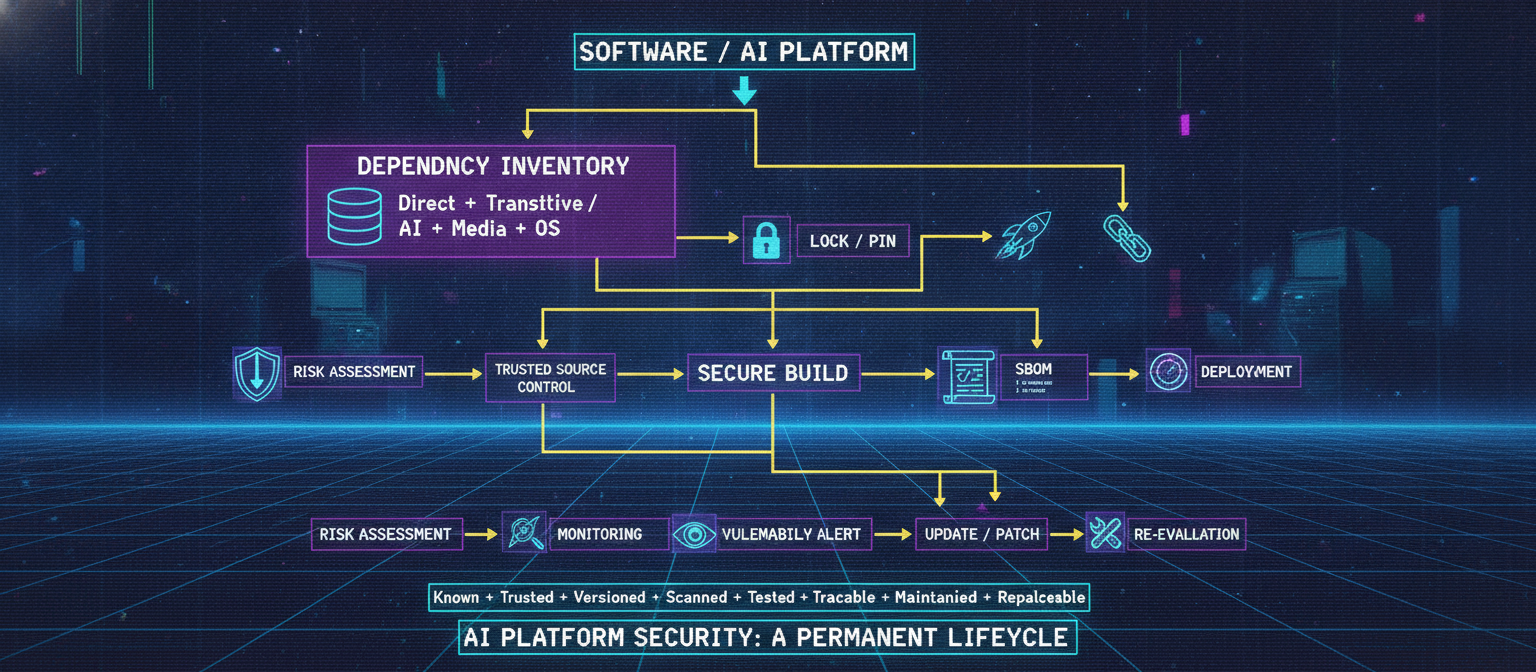
A secure dependency-management architecture can be summarized as:
                 SOFTWARE / AI PLATFORM
                           │
                           ↓
                 DEPENDENCY INVENTORY
                           │
                           ↓
                 ┌────────────────────┐
                 │ Direct + Transitive│
                 │ AI + Media + OS    │
                 └─────────┬──────────┘
                           ↓
                    RISK ASSESSMENT
                           ↓
                 TRUSTED SOURCE CONTROL
                           ↓
                     LOCK / PIN
                           ↓
                     SECURE BUILD
                           ↓
              ┌────────────┼────────────┐
              ↓            ↓            ↓
           SCANNING      SBOM       TESTING
              └────────────┼────────────┘
                           ↓
                    ARTIFACT VERIFY
                           ↓
                     DEPLOYMENT
                           ↓
                    MONITORING
                           ↓
                 VULNERABILITY ALERT
                           ↓
                   UPDATE / PATCH
                           ↓
                    RE-EVALUATION
85.60 Final Principle
Dependency security is not about avoiding external libraries.
Modern software cannot realistically function without dependencies.
The objective is to make dependencies:
Known
+
Trusted
+
Versioned
+
Scanned
+
Tested
+
Traceable
+
Maintained
+
Replaceable
For an AI platform, this extends beyond ordinary packages.
The organization must consider:
Application Libraries
+
AI SDKs
+
Inference Runtimes
+
Model Artifacts
+
Media Codecs
+
Container Images
+
OS Packages
+
Build Tools
The strongest principle is:
If software executes inside the trusted computing boundary, the platform must know what it is, where it came from, which version is running, who owns it, and how it can be replaced when its security posture changes.
A secure dependency lifecycle therefore becomes a permanent part of AI platform security, not a one-time package installation task.



Comments
Post a Comment